Summarizes, extracts, and rewrites content from files.
89M visits/mo+8.7%#2 Productivity & Office

Desktop app for batch exporting and auto-backing up AI chats to a local Markdown vault
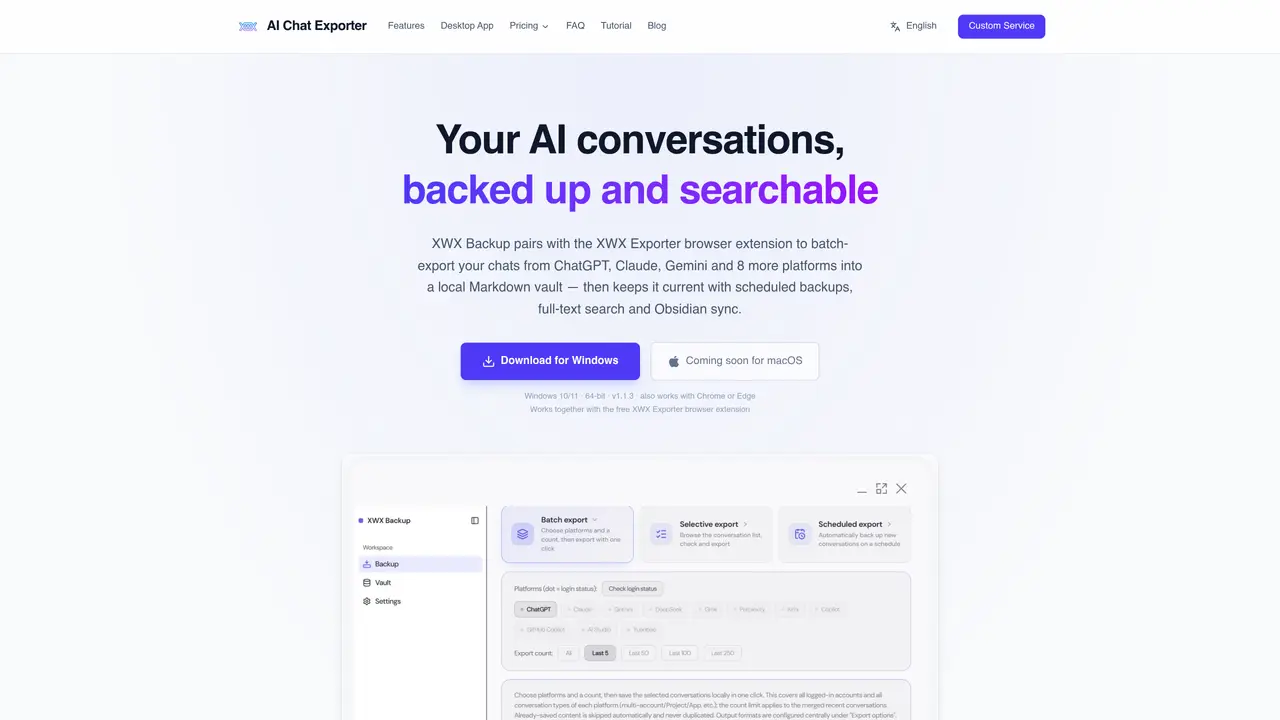
XWX Backup is a Windows desktop application designed for heavy AI users who need to preserve, organize, and search their AI conversations across multiple platforms. It pairs with the free XWX Exporter browser extension to batch-export chats from ChatGPT, Claude, Gemini, DeepSeek, Grok, Copilot, Perplexity, Google AI Studio, Kimi, Yuanbao, and GitHub Copilot into a local Markdown vault. The app supports scheduled backups as frequent as every 30 minutes, ensuring conversations remain up-to-date without manual intervention. Users can filter conversations by title, date range, or account before exporting, and incremental sync prevents duplicate entries. Exported conversations are stored as standard Markdown files with YAML frontmatter containing metadata such as model, timestamps, tags, and source URLs, making them compatible with tools like Obsidian, Dataview, or Logseq. The application operates locally, communicating with the browser over localhost without routing data through external servers, ensuring full data ownership and privacy. Even if the app is uninstalled, the vault remains accessible as plain files on the user’s machine. The tool is particularly suited for developers, researchers, writers, students, consultants, and teams who rely on AI platforms for work or study. It enables users to build a searchable second brain, archive debugging sessions, literature discussions, drafts, or client research, and maintain a permanent knowledge base. The free tier allows users to view, search, and export individual conversations, while the Pro tier adds batch exports, scheduled backups, and Obsidian sync for hands-free management of AI conversations.
XWX Backup is a Windows desktop app that pairs with the XWX Exporter browser extension to batch-export AI conversations from multiple platforms into a local Markdown vault. It communicates with the browser over localhost, ensuring data remains on the user's machine without passing through external servers.
The tool supports 11 AI platforms, including ChatGPT, Claude, Gemini, DeepSeek, Grok, Copilot, Perplexity, Google AI Studio, Kimi, Yuanbao, and GitHub Copilot. It handles multi-account platforms like Gemini and AI Studio by enumerating each account separately.
Yes, XWX Backup allows users to set scheduled backups ranging from every 30 minutes to daily. The app fetches only new content and includes risk controls to avoid overwhelming the platforms.
Yes, the Pro tier includes one-click Obsidian vault sync, where conversations are saved as plain Markdown files with YAML frontmatter in a designated subfolder. The files are compatible with plugins like Dataview or Logseq.
XWX Backup operates locally by default. Conversations are stored as standard Markdown files on the user's machine, and the app communicates with the browser over localhost without using external servers.
The free version allows users to view, search, and export individual conversations with a small watermark on exported files. The Pro version adds batch exports, scheduled backups, and Obsidian sync with no watermarks on output files.
We use essential cookies to run aitoolnavio™, and optional cookies to analyze traffic and measure our marketing. You choose what we use — optional cookies stay off unless you turn them on. See our Privacy Policy.
One short email a week: fresh tools worth trying, honest takes and the updates that actually matter. No spam, unsubscribe any time.
Summarizes, extracts, and rewrites content from files.
Automate citation and reference management, aid research with text and data mining, and securely store and share documents.
Capture, organize, and share ideas, notes, and documents effortlessly.
Headless CMS that lets developers manage structured content and deliver it anywhere via flexible APIs and real-time collaboration tools.
Efficiently create and manage cases, streamline workflows, securely store and share documents, and collaborate with colleagues.
Access files, collaborate, and secure your data with unbeatable customizable system.
An AI-powered PDF editor and converter for editing, OCR, signing, annotating, merging, and chatting with documents across devices.
Browser-based PDF editor that edits, signs, converts, merges, compresses, and shares files, with AI for form filling, document chat, and PDF creation.
Securely store, access, and search documents from any device with ease.
Create and customize legal documents, consult lawyers, and access legal guides all in one platform.
Centralize brand assets, automate approvals, and collaborate with external partners in a single digital asset management platform.
AI diagramming and documentation tool for engineering teams to create and update cloud architecture, ERDs, and flowcharts from prompts, code, and CI/CD workflows.
Matched on what this tool does — grouped by the job you would be replacing.
matches Batch export across 11 AI platforms · Scheduled backups from 30 minutes to daily intervals · Full-text search across all saved conversations
Chrome extension that organizes and exports AI chat histories across platforms
Chrome extension that extends Google NotebookLM with capture, organization, and export features
Exports ChatGPT conversations to PDF, Markdown, HTML or TXT on iPhone and iPad
A Chrome extension that exports NotebookLM chats, notes, and reports to PDF, Word, or Markdown in one click.