

Generate content, correct spelling, suggest synonyms to enhance writing.
173M visits/mo+0.1%#1 Productivity & Office
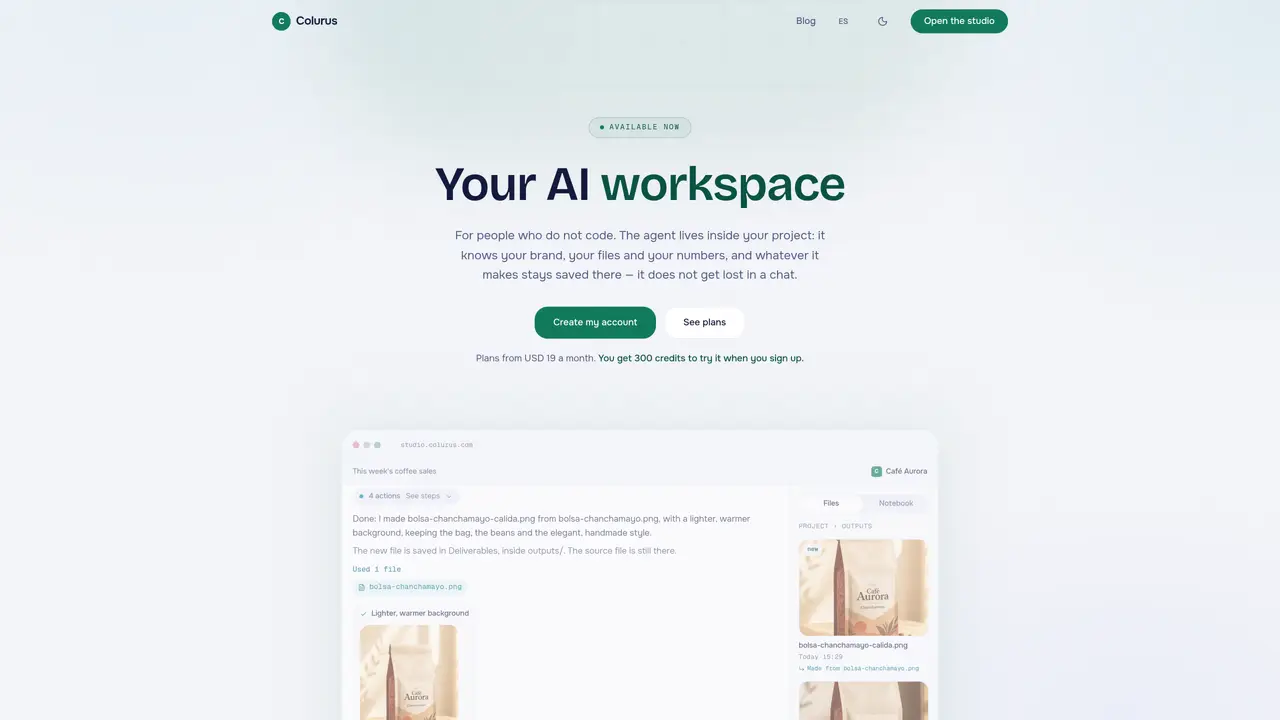
Colurus provides an AI-powered workspace where users can create, store, and edit files directly within a project environment. The platform is designed for people who do not code, allowing them to interact with an AI agent that understands their brand, files, and data. Users can dictate or type instructions which the agent converts into structured entries, such as sales logs or spreadsheets, without requiring manual data entry. The agent retains memory within each project, eliminating the need to repeatedly explain context or re-upload files. Results are saved as new files linked to their sources, ensuring originals remain untouched and changes are traceable. The workspace supports multiple file formats, including documents, images, tables, PDFs, and decks, and allows users to request edits by drawing on images. The agent operates autonomously within the project, suggesting ideas and applying edits without overwriting existing files.
Colurus is an AI-powered workspace where users can create, store, and edit files directly within a project environment. It allows non-technical users to interact with an AI agent that understands their brand, files, and data, converting spoken or typed instructions into structured entries like sales logs or spreadsheets without manual data entry.
Colurus is designed for people who do not code, particularly business owners, teams, or individuals who need to manage projects, files, and data without relying on technical skills. It suits those who want an AI assistant that remembers context and retains memory within each project.
The AI agent in Colurus lives inside the project and retains memory specific to that project. It remembers the user's brand, files, and data, eliminating the need to repeatedly explain context or re-upload files. This memory is project-specific and does not carry over between different projects.
Yes, Colurus ensures that every result is saved as a new file linked to its source, leaving the original files untouched. Changes are traceable, and users can follow the chain of edits backward to the original files.
Colurus supports multiple file formats, including documents, images, tables, PDFs, decks, and spreadsheets. Users can also request edits by drawing on images, and the agent applies the changes while preserving the original file.
To get started, users can create an account on Colurus' website, which provides 300 credits to try the agent before committing to a paid plan. The platform offers clear pricing tiers, including a business plan and an agency plan for managing multiple brands.
We use essential cookies to run aitoolnavio™, and optional cookies to analyze traffic and measure our marketing. You choose what we use — optional cookies stay off unless you turn them on. See our Privacy Policy.
One short email a week: fresh tools worth trying, honest takes and the updates that actually matter. No spam, unsubscribe any time.
Generate content, correct spelling, suggest synonyms to enhance writing.
Turn messy team ideas into actionable plans with Miro's visual workspace.
Leverage analytics, automate tasks, share documents, and coordinate projects.
Integrates AI into Airtable to analyze data, summarize insights, draft content, and automate workflows without prior AI experience.
Cloud accounting software that automates bookkeeping, invoicing, and financial reporting for small and growing businesses.
Streamline teamwork, manage projects, automate tasks efficiently.
Automate code, research, and documents using agents.
AI assistant for safe, reliable productivity with code, collaboration, and integrations.
Create customizable tables, databases, and spreadsheets, share data securely with team members.
Easy-to-use CRM platform that automates lead capturing, prioritizes tasks, and provides sales pipeline analytics for businesses of all sizes.
Transforms thoughts into actions, enhancing productivity and efficiency.
Write & run code in 50+ languages, auto-complete with AI, and code faster with an intuitive interface.
Matched on what this tool does — grouped by the job you would be replacing.
Paid placement · similar tools from listings that support aitoolnavio™
Instant lead response for home-service pros: your phone rings on every new lead, plus 14 days of follow-up
matches AI agent embedded in each project · Dictation or text input for structured data entry · Automatic file generation and editing
matches Automatic file generation and editing · Multi-format output (documents, images, tables, PDFs, decks)
An AI productivity workspace that turns documents and text into presentations, chats with PDFs, and generates long-form content for students, educators, and marketers.
An agentic AI coworker that analyzes documents, spreadsheets, and websites to deliver contextual answers and generate structured outputs.
AI-powered workspace for creating sites, apps, games and documents from text prompts
All-in-one AI-powered workspace for students to manage and complete academic work
AI assistant inside Canva that generates designs, writes copy, and creates visuals faster for marketers, creators, and teams.
AI agent for creating and editing presentation decks from data and text