

Generate content, correct spelling, suggest synonyms to enhance writing.
173M visits/mo+0.1%#1 Productivity & Office
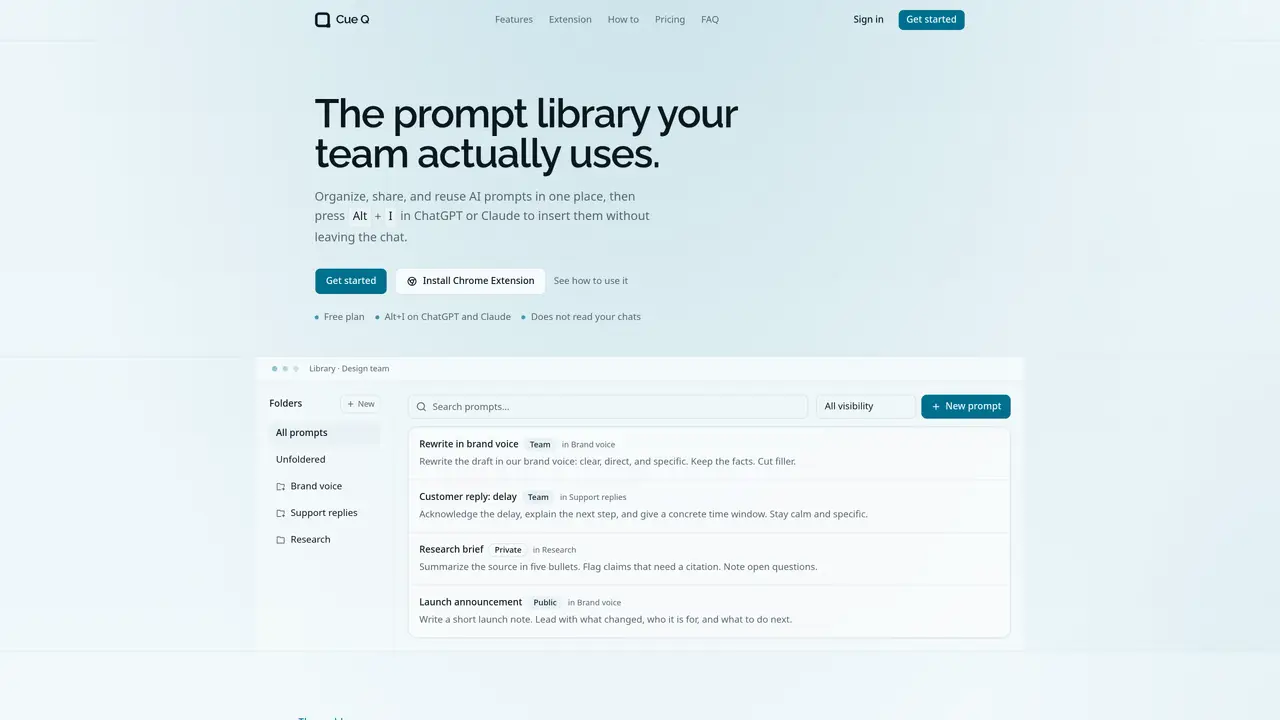
Cue Q provides a shared prompt library where teams can organize, share, and reuse AI prompts in one place. Users can save prompts with titles, content, and folders, then insert them into ChatGPT or Claude using a keyboard shortcut (Alt+I or Option+I on Mac) without leaving the chat interface. The tool supports creating multiple teams, each with its own library, and allows prompts to be marked as private, shared with the team, or made publicly accessible via a link. Folders can be soft-deleted, keeping prompts available while organizing the workspace. The web library serves as the central source of truth, ensuring consistency in tone, structure, and language across the team. The Chrome extension enables quick insertion of prompts directly into chat applications, while the web interface supports browsing, searching, and copying prompts without requiring the extension.
Cue Q is a shared prompt library that allows teams to organize, share, and reuse AI prompts in one centralized location. It enables users to save prompts with titles, content, and folders, then insert them directly into ChatGPT or Claude using a keyboard shortcut without leaving the chat interface.
Cue Q is built for individuals and teams who write with AI and want to maintain consistency in tone, structure, and language. It suits teams that need to reuse effective prompts, share best practices, and avoid rewriting instructions from scratch.
The Chrome extension allows users to press Alt+I (Option+I on Mac) in ChatGPT or Claude to search their prompt library and insert a selected prompt directly into the chat composer without leaving the interface.
Yes, Cue Q allows users to generate public links for prompts or folders, enabling anyone with the URL to view and copy the content without signing in. Team admins or owners can enable public links for shared folders.
No, the extension only accesses the Cue Q prompt library and inserts the selected prompt into the chat composer. It does not read or access the content of your ChatGPT or Claude conversations.
To get started, sign up to create a personal team, then invite collaborators by email when ready to share prompts. Save prompts with titles, content, and folders, and use the Chrome extension or web library to insert them into your chat applications.
We use essential cookies to run aitoolnavio™, and optional cookies to analyze traffic and measure our marketing. You choose what we use — optional cookies stay off unless you turn them on. See our Privacy Policy.
One short email a week: fresh tools worth trying, honest takes and the updates that actually matter. No spam, unsubscribe any time.
Generate content, correct spelling, suggest synonyms to enhance writing.
Turn messy team ideas into actionable plans with Miro's visual workspace.
Leverage analytics, automate tasks, share documents, and coordinate projects.
Integrates AI into Airtable to analyze data, summarize insights, draft content, and automate workflows without prior AI experience.
Cloud accounting software that automates bookkeeping, invoicing, and financial reporting for small and growing businesses.
Streamline teamwork, manage projects, automate tasks efficiently.
Automate code, research, and documents using agents.
AI assistant for safe, reliable productivity with code, collaboration, and integrations.
Create customizable tables, databases, and spreadsheets, share data securely with team members.
Easy-to-use CRM platform that automates lead capturing, prioritizes tasks, and provides sales pipeline analytics for businesses of all sizes.
Transforms thoughts into actions, enhancing productivity and efficiency.
Write & run code in 50+ languages, auto-complete with AI, and code faster with an intuitive interface.
Matched on what this tool does — grouped by the job you would be replacing.
Paid placement · similar tools from listings that support aitoolnavio™
Instant lead response for home-service pros: your phone rings on every new lead, plus 14 days of follow-up
matches Save and organize prompts with folders · Create and manage multiple teams · Share prompts privately, with team, or publicly via link
matches Save and organize prompts with folders · Search and filter prompts by folder or visibility · Browser-based web library for prompt management
Centralize and streamline AI prompt management with organizational tools and a Chrome extension.
Your All-in-one Prompt Management Tool
Create and reuse AI prompt templates with variables across different AI tools
Free community-built library for finding, saving and organizing AI prompts
Save, access, edit AI prompts instantly with search and sorting capabilities.
A Chrome extension to save, organize, and reuse AI prompts across chatbots with shortcuts and prompt chains.
Store and access GPT-3 prompts with PeakGPT.
Browser extension that saves, organizes, and reuses AI prompts directly from the right-click menu in any text field.