Generate content, correct spelling, suggest synonyms to enhance writing.
173M visits/mo+0.1%#1 Productivity & Office

A hackable productivity platform that helps teams focus, automate scheduling, and prevent burnout with calendar integration and actionable insights.
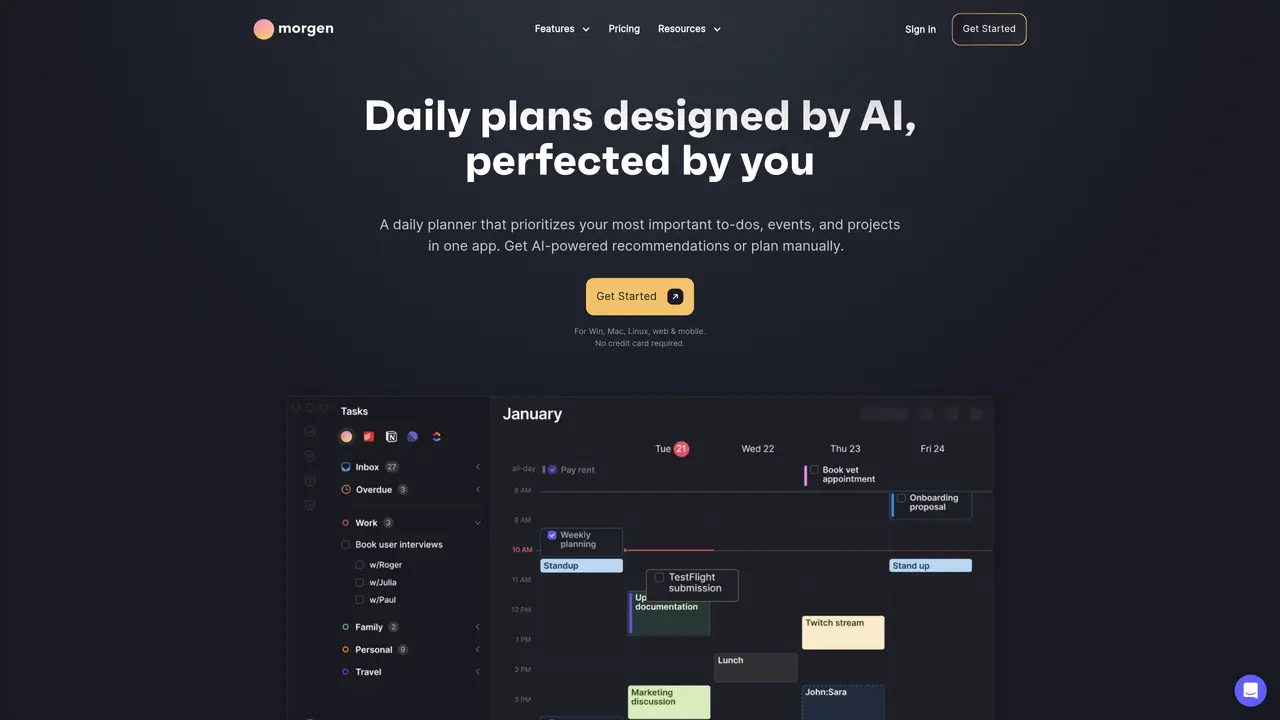
TimeTo, developed by Morgen, is an AI-driven daily planner and calendar management platform designed to help individuals and teams prioritize important tasks, automate scheduling, and protect deep work sessions. The tool consolidates multiple calendars—including Google, Outlook, Apple, and Fastmail—into a unified view, eliminating double-bookings and scattered workflows. Users can import tasks from project management tools like Notion, ClickUp, Linear, or Todoist directly into their calendar, where AI-powered recommendations highlight the most impactful work while allowing manual adjustments. The AI Planner dynamically reprioritizes tasks in response to schedule changes, reminds users of pending items, and evaluates capacity to flag at-risk deadlines. Features such as travel time, buffer time, and custom reminders further enhance focus by preventing overloaded days and ensuring intentional breaks. Morgen supports team workflows by displaying colleague availability and suggesting meeting times that minimize disruptions to deep work. The platform is accessible across web, desktop (Windows, Mac, Linux), and mobile devices, with no credit card required for basic use. By combining automation with user control, TimeTo aims to foster sustainable productivity habits and reduce burnout risks through data-driven insights and adaptive planning.
TimeTo is an AI-powered daily planner and calendar management tool designed for individuals and teams who want to prioritize important work, automate scheduling, and protect focus time. It is particularly useful for remote or hybrid teams managing multiple calendars and tasks across different platforms.
The AI Planner dynamically prioritizes tasks and adjusts schedules in real-time based on conflicts, capacity, and user preferences. It provides live recommendations in the calendar, reprioritizes tasks when plans change, and reminds users of pending or at-risk items to help meet deadlines.
Yes, TimeTo integrates with popular project management and task tools such as Notion, ClickUp, Linear, Todoist, and others. Tasks from these platforms can be imported and scheduled directly in the calendar, streamlining workflow management.
Yes, TimeTo includes team collaboration features such as viewing colleagues' availability, suggesting meeting times that avoid disrupting focus, and managing shared calendars. This helps teams coordinate schedules while protecting individual deep work sessions.
TimeTo is accessible across multiple platforms, including web browsers, desktop applications for Windows, Mac, and Linux, and mobile devices. The tool emphasizes cross-platform consistency to support users across different environments.
Users can get started with TimeTo by signing up on the Morgen website or downloading the desktop or mobile app. The platform offers a guided onboarding process to connect calendars, import tasks, and customize AI recommendations without requiring a credit card for basic use.
We use essential cookies to run aitoolnavio™, and optional cookies to analyze traffic and measure our marketing. You choose what we use — optional cookies stay off unless you turn them on. See our Privacy Policy.
One short email a week: fresh tools worth trying, honest takes and the updates that actually matter. No spam, unsubscribe any time.
Generate content, correct spelling, suggest synonyms to enhance writing.
Turn messy team ideas into actionable plans with Miro's visual workspace.
Leverage analytics, automate tasks, share documents, and coordinate projects.
Integrates AI into Airtable to analyze data, summarize insights, draft content, and automate workflows without prior AI experience.
Cloud accounting software that automates bookkeeping, invoicing, and financial reporting for small and growing businesses.
Streamline teamwork, manage projects, automate tasks efficiently.
Automate code, research, and documents using agents.
AI assistant for safe, reliable productivity with code, collaboration, and integrations.
Create customizable tables, databases, and spreadsheets, share data securely with team members.
Easy-to-use CRM platform that automates lead capturing, prioritizes tasks, and provides sales pipeline analytics for businesses of all sizes.
Transforms thoughts into actions, enhancing productivity and efficiency.
Write & run code in 50+ languages, auto-complete with AI, and code faster with an intuitive interface.
Matched on what this tool does — grouped by the job you would be replacing.
Paid placement · similar tools from listings that support aitoolnavio™
Instant lead response for home-service pros: your phone rings on every new lead, plus 14 days of follow-up
matches Automated task scheduling · Calendar integration for task prioritization · Deep work mode by setting calendars to busy
matches Work intensity measurement to prevent burnout · Actionable insights for sustainable productivity habits · Data-driven feedback on productivity patterns
matches Hackable platform for customization
Optimizes schedules by auto-organizing tasks and meetings.
Unified Calendar, Scheduling Links, and Task Manager for efficient organization.
AI-powered calendar that auto-schedules tasks using intelligent time blocking and prioritization with Google, Office 365, and iCloud sync.
All-in-one AI productivity platform that automates tasks, schedules meetings, and generates reports from a single app.
An AI daily planner for remote workers and wellness-focused users that syncs calendars, predicts energy levels from wearables, and time-blocks tasks.
ADHD-friendly AI assistant that unifies notes, email, tasks, and calendar in one place for natural-language planning and organization.
AI-powered mobile coach that builds daily schedules, tracks habits, syncs calendars, and provides productivity analytics for professionals and students.
Centralize tasks, documents, and team communication in one secure workspace with real-time updates and enterprise integrations.
A personal AI assistant that consolidates email, calendar, notes, tasks, and reminders into one platform for streamlined productivity.