
Generate content, correct spelling, suggest synonyms to enhance writing.
173M visits/mo+0.1%#1 Productivity & Office
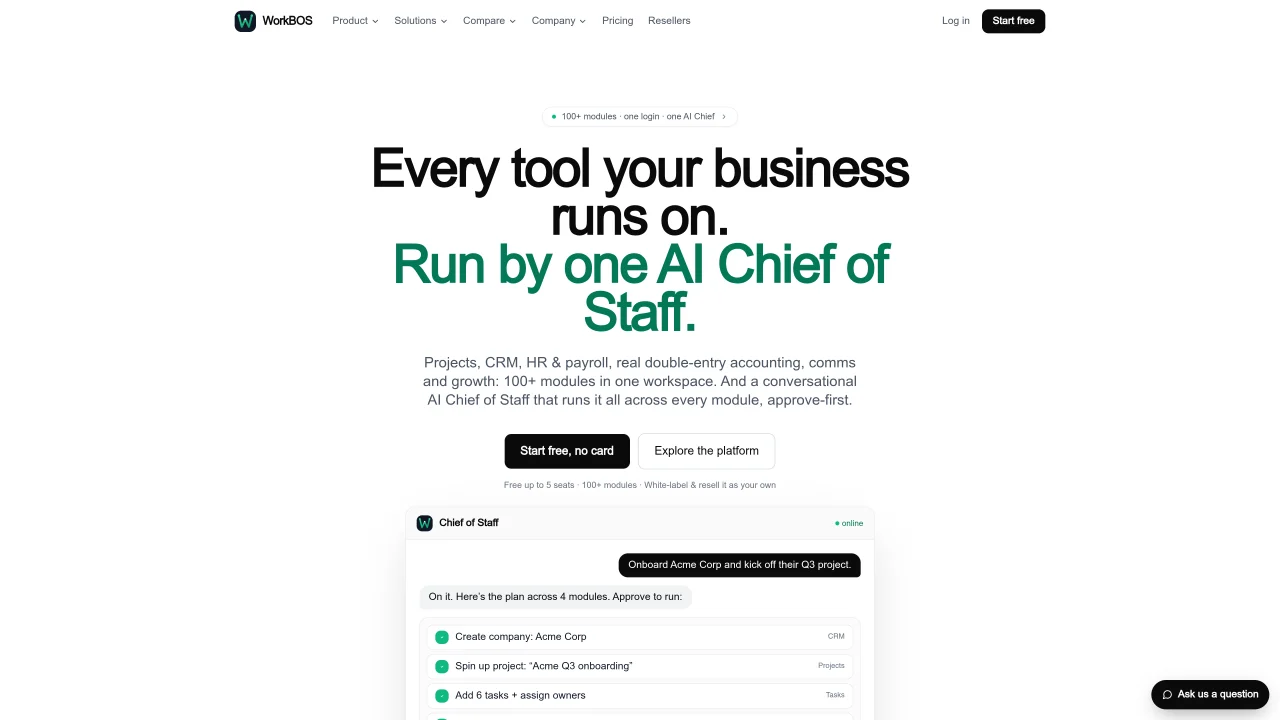
WorkBOS consolidates projects, CRM, HR, payroll, and double-entry accounting into a single workspace. It replaces multiple standalone tools such as ClickUp, Asana, HubSpot, and QuickBooks. The platform includes a conversational AI Chief of Staff that plans, delegates, and executes tasks across departments with user approval. Modules span operations, revenue, finance, and people management, with audit trails and permission controls. Users can run multiple entities from one login while maintaining separate financial records. The system supports API access, webhooks, and an MCP server for integration with AI assistants like Claude or Cursor. Documentation and free video courses are provided for onboarding and training.
WorkBOS is an all-in-one workspace that consolidates projects, CRM, HR, payroll, and double-entry accounting into a single platform. It replaces multiple standalone tools such as ClickUp, Asana, HubSpot, QuickBooks, and others by integrating their core functionalities into one unified system.
WorkBOS is designed for businesses and organizations looking to streamline operations by replacing multiple tools with a single workspace. It suits teams across operations, sales, HR, finance, client services, and leadership, as well as specific industries like agencies and nonprofits.
The AI Chief of Staff plans, delegates, and executes tasks across departments with user approval. It understands plain English commands, breaks goals into steps, and assigns tasks to specialist agents (Operations, Revenue, Finance, People) while requiring one-click approval for actions.
Yes, WorkBOS supports integration with AI assistants like Claude or Cursor through its MCP server, allowing these tools to interact with the workspace under the user's permissions and access controls.
WorkBOS provides free video courses through its Academy, covering every module and including verified hours and a certificate upon completion. Additionally, it offers documentation, guides, and specialists who can assist with setup and training.
WorkBOS includes audit trails, permission controls, and encryption to ensure secure data handling. Access is managed through role-based permissions, and every action is audited and reversible with one click.
We use essential cookies to run aitoolnavio™, and optional cookies to analyze traffic and measure our marketing. You choose what we use — optional cookies stay off unless you turn them on. See our Privacy Policy.
One short email a week: fresh tools worth trying, honest takes and the updates that actually matter. No spam, unsubscribe any time.
Generate content, correct spelling, suggest synonyms to enhance writing.
Turn messy team ideas into actionable plans with Miro's visual workspace.
Leverage analytics, automate tasks, share documents, and coordinate projects.
Integrates AI into Airtable to analyze data, summarize insights, draft content, and automate workflows without prior AI experience.
Cloud accounting software that automates bookkeeping, invoicing, and financial reporting for small and growing businesses.
Streamline teamwork, manage projects, automate tasks efficiently.
Automate code, research, and documents using agents.
AI assistant for safe, reliable productivity with code, collaboration, and integrations.
Create customizable tables, databases, and spreadsheets, share data securely with team members.
Easy-to-use CRM platform that automates lead capturing, prioritizes tasks, and provides sales pipeline analytics for businesses of all sizes.
Transforms thoughts into actions, enhancing productivity and efficiency.
Write & run code in 50+ languages, auto-complete with AI, and code faster with an intuitive interface.
Matched on what this tool does — grouped by the job you would be replacing.
Paid placement · similar tools from listings that support aitoolnavio™
Instant lead response for home-service pros: your phone rings on every new lead, plus 14 days of follow-up
matches CRM with pipeline tracking
matches Projects and task management
matches Double-entry accounting
Unified AI-first business platform combining CRM, sales, HR and more
AI business operating system combining CRM, invoicing, projects and contractor management in one interface
Unified AI-powered business platform combining CRM, HRM, sales and finance tools
Organize and track projects, set deadlines, and gain insights with customizable boards and advanced analytics.
All-in-one project management platform for task management, team collaboration, and workflow visualization with time tracking and reporting.
A shared workspace where humans and AI agents collaborate in real time to plan, code, and manage projects without switching tools.
AI workspace that connects tasks, clients, and time to prioritize daily work
Cloud accounting software that automates bookkeeping, invoicing, and financial reporting for small and growing businesses.
Cloud ERP covering finance, inventory, CRM and manufacturing
AI-native ERP system for finance, supply chain, sales, production and HR