

Turn messy team ideas into actionable plans with Miro's visual workspace.
30M visits/mo+11.8%#8 Productivity & Office
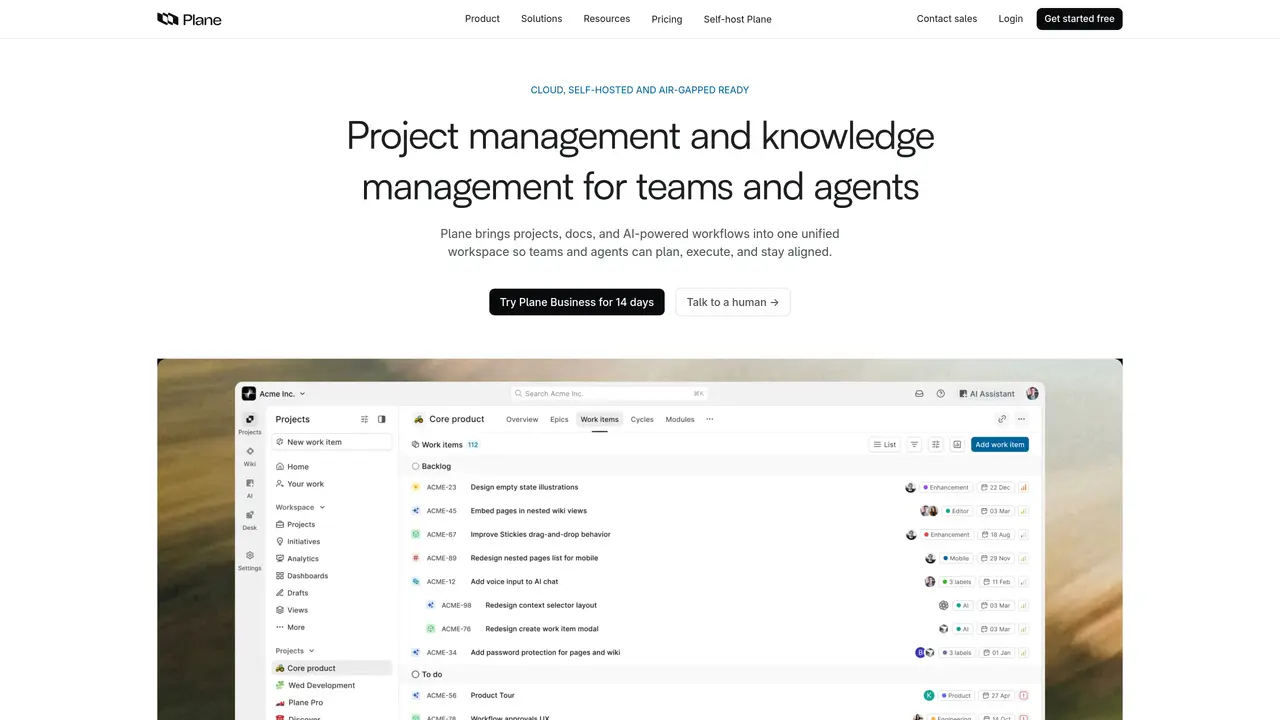
Plane is an open-source project management tool designed to streamline the way teams handle tasks and projects. It offers a suite of features that cater to the needs of developers, project managers, and teams of all sizes, simplifying the complexities of project management. With a focus on flexibility and scalability, Plane helps users organize, track, and complete their work efficiently. Key Features: Task Management: Provides a comprehensive task management system with features like task assignment, priority setting, and due dates. Collaboration Tools: Includes real-time collaboration features that allow team members to communicate and work together effectively. Customizable Workflows: Offers customizable workflows that can be tailored to fit the unique processes of any team. Integration Support: Supports integration with popular tools and platforms to enhance functionality and streamline processes. Plane is suitable for teams of all sizes, from small startups to large organizations, and is particularly useful for software development teams, project managers, and IT departments. It has also been adopted by non-profit organizations and educational institutions for managing volunteer projects and coordinating academic research projects. The tool offers a freemium pricing model, with a free plan available for up to 12 seats, as well as paid plans starting at $8 per seat per month.
Plane is an AI-native project management platform that unifies projects, documentation, and AI-powered workflows into a single workspace. It helps teams plan, execute, and stay aligned while enabling AI agents to assist with tasks like triaging requests, summarizing progress, and automating workflows.
Plane is designed for teams and organizations of all sizes, including software development teams, project managers, IT departments, non-profits, and educational institutions. It is particularly useful for teams looking to migrate from tools like Jira, Linear, ClickUp, Asana, or Monday.
Yes, Plane offers self-hosted and air-gapped deployment options, allowing organizations to control every layer of their instance. It supports deployment via Docker, Kubernetes, and provides tools like Prime CLI and God Mode for administration.
Yes, Plane supports integrations with over 50 tools, including Slack, GitHub, Figma, Sentry, and more. It also provides an open API, webhooks, and OAuth apps for building custom integrations or AI agents.
Plane offers flexible features such as multiple views (Board, Spreadsheet, List, Gantt), real-time dashboards, time-boxed cycles, built-in documentation, initiatives and epics, workflows and approvals, and AI-powered automation for tasks like triaging and summarizing work.
You can get started with Plane by signing up for a free account or contacting their team for a migration consultation if you're moving from another project management tool. Plane also offers a 14-day trial for its Business plan.
plane.so · third-party estimates from Similarweb
Last 4 months · grows by one month every month
Share of visits · estimated visits
Other countries: 51.3%
How people reach this site from other AI tools
7.3K a month · 1.3% of all visits
Productivity & Office · Sep 2026
Traffic figures are third-party estimates, good for scale and trends; they can differ from a company's own numbers. Updated monthly.
We use essential cookies to run aitoolnavio™, and optional cookies to analyze traffic and measure our marketing. You choose what we use — optional cookies stay off unless you turn them on. See our Privacy Policy.
One short email a week: fresh tools worth trying, honest takes and the updates that actually matter. No spam, unsubscribe any time.
Turn messy team ideas into actionable plans with Miro's visual workspace.
All-in-one project management platform for task management, team collaboration, and workflow visualization with time tracking and reporting.
Streamline teamwork, manage projects, automate tasks efficiently.
Organize and track projects, set deadlines, and gain insights with customizable boards and advanced analytics.
Optimize project management with custom workflows, real-time task assignment, and easy navigation of complex projects.
Centralize project information, automate workflows, and integrate popular applications for efficient project management.
Plan projects, track progress, streamline workflow, share files, and communicate collaboratively, maximizing productivity.
Leading product roadmap software for product and marketing teams to plan, visualize, and share strategies with Gantt charts and integrations.
Real-time task tracking, project management, collaboration, and task assignment.
Cloud-based professional services automation platform for agencies and consultancies to manage projects, resources, time tracking, invoicing, and profitability forecasting.
Agile project management platform for teams to organize workflows, track progress, and collaborate in real time with reporting and analytics.
Schedule events, streamline projects, and draft emails efficiently with its features.
Matched on what this tool does — grouped by the job you would be replacing.
matches Task Management · Customizable Workflows · User-Friendly Interface
All-in-one project management platform for task management, team collaboration, and workflow visualization with time tracking and reporting.
Centralize project information, automate workflows, and integrate popular applications for efficient project management.
A project management platform that unifies tasks, docs, and AI-powered meeting transcription for teams in one workspace.
Work management platform combining tasks, real-time docs, and workflow automation for small to mid-sized teams.
matches Collaboration Tools · Integration Support · Open-Source
Collaboration and version control platform for software development and AI model hosting.
Open-source workflow automation platform that connects apps and automates tasks with AI, no coding required.
An AI-powered collaborative workspace for organizing projects, notes, and data with privacy-focused features and open-source flexibility.
Track, manage, and share code, integrate development tools, automate deployments for secure and quick delivery.