Automate citation and reference management, aid research with text and data mining, and securely store and share documents.
15M visits/mo+13.2%#12 Productivity & Office

Chrome extension that bulk-uploads sources to Google NotebookLM from JSON, chats, tickets or YouTube
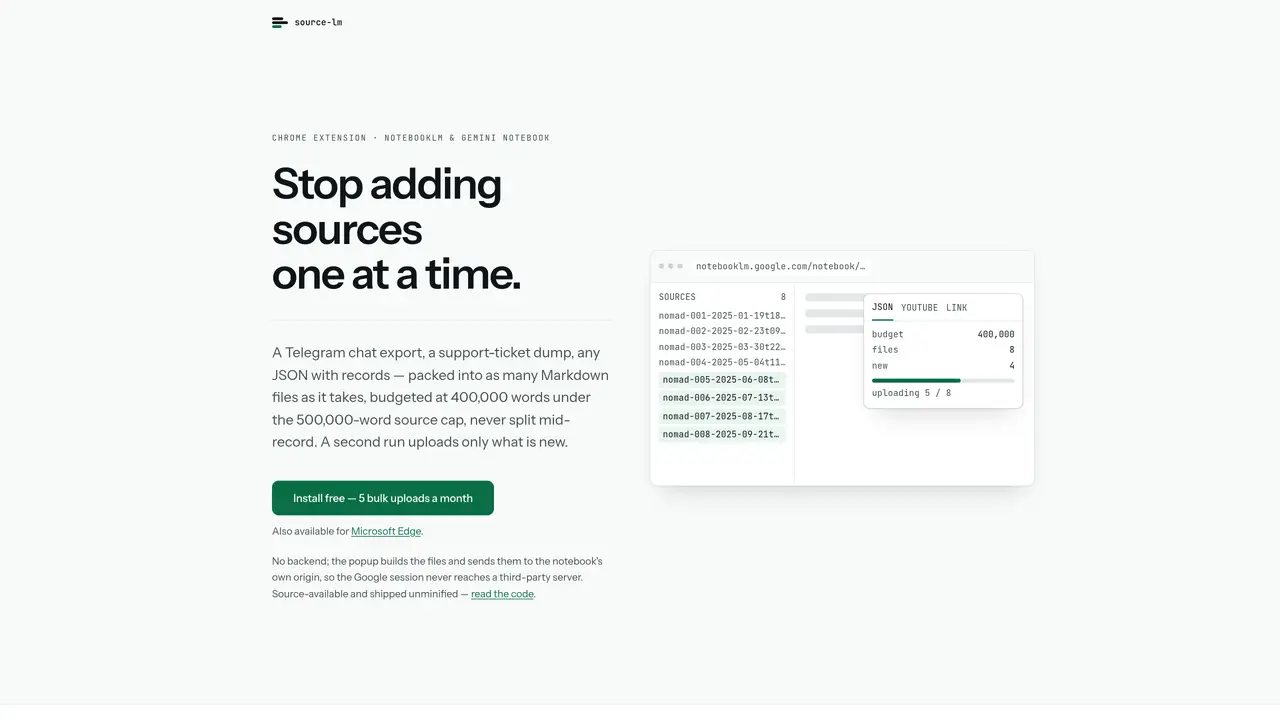
A Chrome extension that bulk-uploads sources to Google NotebookLM without manual entry. It accepts JSON exports, Telegram chat dumps, support-ticket files or lists of URLs and converts them into Markdown files within NotebookLM’s 500,000-word source cap. Each file is capped at 400,000 words to maintain a margin under the limit. A second run uploads only new records by reading the notebook’s existing source names, avoiding duplicates. The extension also supports bulk YouTube uploads via injected buttons on watch, playlist and channel pages, including comment threads as separate sources. Users can right-click highlighted text on any page to add it directly to a notebook as a new source. The tool tracks broken sources—pages NotebookLM failed to fetch—and allows replacing them with the current page text. All processing happens in memory; no files are written to disk and no backend is used. The extension communicates only with NotebookLM’s origin, Google’s upload host and the payment provider’s public endpoint for license checks.
source-lm is a Chrome extension designed to bulk-upload sources to Google NotebookLM, eliminating the need for manual entry. It converts various file formats like JSON exports, Telegram chat dumps, or lists of URLs into Markdown files within NotebookLM’s source cap.
The tool is ideal for researchers, content creators, or professionals who need to organize large volumes of information efficiently in NotebookLM without repetitive manual work.
Users can upload multiple sources at once by selecting a JSON file, Telegram export, or list of URLs. The extension splits content into files capped at 400,000 words to stay under NotebookLM’s 500,000-word limit per source.
Yes, it includes buttons on YouTube watch, playlist, and channel pages to bulk-upload videos or individual selections, including comment threads as separate sources.
On a second run, the extension uploads only new records by reading the notebook’s existing source names. It also tracks broken sources and allows replacing them with current page text directly.
No backend or account is needed. All processing occurs in memory, and the extension communicates only with NotebookLM’s origin, Google’s upload host, and the payment provider’s public endpoint for license checks.
source-lm.com · third-party estimates from Similarweb
Last 2 months · grows by one month every month
Share of visits · estimated visits
Productivity & Office · Sep 2026
Traffic figures are third-party estimates, good for scale and trends; they can differ from a company's own numbers. Updated monthly.
We use essential cookies to run aitoolnavio™, and optional cookies to analyze traffic and measure our marketing. You choose what we use — optional cookies stay off unless you turn them on. See our Privacy Policy.
One short email a week: fresh tools worth trying, honest takes and the updates that actually matter. No spam, unsubscribe any time.
Automate citation and reference management, aid research with text and data mining, and securely store and share documents.
AI research assistant that finds trusted sources, summarizes documents and videos, and generates cited answers with a browser extension for capturing findings.
Transforms queries into real-time, customized pages with expert insights.
Create interactive lessons, track student progress, deliver assessments for personalized learning.
Search scientific papers, discover relevant publications, and enhance understanding of academic literature.
Revolutionizing UX research with AI-driven insight summaries, friction detection, and sentiment analysis.
Access research, sort data, and get insights with predictive analytics.
Legal search engine specializing in Indian case law and statutes
AI browser extension that reads, writes, and creates across any webpage with integrated models like ChatGPT, Claude, and Gemini.
Free tool to collect, organize, cite and share research sources
Quickly summarize documents, identify key themes, and analyze for insights.
Access applications and data, find information easily, stay informed with intuitive interface.
Matched on what this tool does — grouped by the job you would be replacing.
matches Bulk upload from JSON, Telegram chats, support tickets or URL lists · Right-click to add selected text as a new source · YouTube bulk uploads with comment threads as separate sources
Chrome extension that extends Google NotebookLM with capture, organization, and export features
A Chrome extension that exports NotebookLM chats, notes, and reports to PDF, Word, or Markdown in one click.