Generate cinematic video clips from text or images and refine them with AI-powered editing tools for creators and visual professionals.
6.4M visits/mo+14.2%#8 Video & Animation

AI-powered browser tool that rigs 2D PNG characters with motion capture animations and exports as PNG sequences, JSON or Unity prefabs.
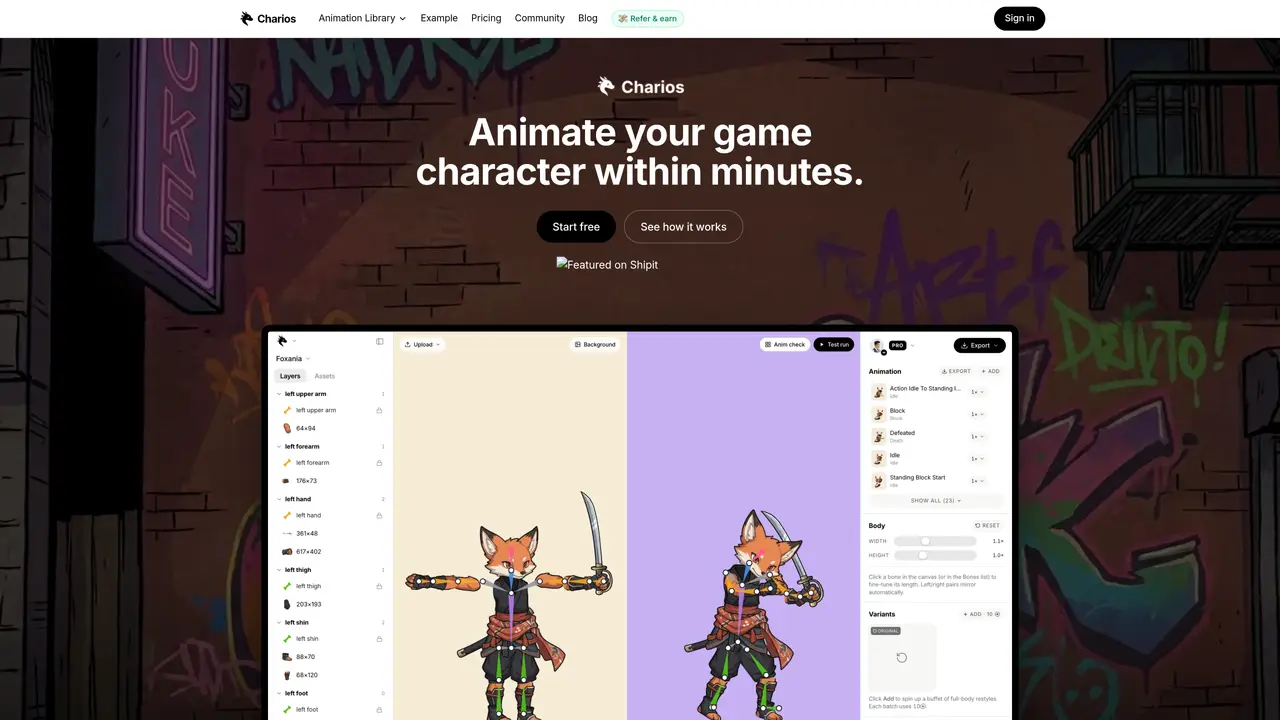
Charios is an AI-powered, browser-based tool for animating 2D characters using motion capture data. It automatically rigs uploaded PNG artwork by mapping and normalizing bone lengths, extrapolating missing hand or foot bones, and retargeting humanoid mocap files (BVH/FBX) to the character. The process requires no software installation or manual keyframing, making professional-grade animations accessible to non-animators. Users can export animations as PNG sequences, JSON data, or Unity prefabs for game development or other projects. The platform supports both bundled and user-uploaded motion capture data, streamlining the animation workflow from start to finish. Charios emphasizes speed and ease of use, enabling creators to generate believable motion quickly while maintaining flexibility for further refinement. The tool is designed for artists, game developers, and animators seeking to accelerate 2D character animation without deep technical expertise. It operates entirely in the browser, eliminating the need for complex software setups or hardware dependencies.
No. Charios is a browser-based tool that runs entirely in the web editor; users can start rigging within seconds by dropping a PNG file.
Yes. Users can drag and drop humanoid .bvh or .fbx files from sources like CMU, Truebones, or Rokoko. The retargeter automatically normalizes bone lengths and extrapolates missing hand or foot bones.
Charios supports exporting to Unity prefabs, JSON skeletons, GIFs, and PNG sequences. Godot import is planned, but currently requires using the JSON skeleton with an open-source loader.
Yes, there is a free tier with all editor features unlocked for up to three active projects. Paid plans remove project caps, increase upload limits, and add additional export options.
The marketing site and dashboards are fully responsive, but the editor itself is optimized for desktop due to the need for precise pointer input and a spacious canvas.
Plans include monthly credit buckets for AI operations, with top-up credits available. Credits reset monthly for subscriptions, while top-up credits never expire and stack.
charios.com · third-party estimates from Similarweb
Last 4 months · grows by one month every month
Share of visits by channel
Share of visits · estimated visits
Video & Animation · Sep 2026
Traffic figures are third-party estimates, good for scale and trends; they can differ from a company's own numbers. Updated monthly.
We use essential cookies to run aitoolnavio™, and optional cookies to analyze traffic and measure our marketing. You choose what we use — optional cookies stay off unless you turn them on. See our Privacy Policy.
One short email a week: fresh tools worth trying, honest takes and the updates that actually matter. No spam, unsubscribe any time.
Generate cinematic video clips from text or images and refine them with AI-powered editing tools for creators and visual professionals.
Create custom titles, 3D objects, adjust color and contrast, add special effects, transitions, and animations.
Animate images effortlessly with text prompts and motion control.
Professional visual AI engine for node-based image, video, 3D, audio and generative workflows with full control over models and outputs.
AI video generation tool that creates videos from text prompts, images, or reference clips with strong character consistency.
AI-powered tool for creating, customizing, and animating lightweight Lottie graphics for websites and apps from text prompts.
Generates high-quality videos and images from text or images with cinematic controls and native 4K output.
An all-in-one creative suite specializing in Image-to-Video animation.
A web-based motion design tool for creating collaborative animations with Figma import and exports like 4K video, GIF, and Lottie.
AI-powered platform to create professional animated videos and presentations with voice-overs, text animation, and asset libraries.
Create animated presentations, design videos with voiceovers and music, and access tutorials and resources for easy use.
Create immersive experiences, personalize customer interactions, and provide dynamic conversations and advice to multiple players.
Matched on what this tool does — grouped by the job you would be replacing.
matches AI-powered rigging of 2D PNG characters · Automatic bone length normalization and extrapolation · Exports as PNG sequences, JSON, or Unity prefabs
Turn any character image into a video by transferring motion, gestures, and expressions from a reference clip—no mocap, rigging, or keyframes required.
AI 2D game character sprite animation generator from a single image
AI tool that converts static game character images into animated sprites and sprite sheets
matches Motion capture retargeting from BVH/FBX files · Supports bundled and user-uploaded mocap data · Exports as PNG sequences, JSON, or Unity prefabs
matches Browser-based with no software installation required · Exports as PNG sequences, JSON, or Unity prefabs
Capture, edit, and animate motion seamlessly for game engines using filters and Rokoko Studio.
Real-Time Facial and Full-Body Motion Capture with Finger Tracking Using a Web Camera or Video Files
Generative AI platform that converts root motion paths into production-ready FBX animations for game studios and animators.
AI-driven tool for precise, real-time human motion capture.
Browser-based AI motion capture that turns webcam or video into 3D animation data for creators using Blender, Unity, and Unreal Engine.
AI-generated image cleanup, animation and export tool