Generate cinematic video clips from text or images and refine them with AI-powered editing tools for creators and visual professionals.
6.4M visits/mo+14.2%#8 Video & Animation

Turn any character image into a video by transferring motion, gestures, and expressions from a reference clip—no mocap, rigging, or keyframes required.
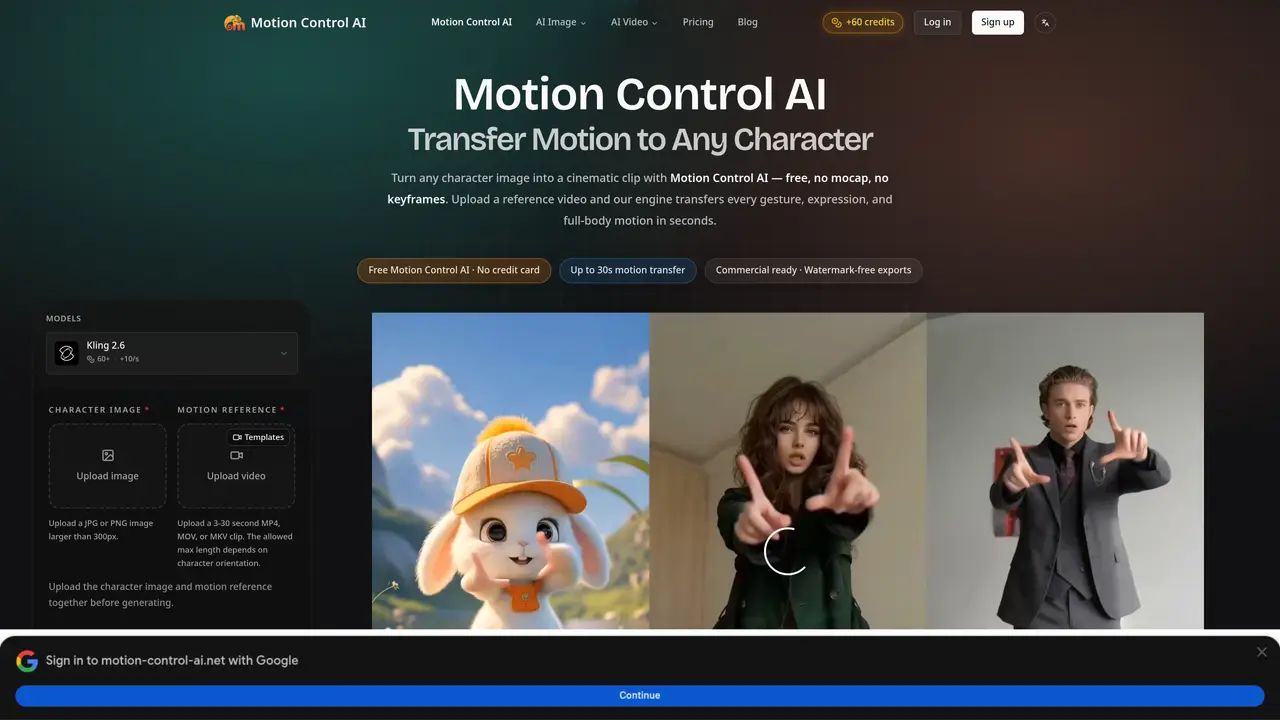
Motion Control AI is a browser-based platform that transfers full-body motion, gestures, facial expressions, and camera movement from a reference video to a static character image. Users upload a PNG, JPG, or WEBP image of a character and up to 30 seconds of reference footage, after which the tool automatically detects pose and timing while preserving the character’s face, outfit, and proportions. The result is a high-quality MP4 video rendered in minutes, available in 9:16, 16:9, and 1:1 aspect ratios with 720p or 1080p output. The tool eliminates the need for motion-capture suits, rigging, or manual keyframe animation, making it accessible for quick and efficient video production. It is designed for creating content for platforms like TikTok, Instagram Reels, YouTube, advertisements, character animation, and film previsualization. Motion Control AI emphasizes ease of use, requiring only a web browser and a few simple uploads to generate shareable results. Commercial usage rights are included with generated videos, allowing users to repurpose content freely.
Motion Control AI is a browser-based tool that transfers full-body motion, gestures, facial expressions, and camera movement from a reference video to any character image. It automates the process of animating characters without requiring motion-capture suits, rigging, or keyframe animation.
The tool is designed for creators, brands, educators, indie filmmakers, game developers, and virtual influencers who need to animate characters quickly and without technical expertise. It suits those creating content for platforms like TikTok, YouTube, or ads.
Start by uploading a character image (PNG, JPG, or WEBP) and a reference video (up to 30 seconds). The tool automatically detects pose, timing, and camera movement, then generates a video in 1–3 minutes. No prior animation experience is required.
Yes, Motion Control AI provides a free plan that allows users to try the engine without a credit card. The free tier includes watermark-free exports and commercial usage rights for generated videos.
The tool supports 9:16, 16:9, and 1:1 aspect ratios with output resolutions of 720p and 1080p. Generated videos are delivered as MP4 files ready for sharing.
Yes, Motion Control AI locks the character's face, outfit, and proportions for up to 30 seconds of motion transfer, preventing identity drift. This ensures consistency across the entire video.
motion-control-ai.net · third-party estimates from Similarweb
Last 4 months · grows by one month every month
Share of visits · estimated visits
Other countries: 10.2%
Video & Animation · Sep 2026
Traffic figures are third-party estimates, good for scale and trends; they can differ from a company's own numbers. Updated monthly.
We use essential cookies to run aitoolnavio™, and optional cookies to analyze traffic and measure our marketing. You choose what we use — optional cookies stay off unless you turn them on. See our Privacy Policy.
One short email a week: fresh tools worth trying, honest takes and the updates that actually matter. No spam, unsubscribe any time.
Generate cinematic video clips from text or images and refine them with AI-powered editing tools for creators and visual professionals.
Create custom titles, 3D objects, adjust color and contrast, add special effects, transitions, and animations.
Animate images effortlessly with text prompts and motion control.
Professional visual AI engine for node-based image, video, 3D, audio and generative workflows with full control over models and outputs.
AI video generation tool that creates videos from text prompts, images, or reference clips with strong character consistency.
AI-powered tool for creating, customizing, and animating lightweight Lottie graphics for websites and apps from text prompts.
Generates high-quality videos and images from text or images with cinematic controls and native 4K output.
An all-in-one creative suite specializing in Image-to-Video animation.
A web-based motion design tool for creating collaborative animations with Figma import and exports like 4K video, GIF, and Lottie.
AI-powered platform to create professional animated videos and presentations with voice-overs, text animation, and asset libraries.
Create animated presentations, design videos with voiceovers and music, and access tutorials and resources for easy use.
Create immersive experiences, personalize customer interactions, and provide dynamic conversations and advice to multiple players.
Matched on what this tool does — grouped by the job you would be replacing.
matches Transfers full-body motion from a reference video · Preserves character's face, outfit, and proportions · No motion-capture suit or rigging required
AI-powered browser tool that rigs 2D PNG characters with motion capture animations and exports as PNG sequences, JSON or Unity prefabs.
Motion control AI video generator that copies real movement from a reference clip to any character or avatar.
matches Supports 9:16, 16:9, and 1:1 formats · Outputs in 720p and 1080p
Generates videos from text prompts or images using multiple AI models
Converts still images into short AI-generated videos with adjustable motion and aspect ratio
AI video generator that animates still images into short clips
Turns still photos into short AI-generated videos with adjustable motion and camera effects