

AI-powered video messaging tool that records, shares, and manages video messages with AI-generated titles, summaries, and tasks.
16M visits/mo-3.4%#5 Chatbots & Assistants
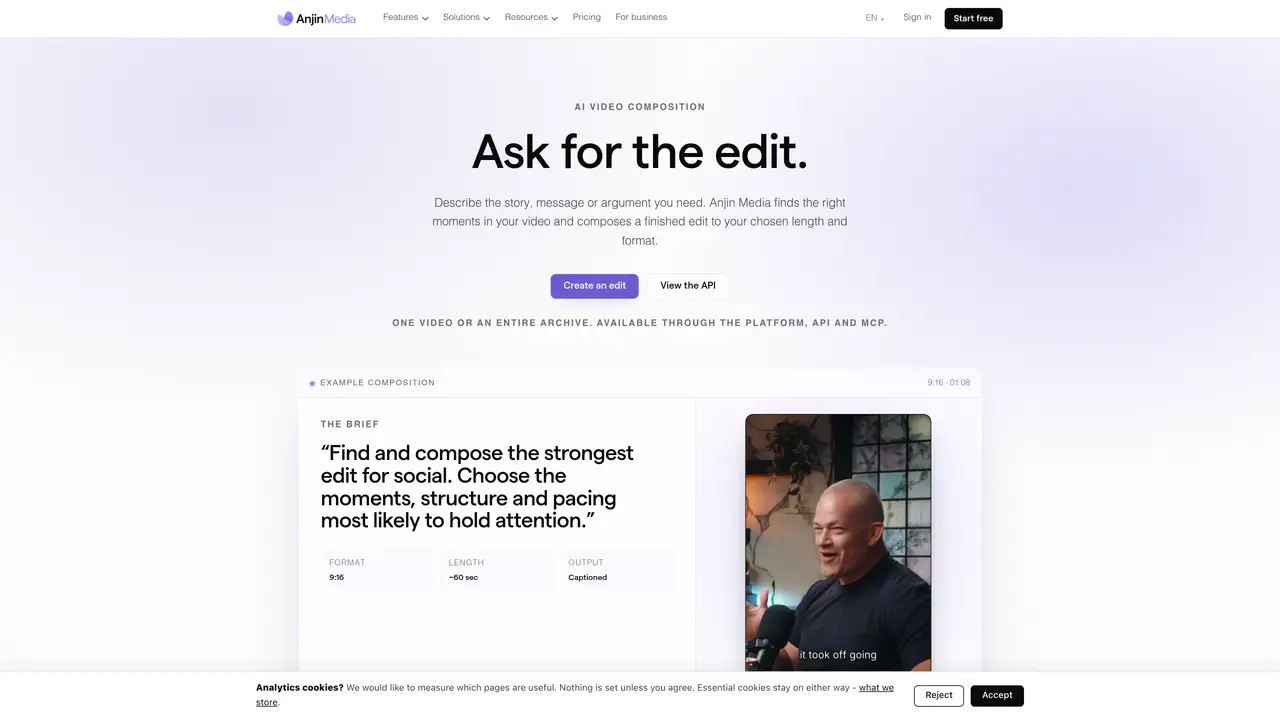
Anjin Media composes video edits from natural-language instructions. Users provide a brief specifying the story, audience, duration and format. The system indexes uploaded footage with word-level timecodes, then selects and orders relevant moments to fulfill the brief, removing repetition and building a coherent narrative. Finished edits are rendered at the requested length and aspect ratio, with each segment traceable to its source timecodes. Access is available through the web platform, a REST API, or MCP for agents. The service targets editorial workflows, enabling teams to repurpose long-form footage such as interviews, webinars and podcasts into shorter, platform-optimized edits. Outputs are delivered as finished videos ready for review, with no manual timeline editing required.
Anjin Media composes finished video edits from natural-language instructions by selecting and ordering relevant moments from uploaded footage. Users provide a brief specifying the story, audience, duration and format, and the system returns a rendered edit ready for review.
The tool targets editorial workflows, enabling teams to repurpose long-form footage such as interviews, webinars and podcasts into shorter, platform-optimized edits. It suits businesses and content creators managing video archives.
Users can start by uploading footage to the platform, transcribing it with word-level timecodes, and then submitting a brief describing the desired story, duration and format. Edits are then composed and rendered automatically.
Yes, Anjin Media provides access through a REST API and MCP for agents, allowing automated video-editing capabilities within external tools or workflows.
Once indexed, every moment in the footage becomes addressable and remains ready to answer future briefs. The system selects and orders relevant segments to fulfill each new brief without manual timeline editing.
Finished edits are delivered as rendered videos at the requested length and aspect ratio, with each segment traceable to its source timecodes. Users receive the edit ready for review, including captions if specified.
We use essential cookies to run aitoolnavio™, and optional cookies to analyze traffic and measure our marketing. You choose what we use — optional cookies stay off unless you turn them on. See our Privacy Policy.
One short email a week: fresh tools worth trying, honest takes and the updates that actually matter. No spam, unsubscribe any time.
AI-powered video messaging tool that records, shares, and manages video messages with AI-generated titles, summaries, and tasks.
Unleash creativity: edit photos, videos, and designs with AI-enhanced tools.
Record lectures, create tutorials, and securely share videos with teams.
Create stunning videos in a few clicks, customize with powerful tools, and automate editing without experience.
Create, convert, and enhance videos effortlessly with professional effects and royalty-free music.
Create marketing videos quickly, customize with templates, music, and photos, optimize for different platforms with AI.
Automate video editing, add text-to-speech voice-overs, and optimize videos for impactful results.
Freemium, uncensored AI video and image creation for individual creators with text-to-video, image effects, and gem-based upgrades for HD and no watermarks.
Create, edit, subtitle, and translate pro-grade videos instantly.
Cloudinary provides APIs and tools to integrate, manage, and optimize images and videos for AI-driven visual experiences.
All-in-one AI suite for creators to automate workflows, edit media, and generate content across video, design, and productivity tools.
Generate cinematic video clips from text or images and refine them with AI-powered editing tools for creators and visual professionals.
Matched on what this tool does — grouped by the job you would be replacing.
matches Natural-language brief input · Multi-segment narrative composition · Cut plan review before rendering
AI video ad generator that turns a brief into a fully rendered ad
Browser-based AI video generator creating cinematic shots from text, images or frames
Generates AI videos from text prompts, images, and references in a browser
AI-powered video generation and publishing for Instagram Reels
matches Word-level transcription and indexing · Transcript-based timeline editing
matches Aspect ratio and duration control · Text-to-video generation · Image-to-video generation
AI-powered video editor and screen recorder for Mac
AI-driven subtitle creation and editing for videos and audio files.
Indexes video clips with AI-generated tags, transcripts and on-screen text for fast search and storyboarding
AI captioning and transcription web app that generates, edits, and exports subtitles and 4K videos with viral templates for creators and marketers.
AI video generator from text, images, audio, and motion references
AI tool for generating and directing cinematic videos and images from text or images
AI platform for generating images, videos, audio and text without watermarks
AI video generator that creates short cinematic videos from text or still images