Automate video editing, add text-to-speech voice-overs, and optimize videos for impactful results.
4.4M visits/mo-5%#13 Video & Animation

Colorize black and white videos, increase resolution up to 8K, and work on multiple videos simultaneously in batch mode.
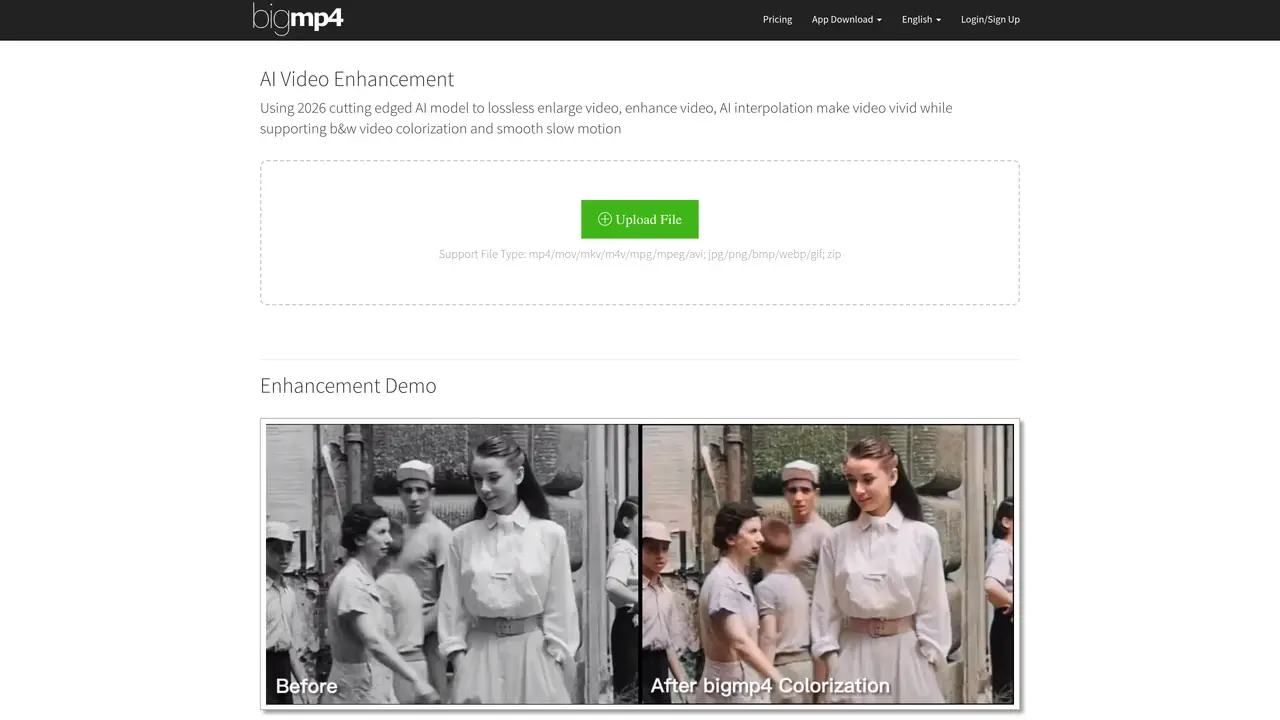
bigmp4’s AI Video Enhancement is designed for creatives, filmmakers, and professionals seeking to improve video quality efficiently. The tool leverages advanced AI models to upscale video resolution to 2K, 4K, or 8K while preserving clarity and reducing noise. It also offers features like black-and-white video colorization, smooth slow-motion conversion, and batch processing for handling multiple videos simultaneously. The platform is built to enhance videos without compromising quality, making it suitable for both personal and professional projects. Users can refine footage for social media, presentations, or archival purposes with minimal effort. The AI-driven approach ensures consistent results across different video formats and resolutions. It caters to a wide audience, from independent creators to large-scale production teams, by simplifying complex enhancement tasks into a streamlined workflow.
It uses a 2026 cutting-edge AI model to losslessly enlarge videos, enhance quality, and reduce noise. The tool also supports AI interpolation for smoother motion, black-and-white video colorization, and batch processing for multiple files.
Video formats include MP4, MOV, MKV, M4V, MPG, MPEG, and AVI. Image formats include JPG, PNG, BMP, WEBP, GIF, and ZIP files for batch processing.
Processing time depends on the number of frames and task settings. AI interpolation doubles the frame count, which increases processing time. The progress bar does not reflect real-time progress.
Uploaded files and results are automatically deleted within one week for privacy. Failed tasks result in a refund of deducted GPU points.
Jelly effects occur due to lens transitions or motion blur. The tool may calculate frames between these scenarios, causing visible artifacts. Adjusting interpolation settings or cropping the video can mitigate this issue.
You can email help@bigmp4.com for assistance or inquiries.
bigmp4.com · third-party estimates from Similarweb
Last 4 months · grows by one month every month
Share of visits · estimated visits
Other countries: 5.5%
Video & Animation · Sep 2026
Traffic figures are third-party estimates, good for scale and trends; they can differ from a company's own numbers. Updated monthly.
We use essential cookies to run aitoolnavio™, and optional cookies to analyze traffic and measure our marketing. You choose what we use — optional cookies stay off unless you turn them on. See our Privacy Policy.
One short email a week: fresh tools worth trying, honest takes and the updates that actually matter. No spam, unsubscribe any time.
Automate video editing, add text-to-speech voice-overs, and optimize videos for impactful results.
Create custom titles, 3D objects, adjust color and contrast, add special effects, transitions, and animations.
Vmake is an all-in-one AI-powered video creation and enhancement platform designed to help creators, marketers, and businesses produce high-quality video content quickly and effortlessly.
AI-enhanced photo and video editing software with local, secure processing.
Efficiently convert, burn, and customize videos for optimal results.
Create lifelike videos from text and images.
Create stunning videos effortlessly with HitPaw's intuitive interface and advanced editing features.
Web-based AI video editor that repurposes YouTube or TikTok clips into scroll-stopping short-form videos with AI voiceovers and viral subtitles.
AI-powered aim trainer that analyzes performance and delivers personalized exercises for FPS gamers to improve accuracy and track progress.
Web-based AI editor that upscales videos to 4K, removes backgrounds and watermarks, generates subtitles, makes clips, and translates videos.
Automatically enhance videos, create stunning results, and supports multiple file formats, with an intuitive chat-based interface.
AI plugin for Adobe Premiere Pro that automates repetitive video editing tasks like silence removal, captioning, and chapter detection.
Matched on what this tool does — grouped by the job you would be replacing.
matches Colorize black and white videos with AI · Increase video resolution up to 8K with no quality loss · Work on multiple videos simultaneously in batch mode
Enhance videos by fixing blurriness, repairing various types of videos, reducing noise, and colorizing black and white videos.
Enhance and restore video quality up to 8K with HitPaw VikPea.
AI-powered video upscaling and enhancement software that converts SD to HD, HD to 4K, and 4K to 8K while preserving quality.
AI-powered tool that upscales videos to 4K resolution, removes noise, and enhances details for better quality.
matches Colorize black and white videos with AI · Increase video resolution up to 8K with no quality loss
Free AI tool that adds realistic color to black and white images and enhances photo realism.
Restore photos, colorize black and white images, and create stunning compositions with AI-powered technology.
Restore old photos, add professional touch, and share memories in vivid color.
One-click AI tool to upscale, unblur, denoise, colorize, and restore photos while preserving quality.