

AI video clipping and editing tool that turns long videos into short clips with captions, reframing, and one-click social publishing.
5.1M visits/mo-0.4%#9 Video & Animation
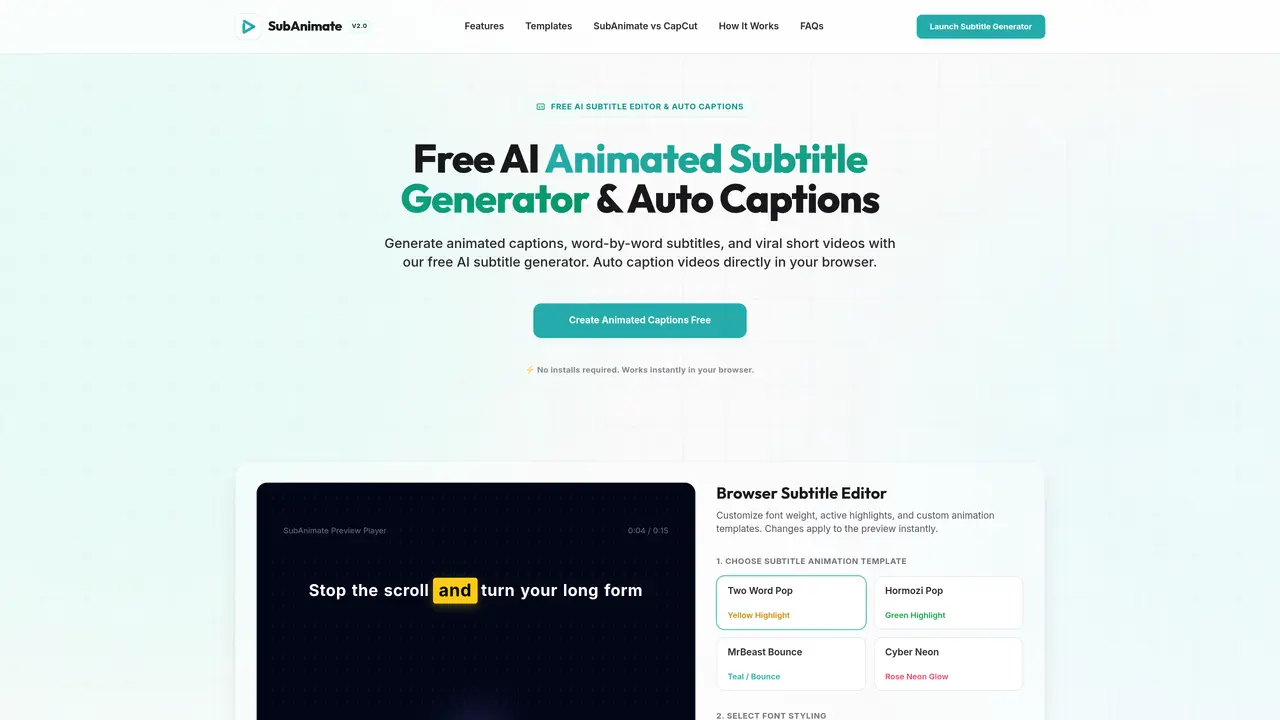
SubAnimate is a browser-based tool that generates and animates subtitles for videos directly in the user’s browser. It supports MP4, WebM, and MOV files, allowing creators to upload raw footage or import SRT/VTT files. The platform offers a range of preset animation templates, including styles inspired by popular content creators, with customizable fonts, colors, and highlight effects. Users can adjust subtitle backgrounds, shadows, letter spacing, and margins to refine the appearance. The tool automatically syncs subtitles with audio timestamps, enabling word-by-word highlighting. Once editing is complete, SubAnimate renders the final video locally as an MP4 with burned-in subtitles, optimized for sharing on platforms like TikTok, Instagram Reels, and YouTube Shorts. It is designed primarily for short-form content creators seeking to enhance engagement through dynamic captions.
SubAnimate is a free, browser-based AI tool that generates and animates subtitles for videos directly in the user’s browser. It supports MP4, WebM, and MOV files and offers customizable animation templates, fonts, colors, and highlight effects.
SubAnimate is designed primarily for short-form content creators, including TikTok, Instagram Reels, and YouTube Shorts users, who want to enhance engagement through dynamic, word-by-word subtitle animations.
No installation is required; it works instantly in the browser. The free tier does not include watermarks, and videos are rendered locally without uploading to the cloud.
Yes, with the Creator Pro plan, users can upload custom fonts in TTF, OTF, and WOFF formats for personalized subtitle styling.
SubAnimate reads video files alongside SRT/VTT files containing text and timestamps, matching the current video frame with the exact word timestamp to apply animations dynamically.
SubAnimate exports the final video as an MP4 with burned-in, hard-coded subtitles that display consistently across all players.
We use essential cookies to run aitoolnavio™, and optional cookies to analyze traffic and measure our marketing. You choose what we use — optional cookies stay off unless you turn them on. See our Privacy Policy.
One short email a week: fresh tools worth trying, honest takes and the updates that actually matter. No spam, unsubscribe any time.
AI video clipping and editing tool that turns long videos into short clips with captions, reframing, and one-click social publishing.
AI-powered video clipping and editing tool that extracts viral moments, adds captions, and schedules shorts for TikTok, YouTube, and Instagram.
Cloud-based video editor with AI-powered clip generation, voiceovers, and auto-subtitles for fast, browser-based editing.
Free online AI video editor for beginners to create videos with text, music, animations, and effects.
Create captivating videos with AI-based captions, edit and customize them, and easily share on social media.
Submagic is an AI tool that helps content creators create viral reels and shorts 10 times faster than any other video editing tool.
AI-powered tool for accurate captions, video clipping, and impactful face centering.
Web-based AI editor that upscales videos to 4K, removes backgrounds and watermarks, generates subtitles, makes clips, and translates videos.
AI video generator that turns scripts or prompts into faceless TikTok and YouTube Shorts with voiceovers, captions, and music for creators and small businesses.
Web-based drag-and-drop video editor for adding animated text, templates, and AI captions to social and marketing videos.
Turn long videos or text into viral short-form clips with AI avatars, captions, and auto-scheduling for TikTok, Reels, and YouTube Shorts.
AI-powered video editor for clips, captions, supercuts and web animations
Matched on what this tool does — grouped by the job you would be replacing.
matches Word-by-word subtitle animations · Preset animation templates (e.g., Two Word Pop, MrBeast Bounce) · Custom font uploads (Creator Pro plan)
Free AI tool to generate and add subtitles to videos without watermarks
On-device subtitle and caption generator for videos with animated styles
Browser-based tool that adds timed captions to short-form videos
Web-based AI tool to generate and edit subtitles for videos
matches Local MP4 rendering with burned-in subtitles · SRT/VTT file import and export · Real-time preview of subtitle animations
AI video localization platform for creators and teams to generate subtitles, translate into 200+ languages, and produce AI dubbing with voice cloning and lip-sync.
macOS video player that generates and translates subtitles in real time for foreign media or language learning with offline processing.
Browser-based tool for local audio and video transcription and subtitle editing