
Generate AI images, discover unique prompts, and save favorite images for quick reference.
4.5M visits/mo+9.2%#24 Image & Design
Chrome extension that refines AI chat drafts by prompting for missing details
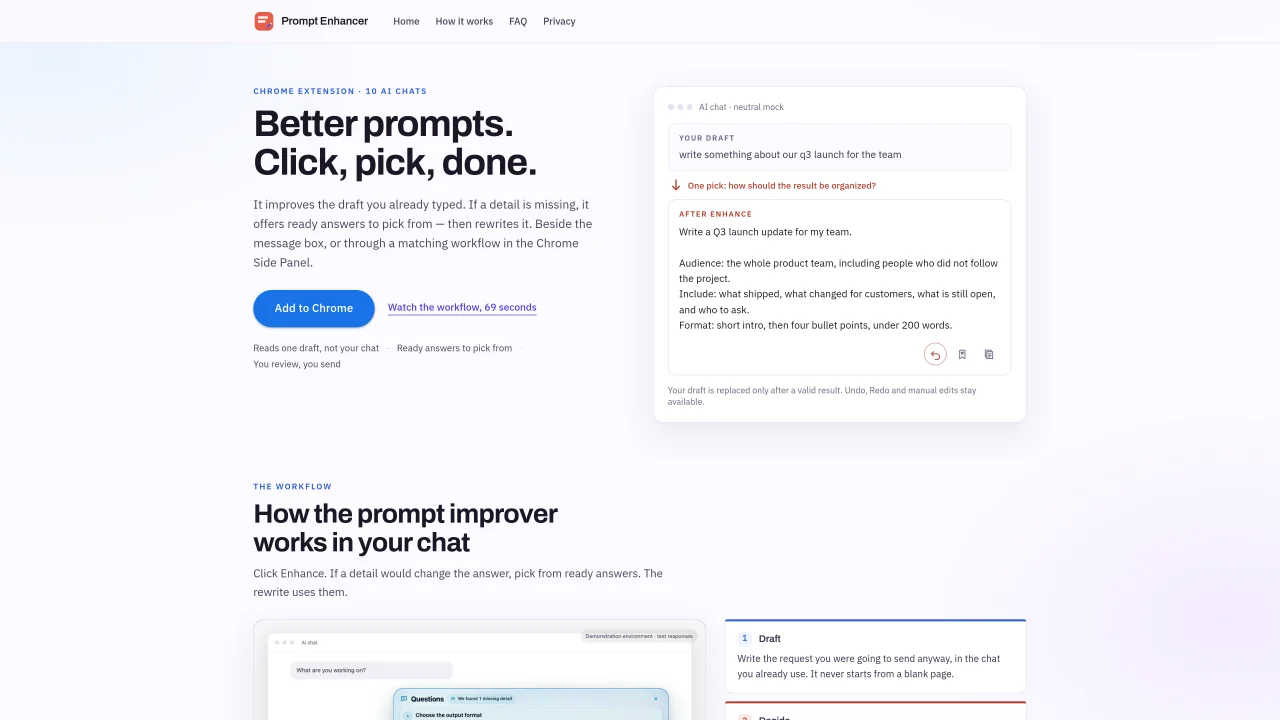
Prompt Enhancer is a Chrome extension that improves AI chat drafts by prompting for missing details before rewriting them. It works within supported AI chat interfaces, either beside the message box or via the Chrome Side Panel. The tool reads only the draft text pointed at and offers ready answers for key details that would change the result, such as audience, tone, or format. Users can pick from suggested options, write their own, or leave questions open. The rewrite uses the selected answers and replaces the draft only after a valid result. Undo, redo, and manual edits remain available. The extension supports ten AI chat services and does not send messages automatically or read entire conversations. Drafts and prompts are not stored by the service, and saved prompts remain local to the device. The workflow is limited to 50 guided prompts per UTC day.
Prompt Enhancer improves AI chat drafts by prompting for missing details before rewriting them. It works within supported AI chat interfaces, either beside the message box or via the Chrome Side Panel, and offers ready answers for key details like audience, tone, or format.
Prompt Enhancer is designed for anyone who drafts messages or prompts in AI chat interfaces and wants to refine them for clarity, specificity, or impact without starting from scratch.
No, Prompt Enhancer never sends messages automatically or activates the chat’s own send control. Users must manually review and send the rewritten draft.
Prompt Enhancer supports ten AI chat services, including ChatGPT, Claude, Gemini, Google AI Studio, Copilot, Perplexity, Grok, DeepSeek, Manus, and NotebookLM.
Prompt Enhancer limits users to 50 guided prompts per UTC day, which resets at 00:00 UTC. The allowance applies to the number of times the Enhance feature is used.
Saved prompts are stored locally on the user’s device and are not uploaded to the service or any external server.
We use essential cookies to run aitoolnavio™, and optional cookies to analyze traffic and measure our marketing. You choose what we use — optional cookies stay off unless you turn them on. See our Privacy Policy.
One short email a week: fresh tools worth trying, honest takes and the updates that actually matter. No spam, unsubscribe any time.
Generate AI images, discover unique prompts, and save favorite images for quick reference.
Discover and share image and text prompts for AI generation, with courses and community support.
Browser tools and guides for composing and refining Suno AI music prompts
Discover ideal prompts, reduce API costs, and monetize your own ideas.
Enhance prompt clarity with actionable, improvement insights.
A Chrome extension and web app that refines, saves, and reuses AI prompts across multiple platforms like ChatGPT, Claude, and Copilot.
Explore and understand MidJourney prompts, identify patterns, uncover insights, and save/share findings with others.
AI low-code prompt generator for system designs and AI workflows
Transform prompts for better results, generate prompts for classroom discussions, and access a library of 200+ inspiring prompts.
Track, manage, and explore OpenAI API requests with a comprehensive dashboard and intuitive UI.
AIForWork.co is the most advanced ChatGPT prompt and resource library with custom GPTs and helpful resources.
All-in-one content creation tool for bloggers, featuring over 70 AI-powered tools to inspire ideas, generate outlines and titles, and rewrite existing content.
Matched on what this tool does — grouped by the job you would be replacing.
matches Draft refinement within supported AI chat interfaces · Ready answers for missing details like audience, tone, or format · Side Panel workflow for limited space
AI email assistant that rewrites, drafts, and improves messages in Outlook, Gmail, Chrome, and iOS with tone control and grammar fixes.
Quiky is an AI-powered email generator that helps users quickly draft professional emails in various tones and styles.
Generate accurate replies, learn agent's style, edit or send drafts to save time.
Chrome extension that rewrites typed text in place with one keystroke
matches One-keystroke rewrite in any editable text field · In-place text replacement without new tabs · Local speech-to-text transcription
Browser extension AI assistant for in-page summarization, translation, drafting, and cited web search.
A macOS AI writing assistant that proofreads, rewrites, summarizes, and drafts emails and Slack replies with cross-app integration and PDF/image chat.