Generate captions, optimize content, and enhance with custom images for maximum engagement.
46M visits/mo-10%#3 Image & Design

Local dashboard to discover, monitor and steer multiple AI coding agents from one screen
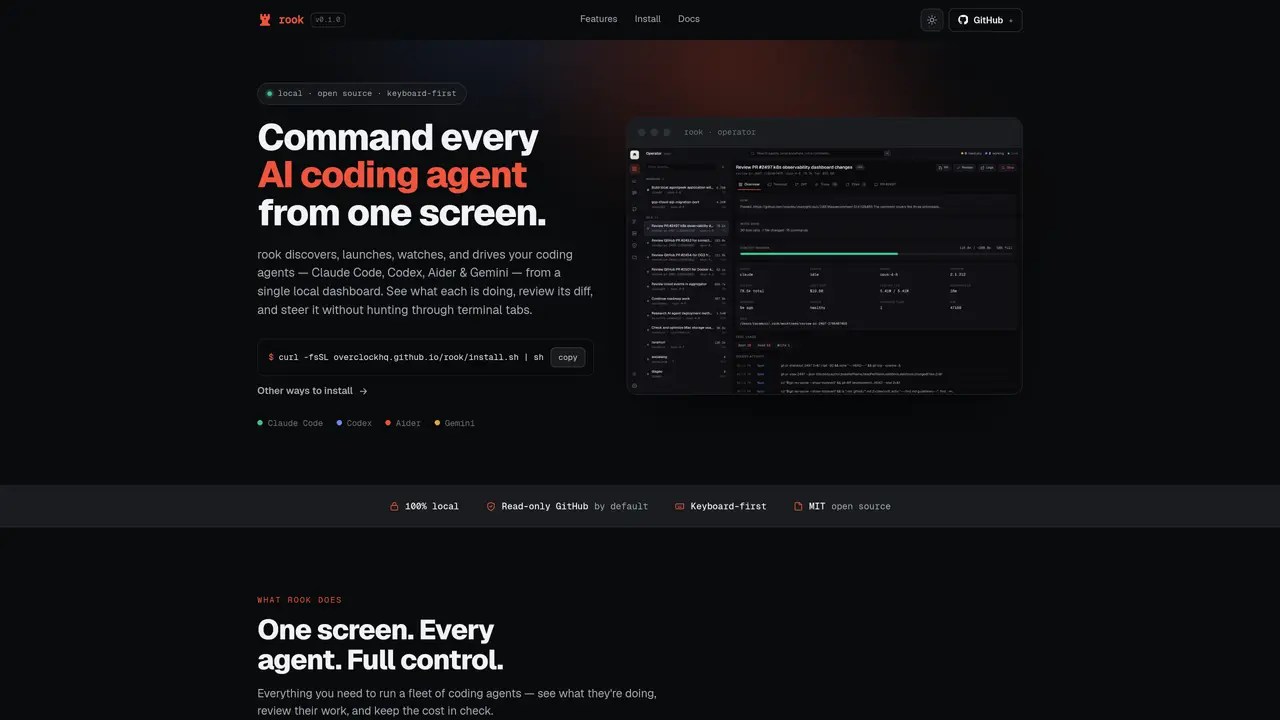
rook is a local-first, open-source dashboard that discovers, launches, monitors and steers multiple AI coding agents—Claude Code, Codex, Aider and Gemini—from a single interface. It runs entirely on the user’s machine and provides a live roster showing each agent’s status in plain English, highlighting blocked or looping agents before they consume excessive tokens. The tool pulls full PR and issue context from GitHub, including descriptions, commits, linked issues, reviews and comments, and displays it alongside the agent’s diff for review. Users can comment directly on the diff within rook, and those comments are automatically injected into the agent’s session as tracked threads, preserving context without copy-paste. rook also tracks token usage and cost per model and project, with spending windows and trend data, and includes a quality score per run to help assess agent efficiency. Past sessions are preserved and can be resumed with full context, including the same conversation history. The application is installed via a single command and opens a browser automatically, binding to localhost.
rook is a local-first, open-source dashboard designed to discover, launch, monitor, and steer multiple AI coding agents—such as Claude Code, Codex, Aider, and Gemini—from a single interface. It runs entirely on the user’s machine and provides real-time visibility into each agent’s status.
rook is intended for developers and teams who work with multiple AI coding agents and need a centralized way to manage, monitor, and review their outputs. It is particularly useful for those who want to maintain full control over their data and workflows.
rook pulls full PR and issue context from GitHub, including descriptions, commits, linked issues, reviews, and comments. This context is displayed alongside the agent’s diff for review, ensuring agents have access to the necessary information.
Yes, users can comment directly on the diff within rook, and those comments are automatically injected into the agent’s session as tracked threads. This preserves context without requiring manual copy-paste.
rook tracks token usage and cost per model and project, providing spending windows and trend data. This helps users monitor efficiency and manage resources effectively.
rook can be installed via a single command, and it automatically opens a browser interface bound to localhost. No additional setup is required beyond running the installation command.
We use essential cookies to run aitoolnavio™, and optional cookies to analyze traffic and measure our marketing. You choose what we use — optional cookies stay off unless you turn them on. See our Privacy Policy.
One short email a week: fresh tools worth trying, honest takes and the updates that actually matter. No spam, unsubscribe any time.
Generate captions, optimize content, and enhance with custom images for maximum engagement.
Build conversational forms, capture rich responses, and automate follow-ups with AI-powered surveys and workflows.
Automate code, research, and documents using agents.
AI-powered IDE for autonomous coding tasks and agentic development workflows
Source, match, and manage talent with predictive analytics for effortless recruiting.
Automate workflow, optimize operations, and detect potential issues with this efficient AI-driven solution.
Transforms thoughts into actions, enhancing productivity and efficiency.
AI Recruitment engine to hire top global talent
All-in-one team productivity platform combining chat, docs, video meetings, workflows, and AI tools in one place.
Personal assistant that coordinates tasks across apps and devices via text or call
AI automation and agent-building platform with 3,000+ app integrations
AI job search copilot that matches roles to skills, optimizes resumes for ATS, generates cover letters, and autofills applications with real-time insights.
Matched on what this tool does — grouped by the job you would be replacing.
matches Live roster of all active agents with status in plain English · Stuck & loop watchdog to flag agents consuming excessive tokens · Session history preservation and resume capability
Local dashboard for managing multiple coding-agent sessions across engines
Unified local dashboard for AI coding sessions across multiple tools
Native macOS application for managing and coordinating coding agents
Modular workbench for designing and running agent workflows with model selection and cost tracking
matches Per-model and per-project token cost tracking with trend data · Session history preservation and resume capability
matches Full PR and issue context pulled live from GitHub · Diff-first review with in-app commenting and tracked threads
Analytics and observability for Model Context Protocol servers
Desktop workspace and usage tracker for AI coding agents
Menu bar app that tracks AI coding spend for Claude Code and Codex
Monitors and logs token usage and execution traces for coding agents including Claude Code
A macOS workspace for running and managing parallel AI coding agents with isolated shells and automatic git worktrees.
Local AI coding agent manager that turns tickets into isolated worktrees and pull requests
Desktop workspace for coding agents like Codex and Claude Code
Local-first desktop workspace for managing multiple AI models and tools in one interface