

Scales efficient language processing with open-source accessibility.
357M visits/mo+1%#2 Coding & Development
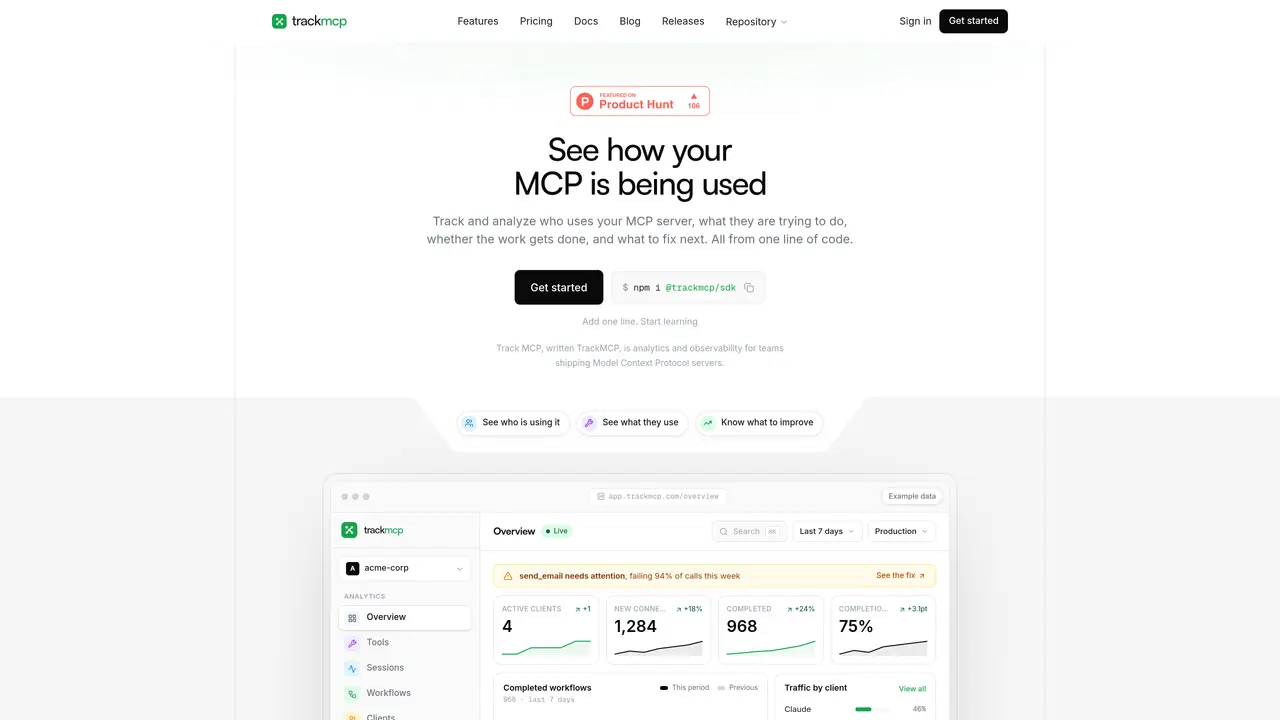
TrackMCP provides analytics and observability for teams developing Model Context Protocol (MCP) servers. It captures tool calls, groups them into sessions, and synthesizes outcomes to show who is using a server, what they are attempting, and where workflows succeed or fail. The tool highlights reliability issues such as silent failures, retries, and schema mismatches, translating technical data into plain-English insights with suggested fixes. It supports TypeScript and Python SDKs and requires only one line of code to integrate. Data appears in a dashboard in real time, enabling developers to identify underused tools, diagnose errors, and improve server performance. The platform also tracks client adoption, workflow completion rates, and returning usage patterns to guide prioritization of fixes.
TrackMCP provides analytics and observability for teams developing Model Context Protocol (MCP) servers. It captures tool calls, groups them into sessions, and synthesizes outcomes to show usage patterns, reliability issues, and workflow performance.
TrackMCP is designed for developers and teams building or maintaining MCP servers who need visibility into tool usage, error diagnostics, and performance insights.
TrackMCP supports TypeScript and Python SDKs and requires only one line of code to integrate with MCP servers, enabling real-time data collection and dashboard visualization.
It translates technical data into plain-English insights, highlighting reliability issues such as silent failures, retries, and schema mismatches, along with suggested fixes.
Yes, it tracks client adoption, workflow completion rates, and returning usage patterns to help teams identify underused tools and diagnose workflow issues.
Yes, data appears in a dashboard in real time, allowing developers to monitor server performance and usage patterns as they occur.
trackmcp.com · third-party estimates from Similarweb
Last 4 months · grows by one month every month
Share of visits by channel
Share of visits · estimated visits
Coding & Development · Sep 2026
Traffic figures are third-party estimates, good for scale and trends; they can differ from a company's own numbers. Updated monthly.
We use essential cookies to run aitoolnavio™, and optional cookies to analyze traffic and measure our marketing. You choose what we use — optional cookies stay off unless you turn them on. See our Privacy Policy.
One short email a week: fresh tools worth trying, honest takes and the updates that actually matter. No spam, unsubscribe any time.
Scales efficient language processing with open-source accessibility.
Collaboration and version control platform for software development and AI model hosting.
Tesla’s AI stack powers Full Self-Driving, Optimus humanoid robots, and real-world autonomy with neural networks, custom hardware, and Dojo-scale training.
Integrates AI into Airtable to analyze data, summarize insights, draft content, and automate workflows without prior AI experience.
AI-powered website builder that generates a professional site in under a minute and includes tools for content, SEO, and analytics.
Unified platform to access and switch between hundreds of AI models like ChatGPT, Claude, and Gemini via a single API.
xAI builds Grok frontier AI models for reasoning, coding, voice, images, video, enterprise workflows, and developer APIs.
Meta AI enhances machine learning, NLP, and computer vision capabilities.
Crowdsourced platform for blind, side-by-side AI model comparisons with a public leaderboard.
Customize, deploy, and control AI models securely.
Independent benchmarks comparing AI models on quality, speed, and cost across multiple capabilities.
Chat, build, and explore with open AI models.
Matched on what this tool does — grouped by the job you would be replacing.
matches Tool call capture and session grouping · Client and workflow analytics · Reliability tracking (errors, retries, silent failures)
LLM observability and cost tracking tool for engineering and product teams
Analytics for MCP servers showing tool usage, failures and schema costs
Analytics and monitoring for Model Context Protocol servers
matches Full conversation traces with timestamps and metadata · Intent discovery from production conversations · Violation rule monitoring against defined policies
matches Token and context window tracking per turn · Cache behavior analysis and breakdown · Tool schema usage auditing
Runtime evaluation and enforcement for AI agents in production
Monitors AI agent conversations to detect failures and user needs
Local dashboard to discover, monitor and steer multiple AI coding agents from one screen
Local observability tool for coding agents that tracks token usage and context growth