Unify customer data, automate workflows, and scale experiences with Einstein AI, Copilot, and Data Cloud in one CRM platform.
Sobmit
0Popularity
About Sobmit
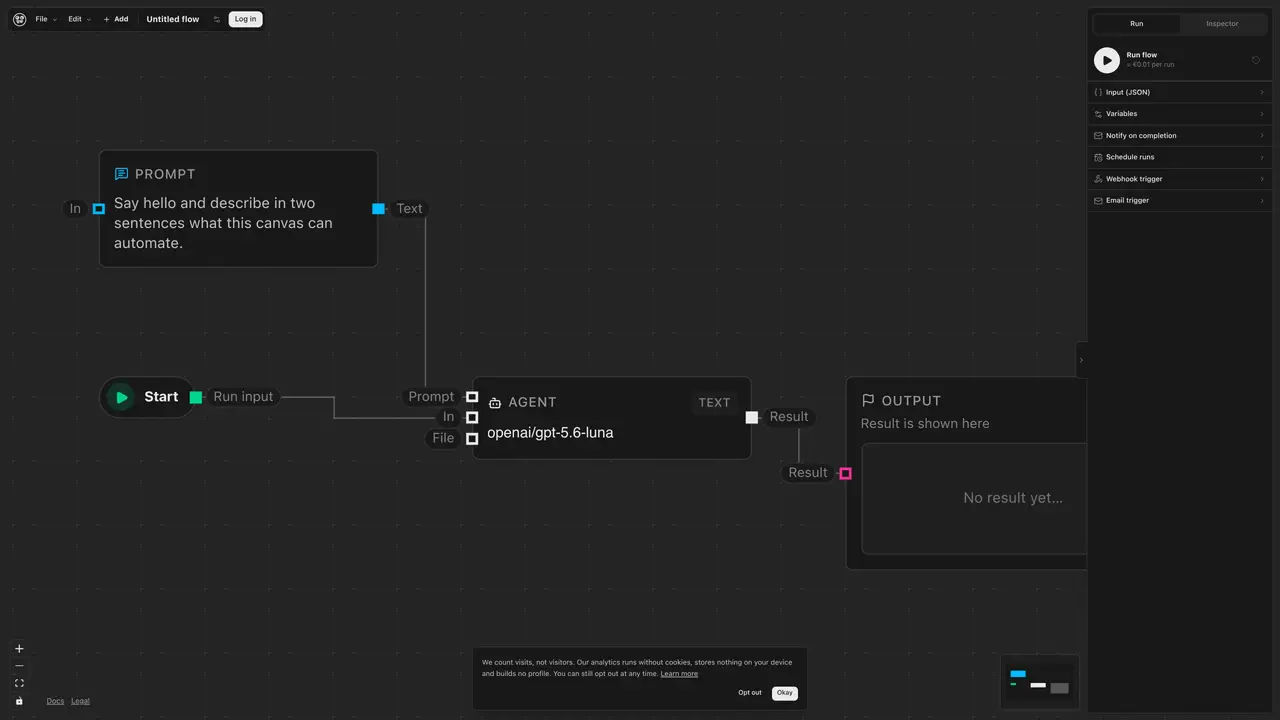
Sobmit is a visual workflow builder designed for AI agents. It allows users to create workflows by dragging and dropping components such as LLM agents, routers, HTTP tools, web search, and MCP servers onto a canvas. Workflows can be executed in real-time, scheduled for later runs, or triggered via webhooks. The interface supports keyboard navigation for selecting and editing nodes and edges, with options to move, delete, or cancel actions. Users can configure inputs, variables, and notifications, and manage workflow execution through the inspector tool.
Key features
- Drag-and-drop workflow builder
- LLM agent integration
- HTTP tools and web search nodes
- MCP server support
- Durable workflow execution
- Scheduled and webhook-triggered runs
- Keyboard navigation for nodes and edges
- Input and variable configuration
Use cases
- Building AI agent workflows without coding
- Automating multi-step processes with triggers
- Integrating external tools via HTTP and MCP servers
Pros
- No-code workflow creation
- Supports multiple trigger types
- Keyboard navigation for node and edge editing
- Integration with LLM agents and MCP servers
- Real-time and scheduled execution options
Cons
- No mention of API access
- Limited to visual interface with no code export
- Keyboard-only node editing may limit accessibility
Frequently asked questions about Sobmit
What is Sobmit?
Sobmit is a visual workflow builder designed for AI agents. It enables users to create workflows by dragging and dropping components such as LLM agents, routers, HTTP tools, web search, and MCP servers onto a canvas without requiring any coding.
How do I interact with the workflow canvas in Sobmit?
The interface supports keyboard navigation for selecting and editing nodes and edges. Users can press enter or space to select a node or edge, use arrow keys to move nodes, and press delete to remove them. Escape cancels the current action.
What types of workflows can I create and run in Sobmit?
Workflows can be executed in real-time, scheduled for later runs, or triggered via webhooks. Users can also configure inputs, variables, and notifications to manage workflow execution.
Can I edit the settings of nodes and edges in Sobmit?
Yes, users can select a node or edge on the canvas to edit its settings. This includes configuring inputs, variables, and other properties specific to the selected component.
Does Sobmit require coding knowledge to use?
No, Sobmit is designed to be a no-code tool, allowing users to build workflows through a visual interface by dragging and dropping components.
What components can I use to build workflows in Sobmit?
Users can use components such as LLM agents, routers, HTTP tools, web search, and MCP servers to construct their workflows in Sobmit.