
Design, distribute, and analyze surveys online or via email with real-time insights using Survey Monkey.
38M visits/mo-3.9%#2 Business & Marketing

AI tool that captures user feedback and automatically analyzes website visitor behavior through session recordings and heatmaps.
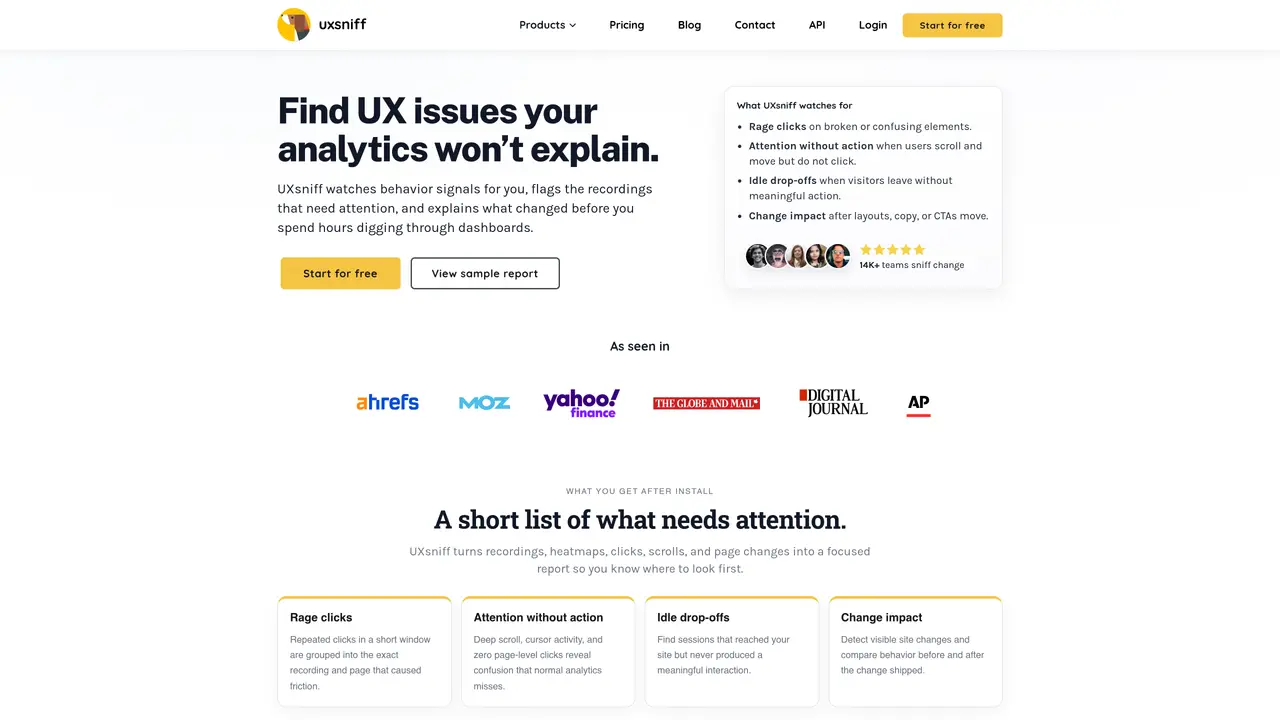
UX Sniffer is an AI-powered platform designed to provide deep user experience insights by analyzing how visitors interact with a website. It automatically collects session recordings, identifies unusual click patterns, and generates heatmaps to visualize user engagement. The tool also supports on-site surveys and feedback widgets to gather direct input from visitors. Additionally, UX Sniffer performs automated audits for both UX and SEO issues, helping teams identify and resolve problems that may impact performance. It is particularly useful for website owners, entrepreneurs, and UX professionals who need to optimize their digital presence without manual analysis. The platform offers a comprehensive suite of features that streamline the process of understanding user behavior and improving site usability.
UX Sniffer uses AI to detect changes in user experience by analyzing behavior signals such as rage clicks, attention without action, and idle drop-offs. It flags recordings and pages that need attention and explains what changed to help teams quickly identify and resolve UX issues.
The tool is built for founders, product teams, and UX professionals who need to understand why user behavior changes without manually reviewing dashboards or recordings. It is particularly useful for teams that want to reduce time spent debating why metrics moved.
UX Sniffer supports retro A/B testing by comparing user behavior before and after a change without requiring a pre-planned experiment. This helps teams identify what actually mattered after a release, even if no test was set up.
Yes, UX Sniffer offers session recordings, heatmaps, and on-site surveys to gather direct user feedback. These features help visualize user engagement and identify areas of friction or confusion on a website.
The tool generates a daily report highlighting priority items such as rage-click sessions, pages with attention but no action, and detected changes. It connects these signals to specific pages and sessions, making it easier to focus on what matters most.
Yes, UX Sniffer continuously monitors for UX changes and flags those that align with behavior shifts. This helps teams spot regressions or unexpected changes sooner, reducing the time spent on manual investigations.
We use essential cookies to run aitoolnavio™, and optional cookies to analyze traffic and measure our marketing. You choose what we use — optional cookies stay off unless you turn them on. See our Privacy Policy.
Design, distribute, and analyze surveys online or via email with real-time insights using Survey Monkey.
Create targeted campaigns, automate email campaigns, and analyze performance for maximum ROI.
Discover keywords, analyze competitors' SEO strategies, and make data-driven decisions for website performance.
Analyze website performance, track competitors' tactics, and access comprehensive analytics and optimization features.
YouTube and Instagram growth toolkit with AI-powered optimization and analytics
Develop, run data jobs, transform datasets, leverage ML algorithms for actionable insights.
Streamline hiring, monitor job performance, and choose flexible pricing plans.
Unified AI-powered platform for real-time monitoring, analytics, and security across cloud infrastructure, applications, and services.
Securely store, analyze, and scale data while enhancing security and performance with encryption and automated backups.
AI-powered customer feedback platform for mid-market businesses to run conversational surveys and extract insights.
Automate review requests, analyze sentiment, and monitor ratings with a streamlined dashboard for improved customer feedback.
Monitor brand performance, create content for social media, and gain insights with deep analytics.
Matched on what this tool does — grouped by the job you would be replacing.
matches Session recordings to track user interactions · Heatmaps for visualizing user engagement · On-site surveys and feedback widgets
Web and app experience analytics with heatmaps, replays, surveys and AI insights
AI-assisted UX research platform for running usability tests, analyzing user behavior, and improving digital experiences through scalable research workflows.
Web analytics platform that combines quantitative metrics with qualitative insights to identify and fix
Privacy-first web analytics with session replay, heatmaps and AI insights
matches Automated UX and SEO audits
Tracks and analyzes brand visibility across AI search platforms like ChatGPT and Google AI Overviews
AI-powered SEO auditing and website growth recommendations
One short email a week: fresh tools worth trying, honest takes and the updates that actually matter. No spam, unsubscribe any time.