

AI-powered video messaging tool that records, shares, and manages video messages with AI-generated titles, summaries, and tasks.
16M visits/mo-3.4%#5 Chatbots & Assistants
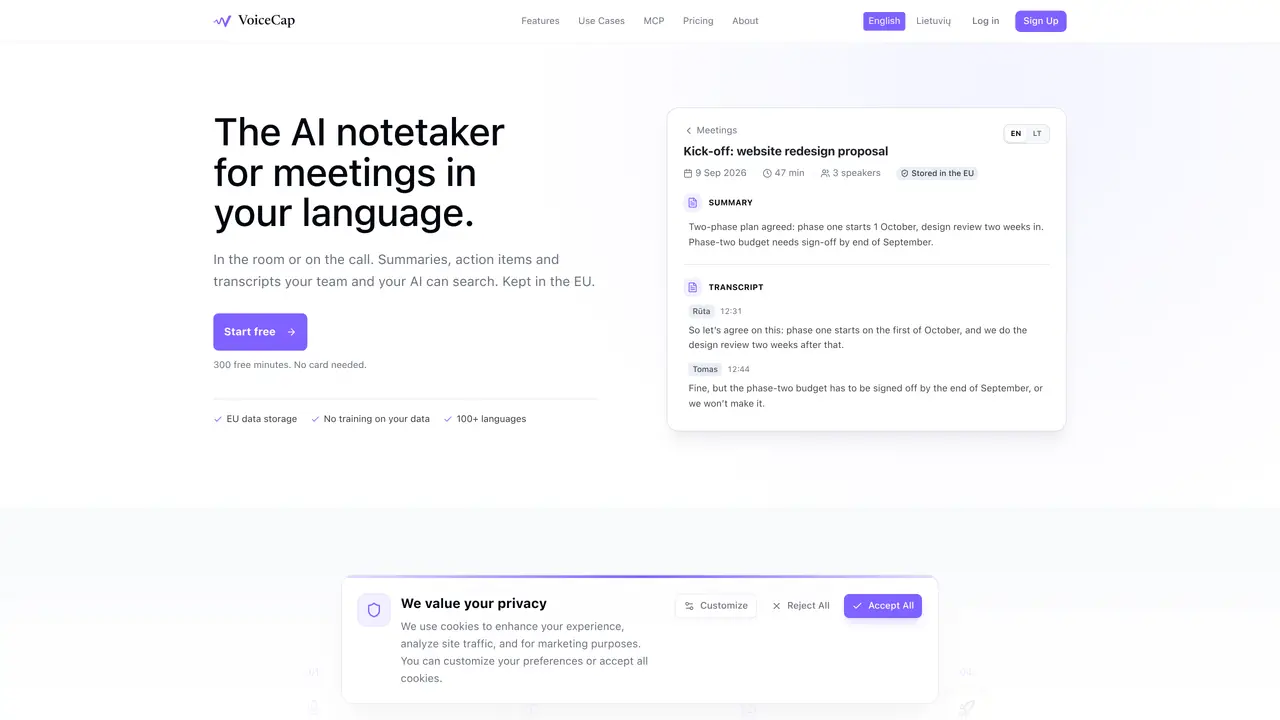
VoiceCap records in-person meetings via mobile apps or joins online calls on Zoom, Google Meet, Microsoft Teams and Webex to capture audio and video. Files can also be uploaded directly from any recorder. The service transcribes meetings with speaker separation and industry-leading accuracy across more than 100 languages. AI-generated summaries extract decisions, action items with owners and due dates, and searchable transcripts are stored in an EU-based archive. Teams can share meetings privately, with groups or workspace-wide, and export content as Markdown or plain text. VoiceCap integrates with Claude and ChatGPT via an MCP server so users can query their meeting archive using natural language. The platform enforces role-based access, with owners, admins, members and viewers, and all data remains within EU data centers under GDPR compliance.
VoiceCap records in-person meetings via mobile apps or joins online calls on Zoom, Google Meet, Microsoft Teams and Webex to capture audio and video. It transcribes meetings with speaker separation, generates AI summaries, and stores searchable transcripts in an EU-based archive.
VoiceCap is designed for teams and organizations that need accurate meeting documentation, actionable insights, and secure storage of meeting data within EU data centers under GDPR compliance.
VoiceCap stores all data in EU data centers, enforces GDPR compliance, encrypts audio and transcripts, and does not use meeting data to train AI models. Deletion is permanent and configurable retention periods are planned.
Yes, VoiceCap integrates with Claude and ChatGPT via an MCP server, allowing users to query their meeting archive using natural language and receive answers with links to the relevant moments.
VoiceCap offers a Free plan with 300 minutes, a Pro plan at €29 per capture seat per month with 1,000 minutes, and a Business plan at €49 per capture seat per month with unlimited recording and transcription.
Users can start for free with 300 minutes without requiring a credit card. Simply sign up, record or upload meetings, and begin transcribing and summarizing them in over 100 languages.
We use essential cookies to run aitoolnavio™, and optional cookies to analyze traffic and measure our marketing. You choose what we use — optional cookies stay off unless you turn them on. See our Privacy Policy.
One short email a week: fresh tools worth trying, honest takes and the updates that actually matter. No spam, unsubscribe any time.
AI-powered video messaging tool that records, shares, and manages video messages with AI-generated titles, summaries, and tasks.
Hardware device that records conversations and converts them into searchable transcripts, summaries, and notes.
Automate transcription, generate summaries, identify speakers, and timestamps for video-conferencing conversations.
AI-powered meeting recorder and summarizer that captures, transcribes, and generates actionable insights from conversations.
Automatically record, transcribe, take notes, and create summaries with key insights during meetings.
Transforms audio/video to summarized text, instantly, across platforms.
Automatically transcribe meetings, create summaries, and securely store audio files in a searchable format.
Automatically turn meetings into searchable notes and tasks.
Wearable AI device that captures conversations and meetings, then auto-generates transcripts, summaries, action items, mind maps, and searchable notes.
Record, transcribe, and share key insights from virtual trainings, online meetings, and content creation.
Record, transcribe, and summarize online meetings from Google Meet and Zoom with AI, then share insights across collaboration tools.
Transform audio/video to text with precision, supporting 1500+ platforms, enriched by AI features.
Matched on what this tool does — grouped by the job you would be replacing.
matches In-person recording via iOS/Android apps · Automatic joining of Zoom, Meet, Teams and Webex calls · AI transcription with speaker identification
A bot-free AI note taker that records meetings, generates transcripts, summaries, and action items, and syncs notes to CRMs in 100+ languages.
AI note-taking and meeting transcription app that records audio, generates transcripts, summaries, and action items.
AI meeting assistant that records, transcribes, and summarizes meetings while tracking action items and syncing updates to tools like Zoom, Teams, Jira, and Salesforce.
AI-powered meeting transcription, summarization and action-item extraction
matches Decision, action item and summary extraction · Full-text search across transcripts and decisions · Role-based permissions and sharing links
matches Markdown and plain text exports · MCP server for AI assistant integration
Record, transcribe, and summarize online meetings from Google Meet and Zoom with AI, then share insights across collaboration tools.
AI-powered meeting assistant that records, summarizes, and organizes notes from Zoom, Google Meet, and Teams with seamless workflow integration.
AI meeting recorder that transcribes, summarizes, and extracts actionable items from calls and lectures in real time.
Chrome extension that records, transcribes and summarizes meetings in Google Meet, Zoom Web and Teams
AI meeting note-taker and screen recorder that auto-joins calls, transcribes conversations, and generates searchable summaries and action items.
AI tool that records, transcribes, and summarizes meetings to keep users organized and share key insights.
AI-powered meeting assistant for transcription, summaries and action items
AI meeting assistant that transcribes calls, generates summaries, action items, and follow-up emails for teams.