
Discover personalized fashion, receive expert advice, and enjoy convenient shopping with free shipping and returns.
6.8M visits/mo+15.2%#5 Lifestyle & Education
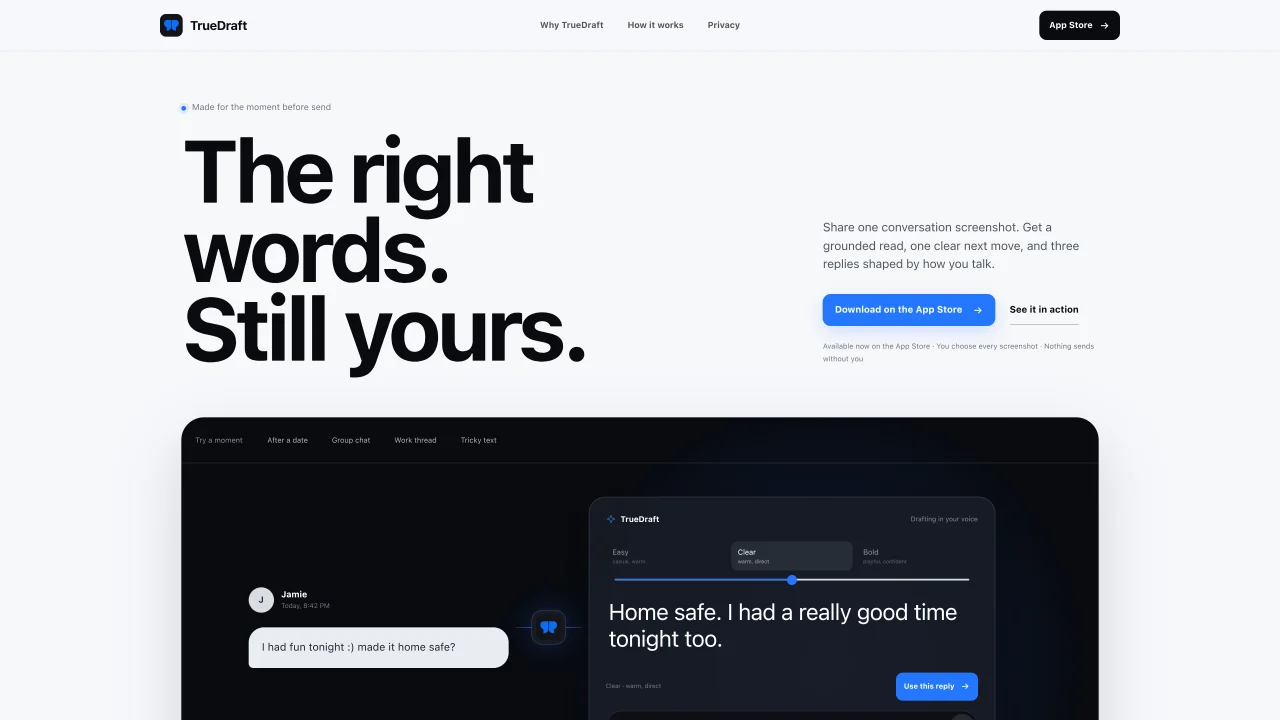
TrueDraft is an iOS application designed to help users craft replies in their own voice after reviewing a conversation screenshot. The tool first reads the exchange to identify what happened, what remains uncertain, and what the most appropriate next move might be. It then generates three reply options tailored to the user’s tone preferences, such as casual, warm, direct, or bold. Users can select a draft, edit it, and send it directly from the iOS keyboard without the message being automatically transmitted. The process prioritizes privacy by requiring an explicit screenshot upload and avoiding background monitoring of typing. TrueDraft focuses on grounding responses in visible context rather than assumptions about intent, aiming to reduce pressure in social interactions like dates, group chats, or work threads.
TrueDraft is an iOS app that helps users craft replies by analyzing a conversation screenshot. It provides a grounded read of the exchange, identifies what’s uncertain, and suggests a clear next move along with three reply options tailored to the user’s tone preferences.
TrueDraft is designed for anyone looking to respond thoughtfully in social interactions, such as dates, group chats, or work threads. It is particularly useful for users who want to avoid misunderstandings and maintain control over their messaging.
No, TrueDraft does not send messages automatically. Users must explicitly choose a draft, edit it if desired, and send it manually from the iOS keyboard. The app prioritizes user control and privacy.
TrueDraft requires users to explicitly upload a screenshot and does not monitor typing in the background. The raw image is not saved to TrueDraft’s database, and the app does not silently access conversations or record everyday typing.
Yes, TrueDraft offers three reply options shaped by different tones, such as casual, warm, clear, direct, bold, playful, or confident. Users can select the tone that best matches their voice and the context of the conversation.
To get started, download TrueDraft from the App Store, capture a screenshot of the conversation you want to respond to, share it with the app, and choose a reply from the three options provided. You can then edit and send the message directly from your iOS keyboard.
We use essential cookies to run aitoolnavio™, and optional cookies to analyze traffic and measure our marketing. You choose what we use — optional cookies stay off unless you turn them on. See our Privacy Policy.
One short email a week: fresh tools worth trying, honest takes and the updates that actually matter. No spam, unsubscribe any time.
Discover personalized fashion, receive expert advice, and enjoy convenient shopping with free shipping and returns.
Personal assistant that coordinates tasks across apps and devices via text or call
Quickly narrow searches by category, control results by country or language, and find relevant, accurate results with ease.
Optimizes schedules by auto-organizing tasks and meetings.
AI assistant that drafts, reviews, and researches legal documents for lawyers and law firms.
Real-time task tracking, project management, collaboration, and task assignment.
An AI voice assistant that delivers emotionally intelligent, context-aware conversations with natural timing and personal engagement.
Identify technologies, analyze data, and refine search criteria with AI-powered tools for patent research and trend analysis.
Automate audio and video transcription, timestamps, speaker labels, diarization, and export with customizations.
An AI chat platform for immersive, personalized interactions with virtual companions, including image generation.
Customer relations assistant in Gmail
AI-driven app personalizing adaptive workouts for continuous improvement.
Matched on what this tool does — grouped by the job you would be replacing.
matches Screenshot-based conversation analysis · Three tone-based reply drafts per exchange · Keyboard integration for sending
AI-powered app that generates text replies from screenshots of conversations
AI assistant that explains social posts or messages from screenshots and suggests replies
AI assistant that drafts replies in your voice across email and messaging apps
Chrome extension that drafts three AI-generated reply tones for X posts
matches Keyboard integration for sending · Tone options: casual, warm, direct, bold · Grounded read of conversation context
AI executive assistant that organizes Gmail and Outlook inboxes, drafts replies in your voice, schedules meetings, and tracks follow-ups for busy professionals.
AI email assistant that rewrites, drafts, and improves messages in Outlook, Gmail, Chrome, and iOS with tone control and grammar fixes.
AI-powered Gmail add-on that drafts contextual email replies in your voice, supports 100+ languages, and integrates across devices.
AI-powered inbox manager that drafts context-aware email replies and surfaces action items across Gmail, Outlook, and calendars.