AI-powered website builder that generates a professional site in under a minute and includes tools for content, SEO, and analytics.
52M visits/mo+0.7%#4 Coding & Development

Mac-only utility that displays Claude Code agents in a MacBook notch panel
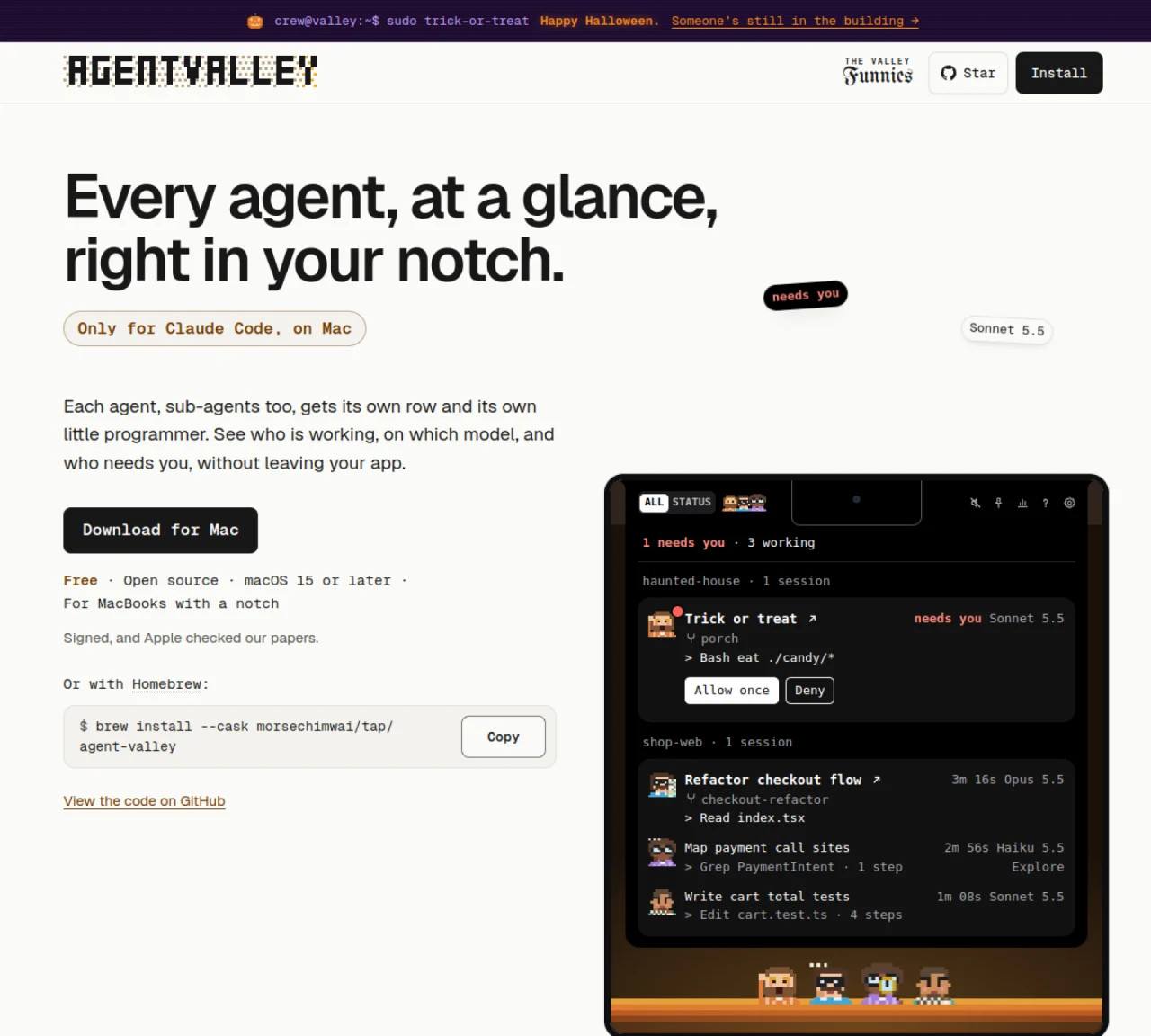
AgentValley is a desktop application for macOS that provides a centralized view of active Claude Code agents within a MacBook’s notch. It organizes each agent, including sub-agents, into rows showing the task, model, and latest step. The tool groups sessions by project, including worktrees, and highlights when an agent requires user input with a red notification. Users can interact with agents directly from the notch panel, allowing them to approve commands or deny requests without switching windows. AgentValley also includes sound notifications for agent updates and maintains a history of sessions, which can be exported as a PDF statement of work. The application integrates with Terminal, iTerm2, Ghostty, and Cursor, displaying agent statuses and faces in the terminal interface. It reads data from Claude Code’s project and session files to track activity and project costs based on API pricing.
AgentValley is a macOS desktop application that provides a centralized view of active Claude Code agents running on a MacBook. It organizes agents into rows, displays their tasks, models, and latest steps, and groups sessions by project. The tool highlights when an agent requires user input and allows direct interaction from the notch panel without switching windows.
AgentValley is designed for developers and teams using Claude Code on macOS who need to monitor multiple AI agents simultaneously. It is particularly useful for those who want to track agent activity, approve commands, and manage sessions without leaving their current workflow.
AgentValley integrates with Terminal, iTerm2, Ghostty, and Cursor, displaying agent statuses and faces directly in the terminal interface. It reads data from Claude Code’s project and session files to track activity and project costs based on API pricing.
Yes, AgentValley allows users to export session history as a PDF statement of work. This feature helps in documenting project progress, costs, and agent interactions for clients or team reviews.
Yes, AgentValley includes sound notifications for agent updates by default. Users can toggle these sounds off in the settings if preferred.
To get started, download AgentValley from the official website or install it via Homebrew on macOS 15 or later. The application is free and open-source, and it requires no additional setup beyond installation to begin monitoring Claude Code agents.
We use essential cookies to run aitoolnavio™, and optional cookies to analyze traffic and measure our marketing. You choose what we use — optional cookies stay off unless you turn them on. See our Privacy Policy.
One short email a week: fresh tools worth trying, honest takes and the updates that actually matter. No spam, unsubscribe any time.
AI-powered website builder that generates a professional site in under a minute and includes tools for content, SEO, and analytics.
AI-powered coding platform that uses agents to plan, write, and test software with real-time feedback and verifiable artifacts.
Automate code, research, and documents using agents.
AI-powered code assistant that generates, reviews, optimizes, and debugs code with natural language prompts and editor integrations.
AI assistant for safe, reliable productivity with code, collaboration, and integrations.
AI-powered IDE for autonomous coding tasks and agentic development workflows
Privacy-focused AI chatbot that generates uncensored text, code, images, and translations without storing conversations or requiring an account.
A free web-based AI chatbot and agent for writing, coding, research, and content creation with multilingual support.
Write & run code in 50+ languages, auto-complete with AI, and code faster with an intuitive interface.
An IDE that automates legacy-to-modern code migration using autonomous coding agents.
AI models that return typed decisions with calibrated confidence for software automation
Practice coding challenges, improve technical skills, get detailed explanations, compare performance with peers.
Matched on what this tool does — grouped by the job you would be replacing.
matches Displays agents in a MacBook notch panel · Shows task, model, and latest step for each agent · Sound notifications for agent updates
Monitors local AI coding agents directly in the MacBook notch
Desktop app that monitors AI coding agents on Mac
Native macOS dashboard for monitoring and managing multiple coding agents locally
matches Groups sessions by project and worktrees · Session history tracking and PDF export · Parallel agent panes with status tinting
matches Live transcript streaming of coding agent activity · Push notifications for agent completion or requests · Live progress updates on lock screen
A macOS workspace for running and managing parallel AI coding agents with isolated shells and automatic git worktrees.
A desktop workspace that integrates AI agents with sessions, memory and tools
Local desktop app that consolidates multiple coding agents into one window
A terminal client that displays and interacts with multiple AI agents in parallel panes
Run and manage remote AI coding agents from any device with real-time sync and a clean UI.
Mobile interface for managing terminal-based coding agents on Mac
iPhone app that displays agent updates on the lock screen
Mobile interface for monitoring and controlling local AI coding agents on a Mac