Collaboration and version control platform for software development and AI model hosting.
645M visits/mo-0.6%#1 Coding & Development

Scans and displays all listening ports on macOS with Apple Intelligence explanations
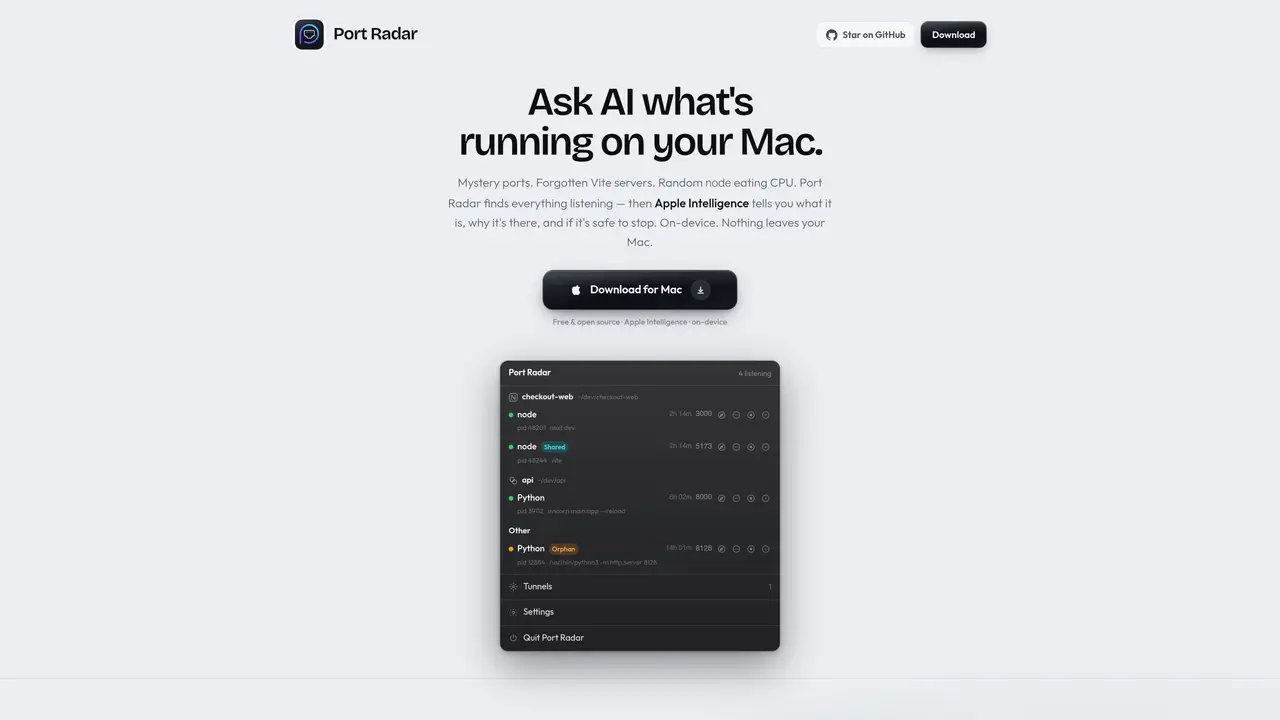
Port Radar is a native macOS utility that scans and displays every listening port on a user’s system. It groups processes by project—such as Vite, Next.js, Python, or Docker—and shows details like port number, process ID, and runtime. Users can query Apple Intelligence directly within the app to learn what a process is, why it is running, and whether it is safe to stop, all processed on-device without cloud involvement. The tool also supports sharing local apps via Cloudflare tunnels with a single click, generating public URLs for previews or collaboration without requiring CLI commands or additional accounts. Port Radar provides a menu-bar interface for quick access and includes options to stop processes cleanly, either gracefully or forcefully, with confirmation prompts to avoid accidental interruptions. It is designed for developers and users who need visibility into background services, debugging tools, or development servers running on their Mac.
Port Radar is a native macOS utility that scans and displays every listening port on a user’s system. It groups processes by project, such as Vite, Next.js, Python, or Docker, and shows details like port number, process ID, and runtime.
Port Radar is designed for developers and users who need visibility into background services, debugging tools, or development servers running on their Mac.
Port Radar allows users to query Apple Intelligence directly within the app to learn what a process is, why it is running, and whether it is safe to stop. This processing is done on-device without cloud involvement.
Yes, Port Radar supports sharing local apps via Cloudflare tunnels with a single click, generating public URLs for previews or collaboration without requiring CLI commands or additional accounts.
No, Port Radar operates entirely on-device and does not require an internet connection for its core functionality, including Apple Intelligence queries.
Download Port Radar for macOS, open the app, and grant necessary permissions if prompted. The tool will scan and display listening ports in the menu bar. For first-time users, macOS may block the app initially; navigate to System Settings → Privacy & Security to allow it.
We use essential cookies to run aitoolnavio™, and optional cookies to analyze traffic and measure our marketing. You choose what we use — optional cookies stay off unless you turn them on. See our Privacy Policy.
One short email a week: fresh tools worth trying, honest takes and the updates that actually matter. No spam, unsubscribe any time.
Collaboration and version control platform for software development and AI model hosting.
A cloud platform for deploying, scaling, and managing web apps and AI workloads with Git-based CI/CD and edge functions.
Unified platform to access and switch between hundreds of AI models like ChatGPT, Claude, and Gemini via a single API.
xAI builds Grok frontier AI models for reasoning, coding, voice, images, video, enterprise workflows, and developer APIs.
Meta AI enhances machine learning, NLP, and computer vision capabilities.
AI-powered coding platform that uses agents to plan, write, and test software with real-time feedback and verifiable artifacts.
Open-source backend platform providing Postgres, authentication, APIs, and real-time features to build scalable apps quickly.
Chat, build, and explore with open AI models.
Standardize application packaging and execution with portable containers for consistent local and cloud workflows.
Cloud communications platform that lets developers embed SMS, voice, WhatsApp, email, video, verification, and conversational AI via APIs.
Revolutionize AI application development, monitoring, and deployment with LangChain.
Run open-source chatbots locally on your PC without internet, keeping conversations private and offline.
Matched on what this tool does — grouped by the job you would be replacing.
matches Scans and lists all listening ports · Groups processes by project (Vite, Next.js, Python, Docker) · Apple Intelligence-powered process explanations
Minimal macOS menu bar app tracking ChatGPT Codex usage limits
A macOS menu-bar app that displays ChatGPT and Codex usage limits in real time
Native macOS dashboard for monitoring and managing multiple coding agents locally