Generate content, correct spelling, suggest synonyms to enhance writing.
173M visits/mo+0.1%#1 Productivity & Office

A macOS menu-bar app that displays ChatGPT and Codex usage limits in real time
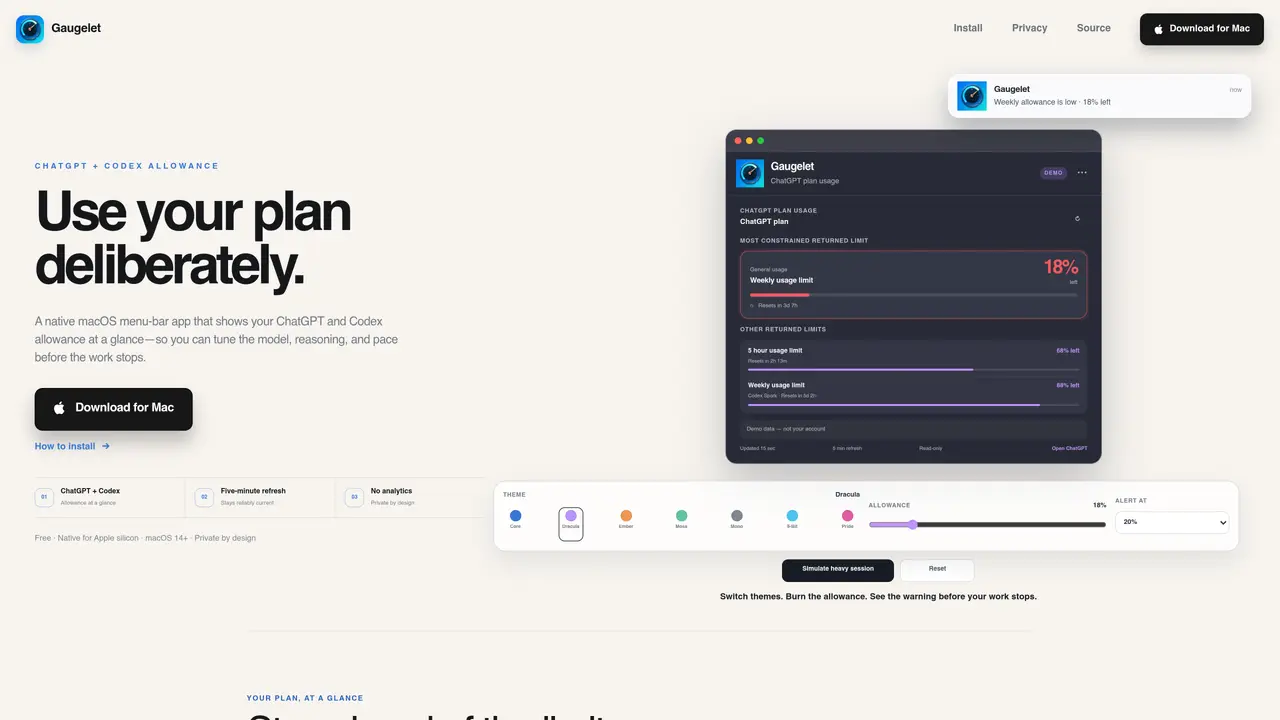
Gaugelet is a native macOS utility designed to monitor ChatGPT and Codex usage allowances directly from the menu bar. It provides a clear visual representation of remaining usage across different plan windows, including weekly, five-hour, and model-specific limits. The app refreshes every five minutes to stay current with local Codex App Server data, offering a reliable alternative to OpenAI’s web interface. It supports multiple themes and integrates seamlessly with macOS 14+ on Apple silicon, including light and dark mode, launch at login, and optional native notifications. Gaugelet operates without requiring an account, analytics, or telemetry, ensuring local-first privacy by reading usage data directly from the local server. Users can set custom alerts to receive warnings before hitting critical limits, allowing for deliberate adjustments in model selection, reasoning depth, or session pacing. The tool is intended for developers and users who rely on ChatGPT or Codex and need to avoid unexpected interruptions due to exhausted allowances.
Gaugelet is a native macOS menu-bar utility that displays remaining ChatGPT and Codex usage allowances in real time. It reads usage data directly from the local Codex App Server and updates every five minutes, helping users avoid unexpected interruptions by monitoring plan limits.
Gaugelet is designed for developers and users who rely on ChatGPT or Codex and need to track their usage allowances to prevent hitting limits unexpectedly. It is particularly useful for those who work with Apple silicon Macs running macOS 14 or later.
No, Gaugelet operates without requiring an account, analytics, or telemetry. It reads usage data locally from the Codex App Server and does not upload any information to external servers, ensuring local-first privacy.
Gaugelet refreshes the usage data every five minutes to stay current with the local Codex App Server. Users can also manually refresh the data as needed.
Yes, Gaugelet allows users to set custom alerts at specific thresholds to receive warnings before hitting critical usage limits. This helps users adjust their model selection, reasoning depth, or session pacing proactively.
Gaugelet is designed for macOS 14 or newer and is built specifically for Apple silicon Macs. It supports light and dark mode, launch at login, and optional native notifications.
We use essential cookies to run aitoolnavio™, and optional cookies to analyze traffic and measure our marketing. You choose what we use — optional cookies stay off unless you turn them on. See our Privacy Policy.
One short email a week: fresh tools worth trying, honest takes and the updates that actually matter. No spam, unsubscribe any time.
Generate content, correct spelling, suggest synonyms to enhance writing.
Turn messy team ideas into actionable plans with Miro's visual workspace.
Leverage analytics, automate tasks, share documents, and coordinate projects.
Integrates AI into Airtable to analyze data, summarize insights, draft content, and automate workflows without prior AI experience.
Cloud accounting software that automates bookkeeping, invoicing, and financial reporting for small and growing businesses.
Streamline teamwork, manage projects, automate tasks efficiently.
Automate code, research, and documents using agents.
AI assistant for safe, reliable productivity with code, collaboration, and integrations.
Create customizable tables, databases, and spreadsheets, share data securely with team members.
Easy-to-use CRM platform that automates lead capturing, prioritizes tasks, and provides sales pipeline analytics for businesses of all sizes.
Transforms thoughts into actions, enhancing productivity and efficiency.
Write & run code in 50+ languages, auto-complete with AI, and code faster with an intuitive interface.
Matched on what this tool does — grouped by the job you would be replacing.
Paid placement · similar tools from listings that support aitoolnavio™
Instant lead response for home-service pros: your phone rings on every new lead, plus 14 days of follow-up
matches Displays weekly, five-hour, and model-specific usage limits · Customizable alert thresholds (e.g., 10%, 20%, 30%) · Launch at login and optional native notifications
Minimal macOS menu bar app tracking ChatGPT Codex usage limits
Mac menu bar app showing AI plan usage limits
Monitors remaining Claude.ai usage and burn rate on macOS