Generate content, correct spelling, suggest synonyms to enhance writing.
173M visits/mo+0.1%#1 Productivity & Office
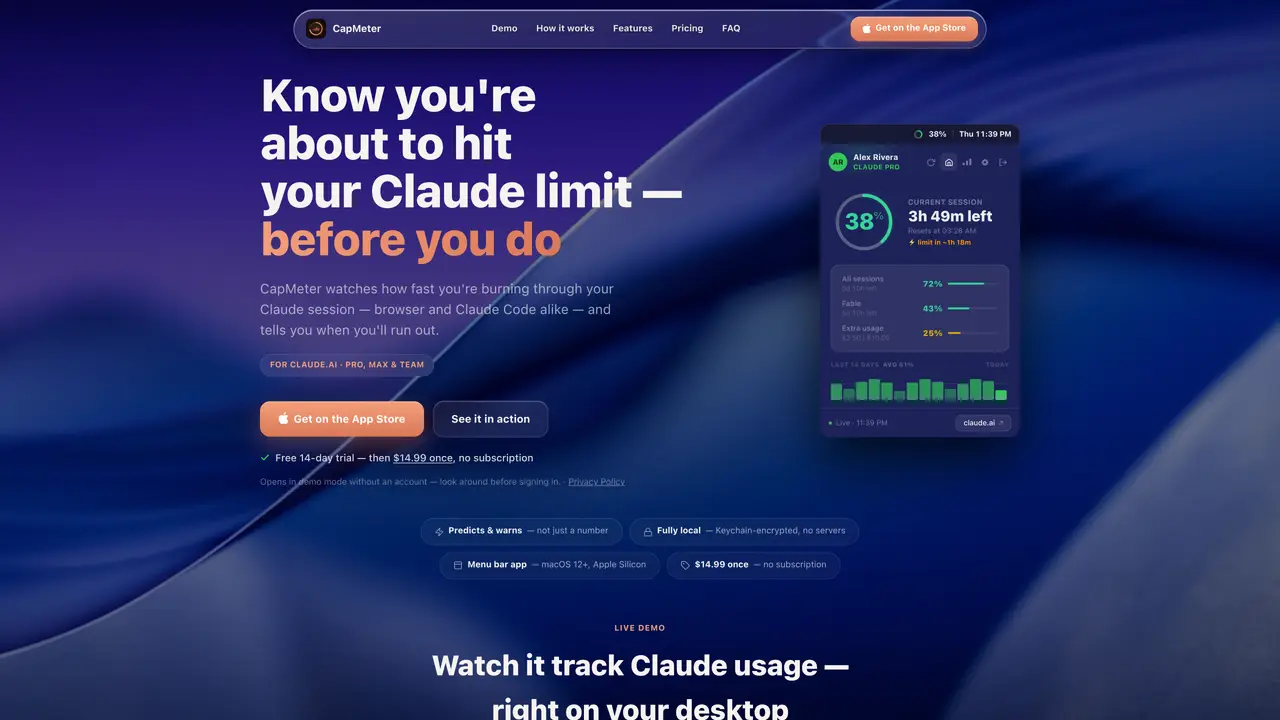
CapMeter is a macOS menu-bar application designed to monitor and manage real-time usage of Claude.ai sessions, including interactions through both the browser interface and Claude Code. It operates locally by reading session data directly from the user’s encrypted Keychain, ensuring privacy and security without relying on external servers. The application displays remaining time or credits in a color-coded ring and a floating widget, providing an at-a-glance overview of usage status. It predicts when users will reach their limits based on current burn rates and sends customizable alerts via macOS notifications, Slack, Discord, or webhooks to help avoid unexpected interruptions. CapMeter supports multiple Claude accounts, allowing users to track usage across different profiles seamlessly. It also enables monitoring of weekly windows and per-model limits, offering flexibility for different subscription tiers or usage plans. Historical usage data is visualized through charts spanning 7, 14, 30, and 90-day periods, helping users analyze trends and plan their usage accordingly. Data can be exported in CSV or JSON formats for further analysis or record-keeping, and the app functions entirely offline with no servers or tracking involved.
CapMeter is a macOS menu-bar application that tracks real-time usage of Claude.ai sessions, including both browser and Claude Code interactions. It reads session data locally from the user’s encrypted Keychain and displays remaining time or credits in a color-coded ring and floating widget.
CapMeter is designed for macOS users who rely on Claude.ai, including Pro, Max, and Team plan subscribers. It helps them monitor their usage limits and avoid unexpected interruptions.
CapMeter measures your burn rate and converts it into a time estimate, such as 'limit in ~1h 18m,' based on your recent usage pace. This prediction updates dynamically as you continue using Claude.ai.
No, CapMeter operates entirely offline. It reads your session data locally from your encrypted Keychain and only communicates with Claude.ai or external services like Slack, Discord, or webhooks if you configure alerts.
Yes, CapMeter supports multiple Claude accounts. You can switch between accounts in one click, and it tracks each account’s usage separately, including weekly windows and per-model limits.
Download CapMeter from the Mac App Store, install it, and open the app. It will read your session data locally without requiring an API key. You can explore its features in a free 14-day trial before making a one-time purchase.
We use essential cookies to run aitoolnavio™, and optional cookies to analyze traffic and measure our marketing. You choose what we use — optional cookies stay off unless you turn them on. See our Privacy Policy.
One short email a week: fresh tools worth trying, honest takes and the updates that actually matter. No spam, unsubscribe any time.
Generate content, correct spelling, suggest synonyms to enhance writing.
Turn messy team ideas into actionable plans with Miro's visual workspace.
Leverage analytics, automate tasks, share documents, and coordinate projects.
Integrates AI into Airtable to analyze data, summarize insights, draft content, and automate workflows without prior AI experience.
Cloud accounting software that automates bookkeeping, invoicing, and financial reporting for small and growing businesses.
Streamline teamwork, manage projects, automate tasks efficiently.
Automate code, research, and documents using agents.
AI assistant for safe, reliable productivity with code, collaboration, and integrations.
Create customizable tables, databases, and spreadsheets, share data securely with team members.
Easy-to-use CRM platform that automates lead capturing, prioritizes tasks, and provides sales pipeline analytics for businesses of all sizes.
Transforms thoughts into actions, enhancing productivity and efficiency.
Write & run code in 50+ languages, auto-complete with AI, and code faster with an intuitive interface.
Matched on what this tool does — grouped by the job you would be replacing.
Paid placement · similar tools from listings that support aitoolnavio™
Instant lead response for home-service pros: your phone rings on every new lead, plus 14 days of follow-up
matches Live menu-bar ring showing usage percentage · Floating widget with real-time session tracking · Customizable alert thresholds and quiet hours
Tracks AI coding costs and token usage for local AI coding sessions
A macOS menu-bar app that displays ChatGPT and Codex usage limits in real time
Mac menu bar app showing AI plan usage limits