Collaboration and version control platform for software development and AI model hosting.
645M visits/mo-0.6%#1 Coding & Development

Collects read-only diagnostic snapshots from macOS for private sharing and AI analysis
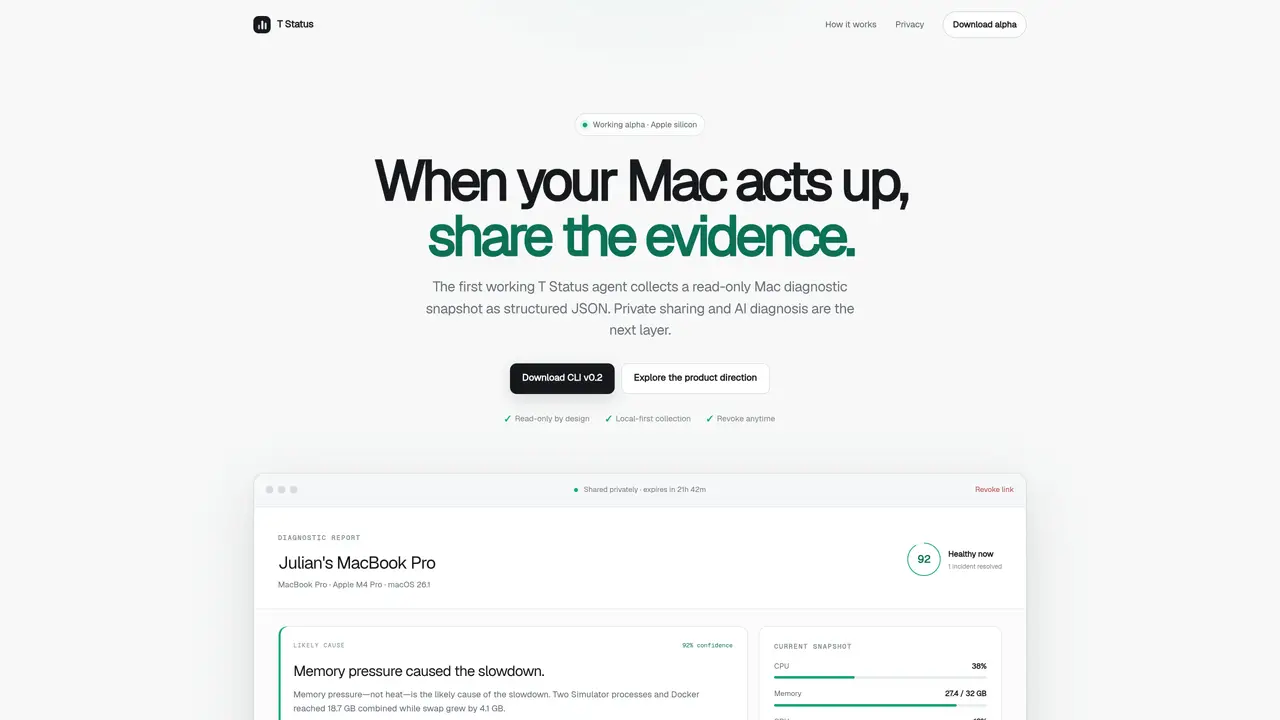
T Status provides a native Swift agent for macOS that gathers system health metrics into structured JSON reports. The tool samples CPU, memory, disk, and GPU usage over time, storing data locally in JSONL format with a stable device identifier. Users can generate shareable links to send diagnostic evidence to technical support, developers, or AI systems for analysis. The collected data is read-only by design and does not include personal files or remote-control capabilities. Sharing links expire after a set period, and access can be revoked at any time. The current CLI version operates locally without uploading data or opening public ports, while future updates will introduce authenticated fleet heartbeats and an administrator console for monitoring multiple devices.
T Status is a native Swift agent for macOS that collects read-only system health metrics into structured JSON reports. It samples CPU, memory, disk, and GPU usage over time and stores the data locally in JSONL format with a stable device identifier.
T Status is designed for developers, local-AI users, technical support teams, multi-Mac operators, and everyday Mac users who need to diagnose system issues or share diagnostic evidence privately.
T Status operates with a read-only design and does not include personal files or remote-control capabilities. Sharing links are private, expire after a set period, and can be revoked at any time. AI access requires explicit owner approval.
The current CLI version supports local collection and authenticated fleet heartbeats. Future updates will introduce an administrator console for monitoring multiple devices and generating fleet health summaries.
The current working alpha is available for Apple silicon Macs only. Future versions may expand compatibility.
Download the CLI v0.2 for Apple silicon from the website, install it locally, and run the collector to generate diagnostic reports. The tool does not require uploading data or opening public ports.
We use essential cookies to run aitoolnavio™, and optional cookies to analyze traffic and measure our marketing. You choose what we use — optional cookies stay off unless you turn them on. See our Privacy Policy.
One short email a week: fresh tools worth trying, honest takes and the updates that actually matter. No spam, unsubscribe any time.
Collaboration and version control platform for software development and AI model hosting.
A cloud platform for deploying, scaling, and managing web apps and AI workloads with Git-based CI/CD and edge functions.
Unified platform to access and switch between hundreds of AI models like ChatGPT, Claude, and Gemini via a single API.
xAI builds Grok frontier AI models for reasoning, coding, voice, images, video, enterprise workflows, and developer APIs.
Meta AI enhances machine learning, NLP, and computer vision capabilities.
AI-powered coding platform that uses agents to plan, write, and test software with real-time feedback and verifiable artifacts.
Open-source backend platform providing Postgres, authentication, APIs, and real-time features to build scalable apps quickly.
Chat, build, and explore with open AI models.
Standardize application packaging and execution with portable containers for consistent local and cloud workflows.
Cloud communications platform that lets developers embed SMS, voice, WhatsApp, email, video, verification, and conversational AI via APIs.
Revolutionize AI application development, monitoring, and deployment with LangChain.
Run open-source chatbots locally on your PC without internet, keeping conversations private and offline.
Matched on what this tool does — grouped by the job you would be replacing.
matches Read-only system diagnostics · CPU, memory, disk, and GPU monitoring · AI-compatible structured data
Local-first desktop app for managing Linux servers with AI terminal and one-click deployments
AI-powered log monitoring and analysis platform that detects anomalies and predicts issues in application logs.
Desktop tool that monitors and reports on local machine state and agent activity
matches Local JSONL history storage · AI-compatible structured data
Local-first tool that turns AI coding sessions into inspectable, reusable workflows
Local analytics for AI coding agent sessions on macOS
Native macOS dashboard for monitoring and managing multiple coding agents locally