Summarizes, extracts, and rewrites content from files.
89M visits/mo+8.7%#2 Productivity & Office

Records browser workflows and generates shareable guides in HTML, PDF and video
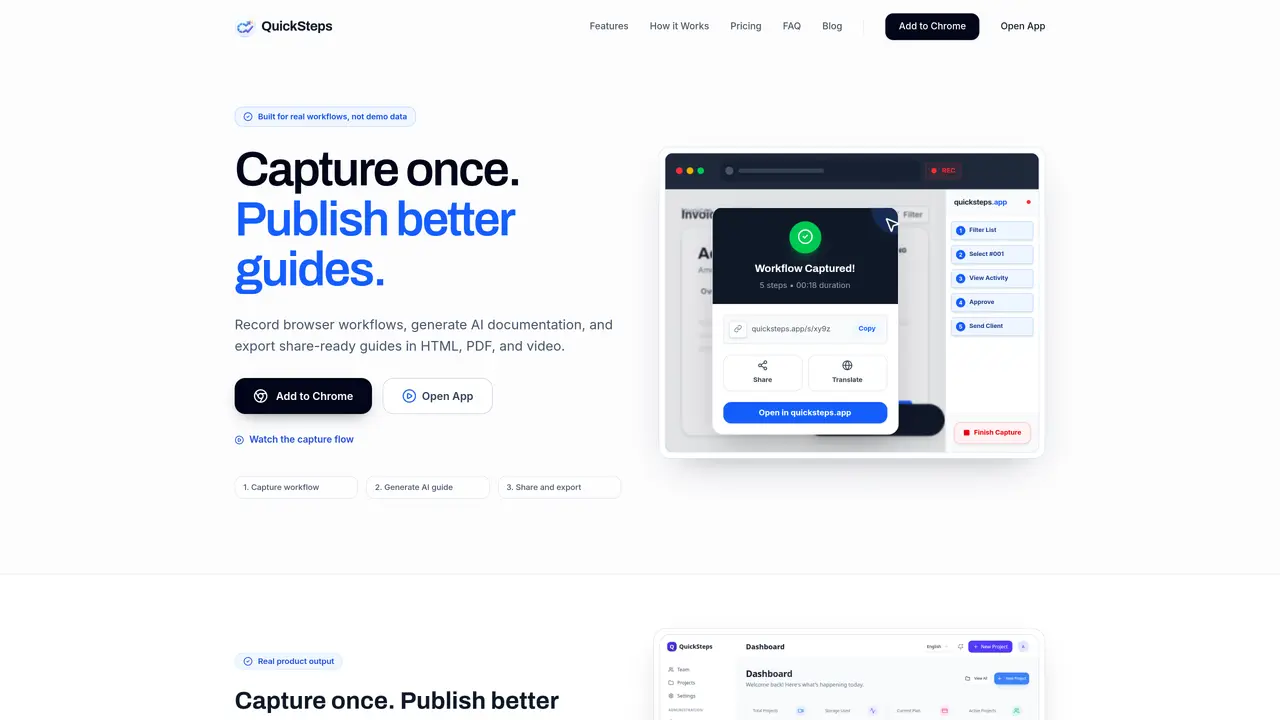
QuickSteps records browser workflows by capturing clicks, inputs, navigation and screenshots in sequence. It then generates AI-drafted step-by-step documentation with titles, descriptions and actionable context. Users can edit the generated guides, remove weak steps, and reorder steps as needed. The tool exports guides in HTML, PDF, Markdown and video formats, including server-side MP4 rendering for premium users. Guides can be shared via a public link or kept private within the app. The extension works across generic web apps, including SPAs, and supports multi-language generation in English, French, Spanish and Arabic. It is designed for teams to capture business workflows from ERP/CRM apps and publish clear SOPs, as well as for support teams to create reusable guides and for product teams to generate training materials.
Yes. The extension is designed for generic web apps, including SPAs. Capture quality depends on DOM stability, and the editor lets you remove noisy steps before publishing.
Yes. You can update titles and descriptions, remove weak steps, reorder steps, and regenerate documentation from the saved event set.
Guides can be exported to HTML, PDF, Markdown, and video. Pro and Team plans include advanced render options such as templates, intro/outro, and subtitle overlays.
Projects are account-scoped in the app, and share links are generated per project. Access control options are available within the app.
Yes. It generates structured documentation in English, French, Spanish, and Arabic from captured steps.
The editor allows you to remove weak or incorrect steps before finalizing the guide. Event ordering is protected to avoid mixed step timelines.
quicksteps.app · third-party estimates from Similarweb
Last 3 months · grows by one month every month
Share of visits by channel
Share of visits · estimated visits
Productivity & Office · Sep 2026
Traffic figures are third-party estimates, good for scale and trends; they can differ from a company's own numbers. Updated monthly.
We use essential cookies to run aitoolnavio™, and optional cookies to analyze traffic and measure our marketing. You choose what we use — optional cookies stay off unless you turn them on. See our Privacy Policy.
One short email a week: fresh tools worth trying, honest takes and the updates that actually matter. No spam, unsubscribe any time.
Summarizes, extracts, and rewrites content from files.
Automate citation and reference management, aid research with text and data mining, and securely store and share documents.
Capture, organize, and share ideas, notes, and documents effortlessly.
Headless CMS that lets developers manage structured content and deliver it anywhere via flexible APIs and real-time collaboration tools.
Efficiently create and manage cases, streamline workflows, securely store and share documents, and collaborate with colleagues.
Access files, collaborate, and secure your data with unbeatable customizable system.
An AI-powered PDF editor and converter for editing, OCR, signing, annotating, merging, and chatting with documents across devices.
Browser-based PDF editor that edits, signs, converts, merges, compresses, and shares files, with AI for form filling, document chat, and PDF creation.
Securely store, access, and search documents from any device with ease.
Create and customize legal documents, consult lawyers, and access legal guides all in one platform.
Centralize brand assets, automate approvals, and collaborate with external partners in a single digital asset management platform.
AI diagramming and documentation tool for engineering teams to create and update cloud architecture, ERDs, and flowcharts from prompts, code, and CI/CD workflows.
Matched on what this tool does — grouped by the job you would be replacing.
matches Browser workflow capture with clicks, inputs and navigation · AI-generated step-by-step documentation · Multi-format export (HTML, PDF, Markdown, video)
AI-powered process documentation tool that captures workflows into visual step-by-step guides with screenshots, editing, and exports.
AI-powered Chrome extension that records browser workflows and turns them into editable step-by-step guides and SOPs.
Records web workflows and turns them into shareable step-by-step guides and exportable documentation with AI assistance.
AI tool that records browser actions and instantly generates annotated step-by-step guides for teams and freelancers.
matches AI-generated step-by-step documentation · Multi-format export (HTML, PDF, Markdown, video)
matches AI-generated step-by-step documentation · Multi-format export (HTML, PDF, Markdown, video)
Turn recorded processes into shareable step-by-step guides with automatic screenshots and editing tools.
Desktop app that turns screen recordings into AI-written documentation
AI platform that converts recorded workflows into structured docs, videos, and guides automatically.
AI-powered interactive demo builder for B2B teams to record workflows, add voiceovers, and share trackable demos.
Transforms screen recordings into interactive product demos with AI-generated instructions, voiceovers, and captions in up to 20 languages.