

Summarizes, extracts, and rewrites content from files.
89M visits/mo+8.7%#2 Productivity & Office
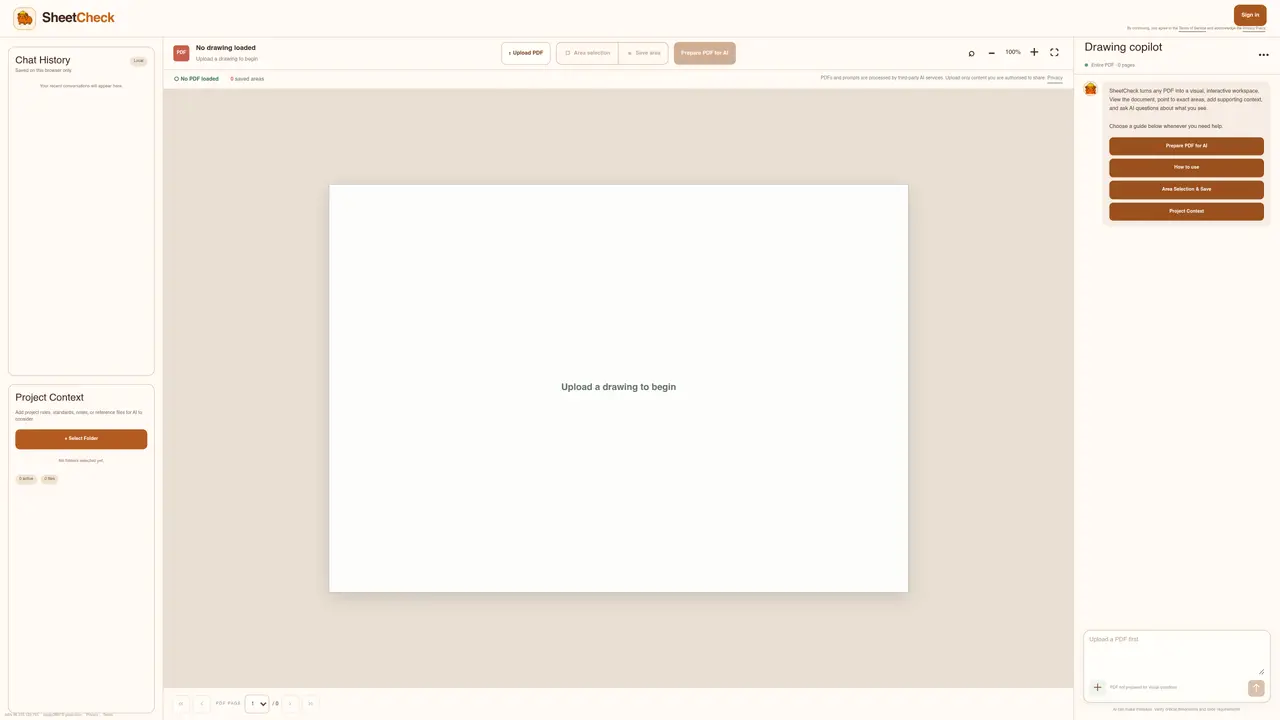
SheetCheck converts uploaded PDFs into an interactive visual workspace where users can view documents, highlight specific areas, and ask AI questions about the content. The tool allows users to add project context such as rules, standards, or reference files to guide AI responses. It supports area selection and saving specific regions of interest for focused review. Users can prepare PDFs for visual questioning and engage in a chat-based interface to clarify details or verify information. The system processes PDFs and prompts through third-party AI services, requiring users to ensure they have authorization to share the content. It emphasizes verifying critical dimensions and code requirements due to potential AI errors.
SheetCheck converts uploaded PDFs into an interactive visual workspace where users can view documents, highlight specific areas, and ask AI questions about the content. It supports adding project context such as rules, standards, or reference files to guide AI responses.
SheetCheck is designed for professionals who need to review technical drawings, documents, or schematics, such as engineers, architects, or project managers. It is particularly useful for verifying details, clarifying information, and ensuring compliance with standards.
PDFs and prompts are processed by third-party AI services. Users must ensure they have authorization to share the content before uploading. The system emphasizes verifying critical dimensions and code requirements due to potential AI errors.
Yes, SheetCheck allows users to select specific areas of a PDF and save them for focused review. This feature helps in highlighting and revisiting key sections during the review process.
Users can add project rules, standards, notes, or reference files to provide additional context for the AI. This helps tailor the AI's responses to the specific requirements of the project.
To get started, upload a PDF drawing to begin. Once uploaded, you can prepare the PDF for AI review, select areas of interest, and start asking questions in the chat-based interface. Ensure you have the necessary authorization to share the content.
We use essential cookies to run aitoolnavio™, and optional cookies to analyze traffic and measure our marketing. You choose what we use — optional cookies stay off unless you turn them on. See our Privacy Policy.
One short email a week: fresh tools worth trying, honest takes and the updates that actually matter. No spam, unsubscribe any time.
Summarizes, extracts, and rewrites content from files.
Automate citation and reference management, aid research with text and data mining, and securely store and share documents.
Capture, organize, and share ideas, notes, and documents effortlessly.
Headless CMS that lets developers manage structured content and deliver it anywhere via flexible APIs and real-time collaboration tools.
Efficiently create and manage cases, streamline workflows, securely store and share documents, and collaborate with colleagues.
Access files, collaborate, and secure your data with unbeatable customizable system.
An AI-powered PDF editor and converter for editing, OCR, signing, annotating, merging, and chatting with documents across devices.
Browser-based PDF editor that edits, signs, converts, merges, compresses, and shares files, with AI for form filling, document chat, and PDF creation.
Securely store, access, and search documents from any device with ease.
Create and customize legal documents, consult lawyers, and access legal guides all in one platform.
Centralize brand assets, automate approvals, and collaborate with external partners in a single digital asset management platform.
AI diagramming and documentation tool for engineering teams to create and update cloud architecture, ERDs, and flowcharts from prompts, code, and CI/CD workflows.
Matched on what this tool does — grouped by the job you would be replacing.
matches PDF upload and processing · Interactive visual workspace · Area selection and saving
Summarize, chat with, and clean up PDFs.
Chat with PDFs and Word documents by uploading files
Automatically process and search PDFs by loading them into ChatGPT, and gain insights through simple natural language questions.
All-in-one PDF toolkit with AI-powered features and client-side processing
matches Interactive visual workspace · Project context integration · Area selection and saving
AI-powered visual workspace for organizing research and creative projects on one canvas
A visual knowledge base for students, researchers, and lifelong learners to organize and explore ideas interactively.