Generate content, correct spelling, suggest synonyms to enhance writing.
173M visits/mo+0.1%#1 Productivity & Office

Turns existing notes, docs and dictations into a self-updating memory for AI tools
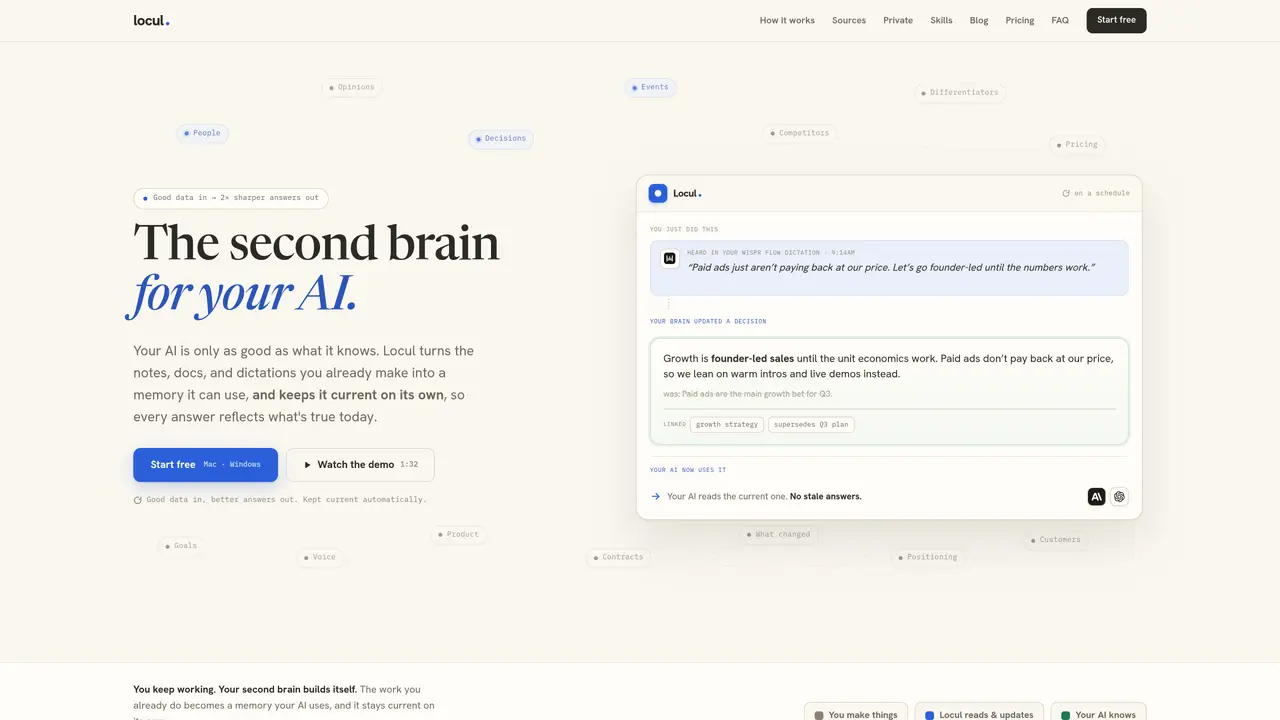
Locul ingests files, Notion workspaces, Obsidian vaults, dictations and LinkedIn posts that users already create and transforms them into a continuously updated memory for AI assistants. The application reads content in place without altering originals, indexes changes on a schedule, and merges updates into existing memories while preserving prior versions. It connects directly to AI tools such as Claude, ChatGPT, Cursor and Codex so those tools can retrieve context without manual pasting. The system runs locally on Mac or Windows, with an optional opt-in cloud AI mode that uses the user’s own API key. No manual tagging or upkeep is required; the brain builds and refreshes itself as new material is added. Users can query their AI about current projects, pricing decisions or brand positioning without re-explaining prior context.
Locul transforms existing files, Notion workspaces, Obsidian vaults, dictations, and LinkedIn posts into a continuously updated memory for AI assistants. It reads content in place without altering originals, indexes changes on a schedule, and merges updates into existing memories while preserving prior versions.
Locul is designed for individuals and teams who want their AI assistants to have accurate, up-to-date context about their work, projects, and decisions without manual upkeep. It suits users who already create notes, documents, or dictations and want to leverage that content for AI interactions.
Locul runs on a schedule to index new files or notes, compares them against existing memories, updates outdated information, and stores old versions for reference. It automatically pulls from sources like Notion, Obsidian, and dictations to ensure the AI always has the latest context.
No, Locul does not require manual tagging or upkeep. The system builds and refreshes itself as new material is added, eliminating the need for users to manage or maintain the memory manually.
Yes, Locul connects directly to AI tools such as Claude, ChatGPT, Cursor, and Codex, allowing them to retrieve context without manual pasting. The integration is designed to be seamless, with guided steps for setup.
Locul runs locally on Mac or Windows, with an optional opt-in cloud AI mode that uses the user’s own API key. All data is stored locally by default, ensuring privacy and control over the information.
locul.ai · third-party estimates from Similarweb
Last 2 months · grows by one month every month
Share of visits by channel
Share of visits · estimated visits
Productivity & Office · Sep 2026
Traffic figures are third-party estimates, good for scale and trends; they can differ from a company's own numbers. Updated monthly.
We use essential cookies to run aitoolnavio™, and optional cookies to analyze traffic and measure our marketing. You choose what we use — optional cookies stay off unless you turn them on. See our Privacy Policy.
One short email a week: fresh tools worth trying, honest takes and the updates that actually matter. No spam, unsubscribe any time.
Generate content, correct spelling, suggest synonyms to enhance writing.
Markdown-based note-taking and personal knowledge management app that turns notes into a connected system of ideas.
Capture, organize, and share ideas, notes, and documents effortlessly.
Easily create and track training courses, design learning environments, and access from any device with an intuitive interface.
An AI-powered note-taking app for students and professionals to write, sketch, annotate PDFs, record audio, and generate summaries, quizzes, and flashcards.
Handwritten note-taking app with searchable ink, PDF annotation, synced audio, and AI-powered study tools.
AI-powered process documentation tool that captures workflows into visual step-by-step guides with screenshots, editing, and exports.
AI web app that transcribes audio, video, and YouTube links into text in 98 languages with summaries, mind maps, and export formats for students and teams.
A note-taking and spaced-repetition flashcard app for students and learners, with PDF annotation plus AI tools for generating cards, quizzes, and study summaries.
AI-powered research assistant for organizing, analyzing, and synthesizing information from notes and documents.
Capture thoughts, create documents, and access on any device for convenient organization and productivity.
AI-powered PDF editor with built-in agents for summarization, translation, and document analysis.
Matched on what this tool does — grouped by the job you would be replacing.
matches Turns existing notes, docs and dictations into a self-updating memory for AI tools · Supports markdown, PDF, Notion, Obsidian, dictations and LinkedIn · Self-updating memory with change history
Stores coding assistants' project history locally.
Local memory manager for AI agents that retains context across tools
Local memory layer that indexes everything on a Mac for instant search and agent context
Converts owned books into on-device AI skills for local agent use
matches Local-first operation on Mac and Windows · Supports markdown, PDF, Notion, Obsidian, dictations and LinkedIn · Opt-in cloud AI mode using user’s own API key
matches Local-first operation on Mac and Windows · Supports markdown, PDF, Notion, Obsidian, dictations and LinkedIn · Opt-in cloud AI mode using user’s own API key
Local document search engine for AI agents with full-text indexing across multiple file types
Private AI-powered file search for Windows that indexes and retrieves documents, images and notes by meaning
Searches screenshots and images by text descriptions or OCR content
Local AI assistant for Windows and Linux that reads files, views screen content and writes documents entirely
Runs private AI models entirely on a user’s Mac without cloud dependency