

Summarizes, extracts, and rewrites content from files.
89M visits/mo+8.7%#2 Productivity & Office
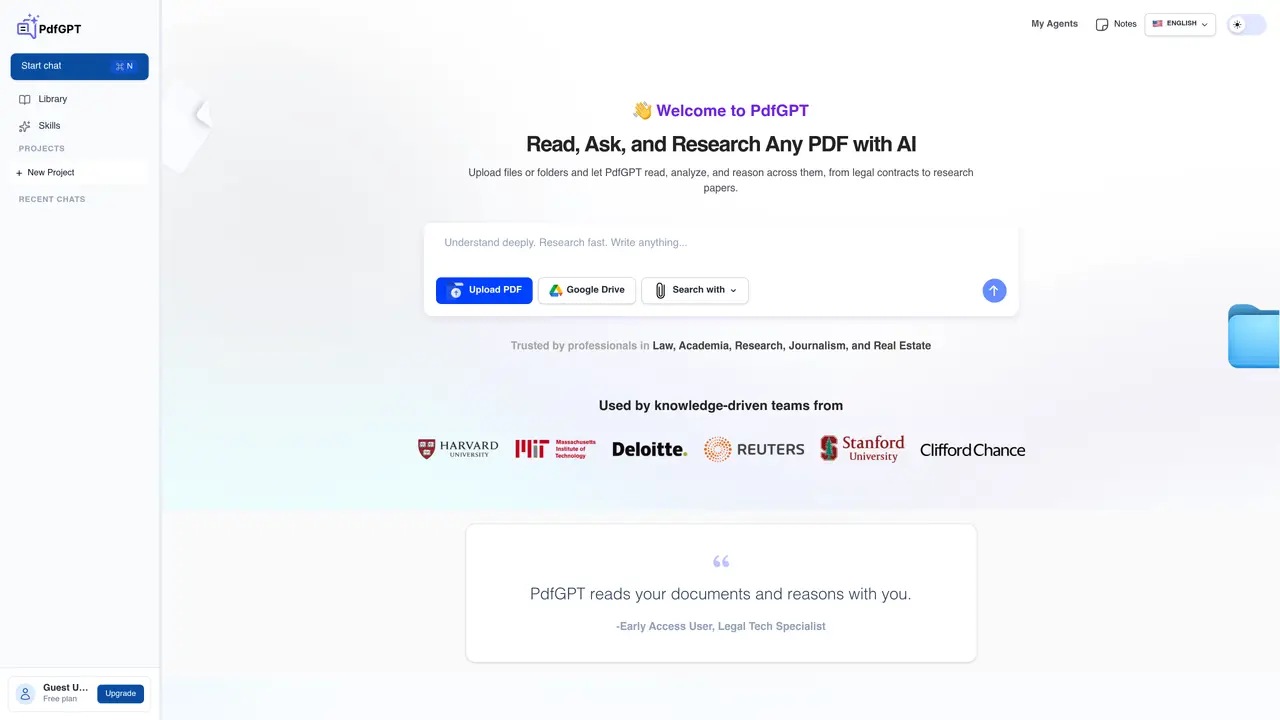
PDF GPT is an easy-to-use tool that allows users to quickly and accurately summarize PDF documents and get answers to their questions. With just a few clicks, you can upload the PDF file and automatically extract the key topics and ideas, while also obtaining answers to the questions you have. By using natural language processing and machine learning, PDF GPT is able to understand the core concepts and provide users with accurate summaries and results. Whether you’re a student, researcher, or business professional, PDF GPT can provide you with the insights and answers you need from your PDF documents. Thanks to its intuitive interface, anyone can get their desired results in no time. Get started with PDF GPT today and discover how you can easily extract the key concepts and answers from PDF documents.
PDF GPT allows users to upload PDF documents and interact with them using natural language queries. It provides summaries of the content and answers specific questions about the document.
The tool is designed for students, researchers, and business professionals who need to quickly extract insights, summarize key topics, or find answers within PDF documents.
Users can start by uploading a PDF file and then asking questions or requesting a summary directly through the chat interface.
PDF GPT can process and respond to queries about uploaded PDFs, provided the content is text-based and accessible for natural language processing.
No technical knowledge is required. The tool features an intuitive interface that allows users to upload files and interact with the AI without additional setup.
The platform provides a library feature where users can save and manage their recent chats and projects for future reference.
pdfgpt.io · third-party estimates from Similarweb
Last 4 months · grows by one month every month
Share of visits · estimated visits
Other countries: 38.9%
Productivity & Office · Sep 2026
Traffic figures are third-party estimates, good for scale and trends; they can differ from a company's own numbers. Updated monthly.
We use essential cookies to run aitoolnavio™, and optional cookies to analyze traffic and measure our marketing. You choose what we use — optional cookies stay off unless you turn them on. See our Privacy Policy.
One short email a week: fresh tools worth trying, honest takes and the updates that actually matter. No spam, unsubscribe any time.
Summarizes, extracts, and rewrites content from files.
Free tool to collect, organize, cite and share research sources
An AI-powered PDF editor and converter for editing, OCR, signing, annotating, merging, and chatting with documents across devices.
Browser-based PDF editor that edits, signs, converts, merges, compresses, and shares files, with AI for form filling, document chat, and PDF creation.
Streamline PDF interaction with AI summarization, batch processing, and secure Q&A.
Efficiently find data, extract key topics, map entities, analyze sentiment, and highlight important points in your PDF documents.
All-in-one AI platform for writing, image, music, and analysis.
AI-powered PDF editor with built-in agents for summarization, translation, and document analysis.
Obtain information, navigate documents, and customize responses with an AI-powered chatbot and user-friendly interface.
Summarize, chat with, and clean up PDFs.
Find sections, analyze & extract content, and interact with documents efficiently using AI-powered technology.
Generate comprehensive PDF reports, leverage NLP and ML to understand documents, save time and money with faster decision-making.
Matched on what this tool does — grouped by the job you would be replacing.
matches Quickly summarize PDFs with a few clicks · Automatically extract topics and ideas · Obtain answers to questions
Obtain information, navigate documents, and customize responses with an AI-powered chatbot and user-friendly interface.
AI assistant that analyzes documents like PDFs and contracts, answers questions in plain language, and extracts insights for faster understanding.
Extract data from PDFs, search documents effortlessly, and get instant precise answers.
Automatically process and search PDFs by loading them into ChatGPT, and gain insights through simple natural language questions.
matches Quickly summarize PDFs with a few clicks · Automatically extract topics and ideas · Obtain answers to questions
Summarizes, extracts, and rewrites content from files.
AI-powered writing tool for paraphrasing, summarizing, and enhancing writing effortlessly.
Plagiarism detector for AI generated text.
Quickly summarize web articles, get essential points without reading, save time for busy professionals and students.