

Generate content, correct spelling, suggest synonyms to enhance writing.
173M visits/mo+0.1%#1 Productivity & Office
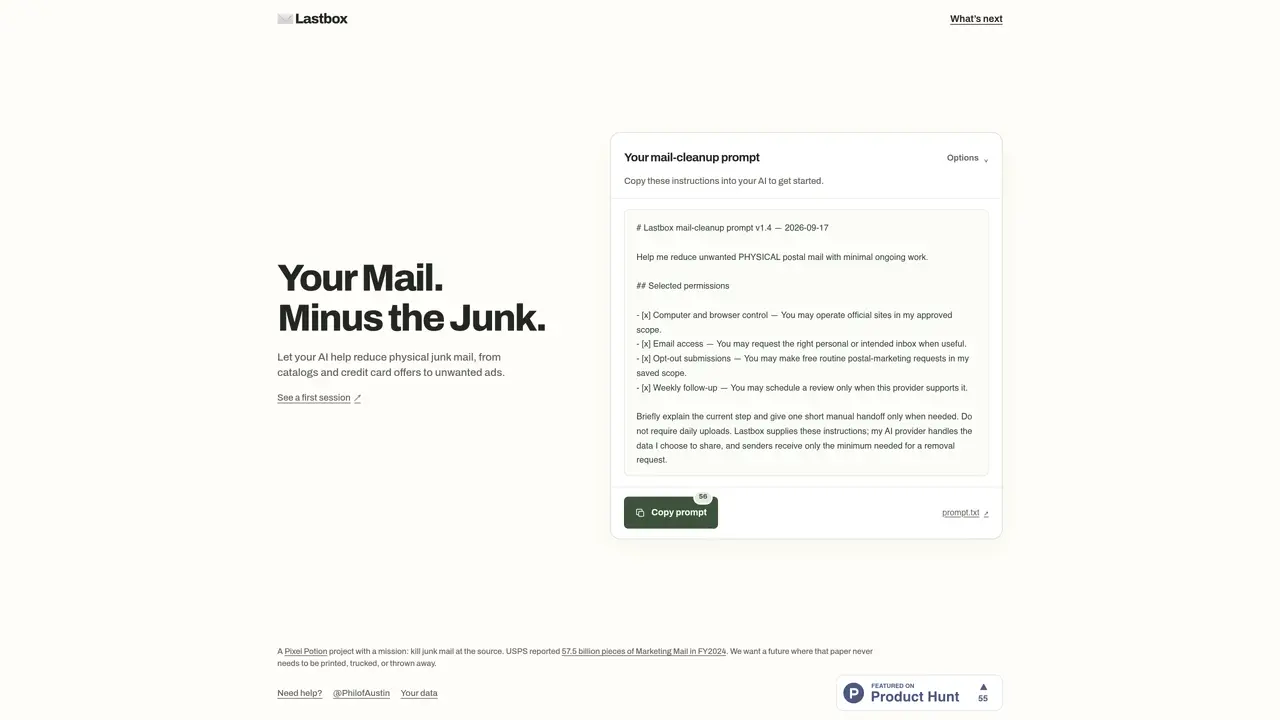
Lastbox uses an AI agent to help users reduce unwanted physical postal mail such as catalogs, credit card offers, and advertisements. The tool operates through a guided setup process where users grant specific permissions for browser, computer, and email access to enable automated or semi-automated mail cleanup. Users can choose between browser-based or email-based workflows, and the agent performs tasks like submitting opt-out requests, reviewing mail history, and scheduling periodic cleanups. The system emphasizes minimal ongoing manual effort by automating repetitive tasks while allowing user oversight. Setup requires granting permissions such as computer and browser control, email access, and opt-out submissions, with the agent verifying tool availability before proceeding. The agent also checks for required account connections and scheduling capabilities to ensure smooth operation. Users retain control over data sharing, and the agent only submits the minimum necessary information to senders for removal requests.
Lastbox uses an AI agent to help users reduce unwanted physical postal mail such as catalogs, credit card offers, and advertisements. It automates or semi-automates mail cleanup through guided setup and user permissions.
Lastbox is suitable for individuals who receive a high volume of physical mail and want to minimize junk mail with minimal ongoing effort. It is ideal for those comfortable granting specific permissions for browser, computer, and email access.
Lastbox operates through a guided setup process where users grant permissions for browser, computer, and email access. The AI agent then performs tasks like submitting opt-out requests, reviewing mail history, and scheduling periodic cleanups.
Lastbox requires permissions such as computer and browser control, email access, opt-out submissions, and scheduling capabilities for weekly cleanups. Users retain control over data sharing, and the agent only submits minimal necessary information to senders.
Yes, Lastbox can integrate with mail-related email services to assist with mail cleanup. Users can choose between browser-based or email-based workflows depending on their setup.
To get started, users follow the guided setup process and grant the required permissions. The AI agent will then verify tool availability and guide users through connecting accounts and enabling necessary features.
We use essential cookies to run aitoolnavio™, and optional cookies to analyze traffic and measure our marketing. You choose what we use — optional cookies stay off unless you turn them on. See our Privacy Policy.
One short email a week: fresh tools worth trying, honest takes and the updates that actually matter. No spam, unsubscribe any time.
Generate content, correct spelling, suggest synonyms to enhance writing.
Turn messy team ideas into actionable plans with Miro's visual workspace.
Leverage analytics, automate tasks, share documents, and coordinate projects.
Integrates AI into Airtable to analyze data, summarize insights, draft content, and automate workflows without prior AI experience.
Cloud accounting software that automates bookkeeping, invoicing, and financial reporting for small and growing businesses.
Streamline teamwork, manage projects, automate tasks efficiently.
Automate code, research, and documents using agents.
AI assistant for safe, reliable productivity with code, collaboration, and integrations.
Create customizable tables, databases, and spreadsheets, share data securely with team members.
Easy-to-use CRM platform that automates lead capturing, prioritizes tasks, and provides sales pipeline analytics for businesses of all sizes.
Transforms thoughts into actions, enhancing productivity and efficiency.
Write & run code in 50+ languages, auto-complete with AI, and code faster with an intuitive interface.
Matched on what this tool does — grouped by the job you would be replacing.
Paid placement · similar tools from listings that support aitoolnavio™
Instant lead response for home-service pros: your phone rings on every new lead, plus 14 days of follow-up
matches Permission-based data sharing controls · Browser and computer control permissions · Access verification and setup guidance
matches Email access for mail history review · AI-powered document validation and rejection · Secure external portal for submissions
Multi-agent orchestration platform for AI teams and workflows
Provides scoped data access for AI agents and apps via a permission boundary
Summarizes, extracts, and rewrites content from files.
Automates document and data collection from external parties with AI-driven follow-ups