Generate content, correct spelling, suggest synonyms to enhance writing.
173M visits/mo+0.1%#1 Productivity & Office

AI-powered workspace to track finance, schedule, nutrition, activity and reflections in one place
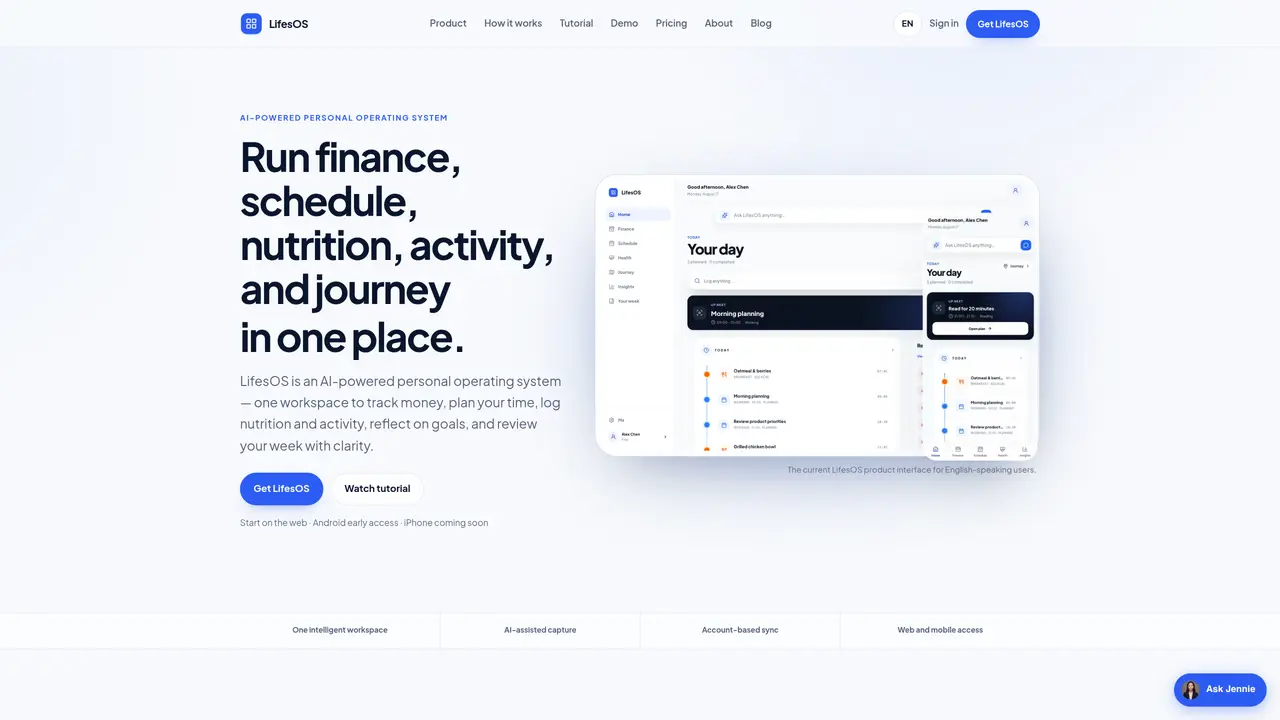
LifesOS is an AI-assisted personal operating system that consolidates finance tracking, scheduling, nutrition logging, activity monitoring, and reflective journaling into a single workspace. Users can manually enter data or use AI to interpret natural language inputs such as voice notes or text descriptions, which the system structures and confirms before saving. The platform organizes inputs into domains like finance, schedule, nutrition, activity, and journey, while Home and Insights views provide cross-domain summaries and trends. Weekly reports highlight patterns in spending, productivity, nutrition, and movement, offering comparisons and recommendations based on recorded data. The system emphasizes clarity and control, allowing users to review structured details before finalizing entries. It supports cross-device synchronization via web and early-access Android, with iPhone access planned. LifesOS prioritizes privacy with HTTPS connections, secure password hashing, email verification, and server-side data isolation.
LifesOS is an AI-powered personal operating system that consolidates finance tracking, scheduling, nutrition logging, activity monitoring, and reflective journaling into a single workspace. It uses AI to interpret natural language inputs like voice notes or text descriptions, structures the details, and confirms them before saving.
LifesOS is designed for individuals seeking to organize and understand different aspects of their daily life in one place. It suits busy professionals, personal planners, and health-conscious users who want to track finances, schedules, nutrition, and activities without switching between multiple apps.
Users can manually enter data or use AI-assisted input by describing events or plans in natural language. The system interprets the intent, structures the details, and asks for confirmation before saving the information into the appropriate domain like finance, schedule, nutrition, or activity.
LifesOS is available on the web and offers early access for Android devices. iPhone support is planned for the future. Data syncs across devices when users sign in with the same account.
LifesOS uses HTTPS for secure connections, stores passwords as secure hashes, requires email verification, and implements server-side data isolation. AI features are only activated when explicitly chosen by the user.
LifesOS provides weekly reports that combine recorded data into highlights, comparisons, trends, and recommendations. These insights help users review patterns in spending, productivity, nutrition, and movement across different areas of their life.
We use essential cookies to run aitoolnavio™, and optional cookies to analyze traffic and measure our marketing. You choose what we use — optional cookies stay off unless you turn them on. See our Privacy Policy.
One short email a week: fresh tools worth trying, honest takes and the updates that actually matter. No spam, unsubscribe any time.
Generate content, correct spelling, suggest synonyms to enhance writing.
Turn messy team ideas into actionable plans with Miro's visual workspace.
Leverage analytics, automate tasks, share documents, and coordinate projects.
Integrates AI into Airtable to analyze data, summarize insights, draft content, and automate workflows without prior AI experience.
Cloud accounting software that automates bookkeeping, invoicing, and financial reporting for small and growing businesses.
Streamline teamwork, manage projects, automate tasks efficiently.
Automate code, research, and documents using agents.
AI assistant for safe, reliable productivity with code, collaboration, and integrations.
Create customizable tables, databases, and spreadsheets, share data securely with team members.
Easy-to-use CRM platform that automates lead capturing, prioritizes tasks, and provides sales pipeline analytics for businesses of all sizes.
Transforms thoughts into actions, enhancing productivity and efficiency.
Write & run code in 50+ languages, auto-complete with AI, and code faster with an intuitive interface.
Matched on what this tool does — grouped by the job you would be replacing.
Paid placement · similar tools from listings that support aitoolnavio™
Instant lead response for home-service pros: your phone rings on every new lead, plus 14 days of follow-up
matches Finance tracking with income, expenses, budgets, and spending patterns · AI analysis for pattern recognition and insights · Weekly reports with trends, comparisons, and recommendations
matches Nutrition logging with calories, macros, and personal targets · AI analysis for pattern recognition and insights · Weekly reports with trends, comparisons, and recommendations
matches Schedule planning with tasks, events, and recurring routines · AI analysis for pattern recognition and insights · Weekly reports with trends, comparisons, and recommendations
Track income, expenses, and custom financial calculations with an AI-powered, user-friendly finance dashboard.
Mobile app that logs expenses via text, voice, receipt scan or bank upload
iOS app that turns bank screenshots into tracked expenses using on-device AI
Track income and expenses, set financial goals, and access financial resources with this small-business finance platform.
AI-powered tool that tracks calories and nutrients by analyzing meal photos or voice notes, designed for effortless nutrition monitoring.
Tracks workouts, meals and progress in one app with barcode scanning and AI coaching
Mobile app for tracking calories, macros, water, activity and weight with optional AI coaching
Android app that logs meals via photo, voice or chat using AI to track calories and macros
ADHD-friendly AI assistant that unifies notes, email, tasks, and calendar in one place for natural-language planning and organization.
Unified note-taking and task manager that syncs across devices, integrates with productivity tools, and supports reminders and due dates.
AI-powered task manager that captures tasks from voice, photos, and Gmail, syncs with calendars, and supports Kanban planning.
Unified platform combining tasks, calendar, habits, finance and AI insights