

Generate content, correct spelling, suggest synonyms to enhance writing.
173M visits/mo+0.1%#1 Productivity & Office
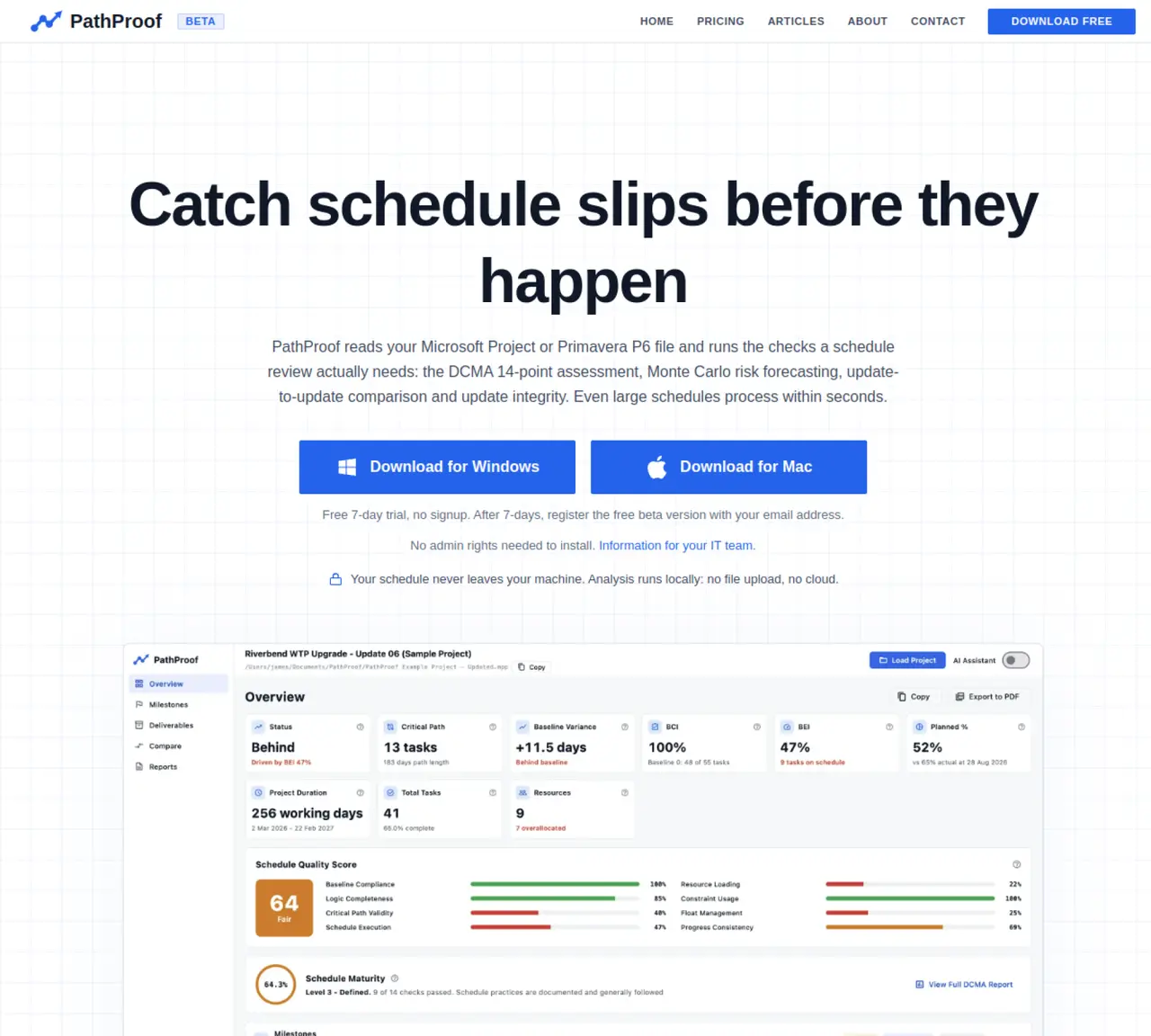
PathProof reads Microsoft Project or Primavera P6 schedules and performs automated compliance checks, risk analysis, and update comparisons without uploading files. It runs the DCMA 14-point assessment, Monte Carlo simulations for probabilistic finish dates, and update-to-update comparisons that highlight every change between schedule versions. The tool also checks update integrity for common errors such as out-of-sequence progress or actuals recorded after the status date. An AI assistant allows users to ask plain-language questions about logic chains, milestone movements, or delay drivers, with answers citing specific data points. All analysis executes locally on the user’s machine, and results can be exported to Excel or PDF for governance reviews. The application targets professional schedulers and project controls teams who need to validate schedule quality and detect risks before reporting to stakeholders.
PathProof is a desktop application that reads Microsoft Project or Primavera P6 schedules and performs automated compliance checks, risk analysis, and update comparisons without uploading files. It runs the DCMA 14-point assessment, Monte Carlo simulations for probabilistic finish dates, and update-to-update comparisons to highlight changes between schedule versions.
The tool targets professional schedulers and project controls teams who need to validate schedule quality, detect risks, and ensure update integrity before reporting to stakeholders.
No, all analysis executes locally on the user’s machine, and the schedule never leaves the user’s device. No file uploads or cloud processing are required.
The AI assistant allows users to ask plain-language questions about logic chains, milestone movements, or delay drivers. It cites specific data points and uses the user’s own Anthropic or OpenAI API key, though the assistant is optional and all analysis can run without it.
PathProof can export audit-ready reports to Excel or PDF, including schedule quality scores, risk forecasting results, update-to-update comparisons, and update integrity checks formatted for governance reviews.
Download the application for Windows or Mac, install it without admin rights, and drop in your Microsoft Project or Primavera P6 schedule file. A free 7-day trial is available, followed by a free beta registration with an email address.
We use essential cookies to run aitoolnavio™, and optional cookies to analyze traffic and measure our marketing. You choose what we use — optional cookies stay off unless you turn them on. See our Privacy Policy.
One short email a week: fresh tools worth trying, honest takes and the updates that actually matter. No spam, unsubscribe any time.
Generate content, correct spelling, suggest synonyms to enhance writing.
Turn messy team ideas into actionable plans with Miro's visual workspace.
Leverage analytics, automate tasks, share documents, and coordinate projects.
Integrates AI into Airtable to analyze data, summarize insights, draft content, and automate workflows without prior AI experience.
Cloud accounting software that automates bookkeeping, invoicing, and financial reporting for small and growing businesses.
Streamline teamwork, manage projects, automate tasks efficiently.
Automate code, research, and documents using agents.
AI assistant for safe, reliable productivity with code, collaboration, and integrations.
Create customizable tables, databases, and spreadsheets, share data securely with team members.
Easy-to-use CRM platform that automates lead capturing, prioritizes tasks, and provides sales pipeline analytics for businesses of all sizes.
Transforms thoughts into actions, enhancing productivity and efficiency.
Write & run code in 50+ languages, auto-complete with AI, and code faster with an intuitive interface.
Matched on what this tool does — grouped by the job you would be replacing.
Paid placement · similar tools from listings that support aitoolnavio™
Instant lead response for home-service pros: your phone rings on every new lead, plus 14 days of follow-up
matches DCMA 14-point schedule health check · Monte Carlo simulation with P50/P90 confidence ranges · Update-to-update comparison with float erosion tracking
AI-augmented engineering platform for requirements, diagrams, verification, schedule and risk management
AI-native project controls for heavy civil schedules
Schedule risk management and CCPM software for R&D programs