Generate content, correct spelling, suggest synonyms to enhance writing.
173M visits/mo+0.1%#1 Productivity & Office

Transcribes VoIP calls with speaker labels and serves transcripts to AI via MCP
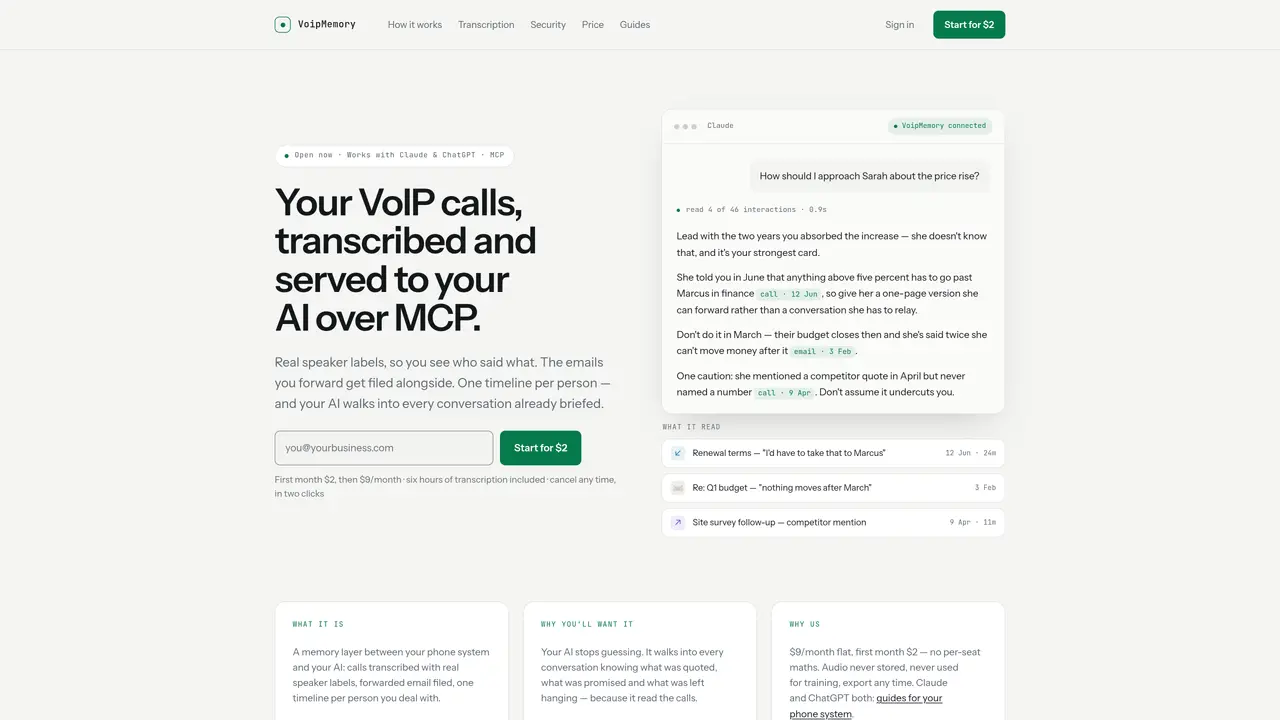
VoipMemory acts as a memory layer between a VoIP phone system and an AI assistant. It transcribes calls with real speaker labels and automatically files forwarded emails, creating a single timeline per contact. The service integrates with Claude and ChatGPT through an MCP endpoint, allowing the AI to access call transcripts, emails, and notes without requiring new habits from the user. Transcription can be handled via built-in credits, a user-provided API key, or an on-device Mac app that processes audio locally. The platform emphasizes security by never storing audio, prohibiting training use, and restricting support access to metadata only. Transcripts are exportable and deletable on demand, with encryption at rest and per-account isolation. The service charges a flat monthly fee per user with no per-seat pricing, including six hours of transcription credits initially.
VoipMemory currently integrates with RingCentral and supports Vonage, GoTo, Zoom Phone, 8x8, Dialpad, and Nextiva through audited builds. Additional systems are added based on user demand.
VoipMemory includes three hours of transcription credits in the monthly fee. After that, users can bring their own transcription API key (e.g., Deepgram, AssemblyAI, or OpenAI) and pay the vendor directly.
Yes, VoipMemory offers an on-device Mac app that transcribes audio locally without sending it to servers, though it does not provide speaker labels and requires the Mac to be awake.
VoipMemory emphasizes security by never storing audio, prohibiting training use, and restricting support access to metadata only. Transcripts are encrypted at rest and can be exported or deleted on demand.
Sign up with an email and password, then connect your phone system (e.g., RingCentral) via a two-click grant screen. You’ll receive an email address to forward or BCC relevant emails, and your AI can access the timeline via an MCP endpoint.
No, VoipMemory works with existing call recording and email forwarding habits. It automatically files emails and transcribes calls without requiring users to adopt new tools or workflows.
We use essential cookies to run aitoolnavio™, and optional cookies to analyze traffic and measure our marketing. You choose what we use — optional cookies stay off unless you turn them on. See our Privacy Policy.
One short email a week: fresh tools worth trying, honest takes and the updates that actually matter. No spam, unsubscribe any time.
Generate content, correct spelling, suggest synonyms to enhance writing.
Turn messy team ideas into actionable plans with Miro's visual workspace.
Leverage analytics, automate tasks, share documents, and coordinate projects.
Integrates AI into Airtable to analyze data, summarize insights, draft content, and automate workflows without prior AI experience.
Cloud accounting software that automates bookkeeping, invoicing, and financial reporting for small and growing businesses.
Streamline teamwork, manage projects, automate tasks efficiently.
Automate code, research, and documents using agents.
AI assistant for safe, reliable productivity with code, collaboration, and integrations.
Create customizable tables, databases, and spreadsheets, share data securely with team members.
Easy-to-use CRM platform that automates lead capturing, prioritizes tasks, and provides sales pipeline analytics for businesses of all sizes.
Transforms thoughts into actions, enhancing productivity and efficiency.
Write & run code in 50+ languages, auto-complete with AI, and code faster with an intuitive interface.
Matched on what this tool does — grouped by the job you would be replacing.
Paid placement · similar tools from listings that support aitoolnavio™
Instant lead response for home-service pros: your phone rings on every new lead, plus 14 days of follow-up
matches Call transcription with real speaker labels · MCP endpoint for AI integration · On-device Mac transcription without cloud processing
matches Call transcription with real speaker labels · Speaker labeling and diarization
Local-first meeting notes app for Mac that transcribes calls privately
Captures audio and screen locally, transcribes with speaker separation, and generates private AI summaries without cloud dependency.
A private Mac app that continuously records, searches, and queries your screen history with optional on-device AI processing.
AI web app that transcribes audio, video, and YouTube links into text in 98 languages with summaries, mind maps, and export formats for students and teams.
AI-powered transcription tool that converts audio/video to text with speaker labels and supports 99+ languages.
Transcribes audio and video files to text in 90+ languages
Transcribes audio or video into speaker-labeled, editable text with AI summaries