AI-powered video messaging tool that records, shares, and manages video messages with AI-generated titles, summaries, and tasks.
16M visits/mo-3.4%#5 Chatbots & Assistants
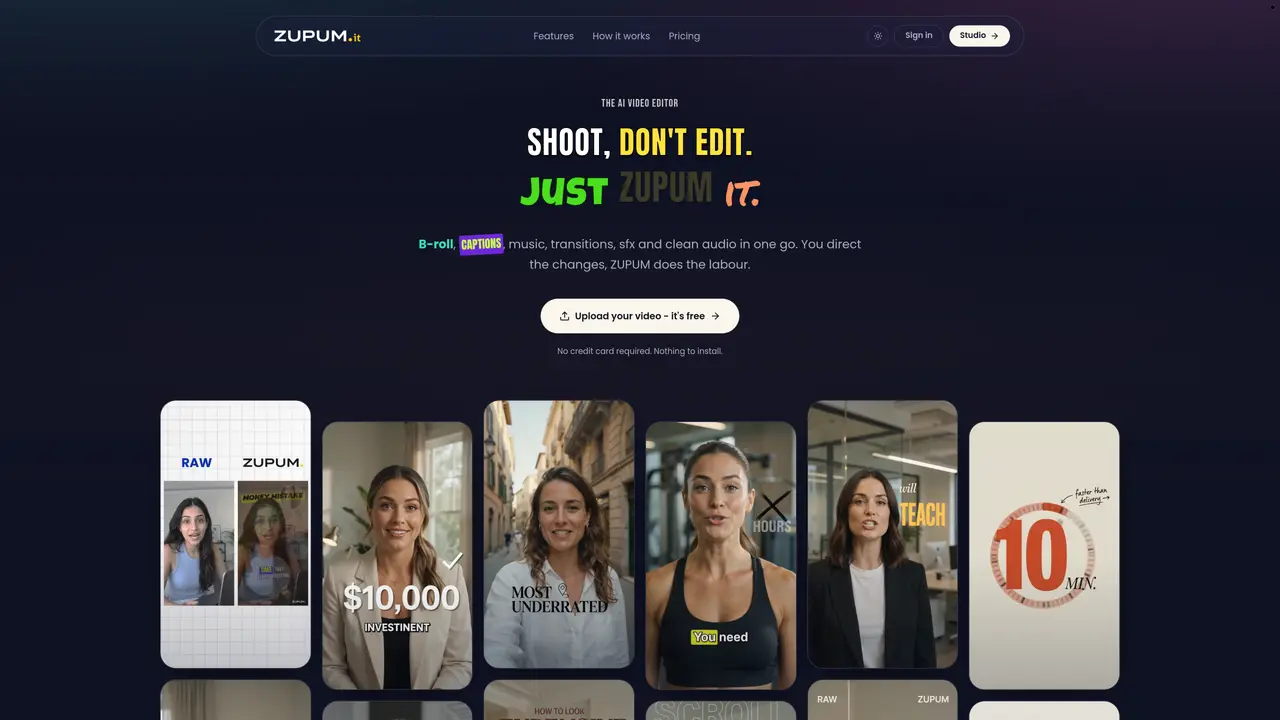
Zupum is an AI-powered video editing tool designed to transform raw talking-head footage into polished, publish-ready videos without manual timeline editing. It automatically generates B-roll cutaways, animated captions, background music, and sound effects while cleaning audio and applying color grades. The editor analyzes both audio and visual cues to align edits with spoken content, ensuring coherence between speech and visuals. Users upload a video file and receive a complete edit featuring word-synced captions in multiple styles, AI-generated B-roll in various artistic styles, and a matched soundtrack with sound effects. The tool applies transitions, background plates, and color grades in one pass, producing an H.264/AAC MP4 export at the source resolution. It operates entirely in-browser with no installation required.
Zupum is an AI-powered video editor that transforms raw talking-head footage into polished, publish-ready videos automatically. It adds AI-generated B-roll, animated captions, background music, sound effects, transitions, and color grades without requiring manual timeline editing.
Zupum is designed for creators, educators, and professionals who need to quickly turn talking-head videos into engaging, shareable content without spending hours on manual editing or hiring a full post-production team.
Users upload a video file, and Zupum analyzes both audio and visual cues to align edits with spoken content. It then applies B-roll, captions, music, transitions, and color grades in one pass, producing a final MP4 export at the source resolution.
No, Zupum operates entirely in-browser and does not require installation or a credit card to start using the tool. Users can begin editing immediately after uploading their video.
Yes, Zupum offers a preset library with multiple B-roll art styles, caption styles, and music options. Users can browse and select presets in one click, and adjust elements like transitions and background plates as needed.
Yes, Zupum includes audio cleaning features that filter out hum, hiss, and room rumble using a broadcast-style chain, applied consistently to both the preview and final export.
We use essential cookies to run aitoolnavio™, and optional cookies to analyze traffic and measure our marketing. You choose what we use — optional cookies stay off unless you turn them on. See our Privacy Policy.
One short email a week: fresh tools worth trying, honest takes and the updates that actually matter. No spam, unsubscribe any time.
AI-powered video messaging tool that records, shares, and manages video messages with AI-generated titles, summaries, and tasks.
Unleash creativity: edit photos, videos, and designs with AI-enhanced tools.
Record lectures, create tutorials, and securely share videos with teams.
Create stunning videos in a few clicks, customize with powerful tools, and automate editing without experience.
Create, convert, and enhance videos effortlessly with professional effects and royalty-free music.
Create marketing videos quickly, customize with templates, music, and photos, optimize for different platforms with AI.
Automate video editing, add text-to-speech voice-overs, and optimize videos for impactful results.
Freemium, uncensored AI video and image creation for individual creators with text-to-video, image effects, and gem-based upgrades for HD and no watermarks.
Create, edit, subtitle, and translate pro-grade videos instantly.
Cloudinary provides APIs and tools to integrate, manage, and optimize images and videos for AI-driven visual experiences.
All-in-one AI suite for creators to automate workflows, edit media, and generate content across video, design, and productivity tools.
Generate cinematic video clips from text or images and refine them with AI-powered editing tools for creators and visual professionals.
Matched on what this tool does — grouped by the job you would be replacing.
matches AI B-roll generation with motion and cross-fades · 20+ caption styles with word synchronization · Automatic music scoring and sound effect matching
AI video editor that adds B-roll visuals, captions, and edits to videos automatically.
AI video editing platform that turns raw footage into polished short-form videos with auto B-roll, captions, and backdrop swapping for creators and marketers.
AI video editor that edits videos by text transcript
Transform raw footage into polished videos with Levio's AI-powered video editing agent.
matches AI B-roll generation with motion and cross-fades · 20+ caption styles with word synchronization · Audio cleanup with noise and rumble reduction
matches AI B-roll generation with motion and cross-fades · Automatic music scoring and sound effect matching · 30+ transitions including cuts, wipes and glitches
matches AI B-roll generation with motion and cross-fades · 20+ caption styles with word synchronization · Audio cleanup with noise and rumble reduction
AI-powered tool to generate faceless split-screen reels and talking avatar videos from text prompts
AI-powered talking-head video editor that automates cuts, captions and zooms for product launches
AI-powered video clipping and editing tool that extracts viral moments, adds captions, and schedules shorts for TikTok, YouTube, and Instagram.
AI editor that transforms raw clips into platform-ready short-form videos
AI-powered video editor for clips, captions, supercuts and web animations
An AI video editing assistant that transcribes audio, removes silences, auto-builds rough cuts, and exports timelines to major NLEs.
AI-powered video editor that writes scripts, edits clips, adds captions and auto-posts to multiple platforms