OpenAI builds and deploys advanced AI models like GPT-4o for autonomous agents and workflows.

CCC
0Popularity
About CCC
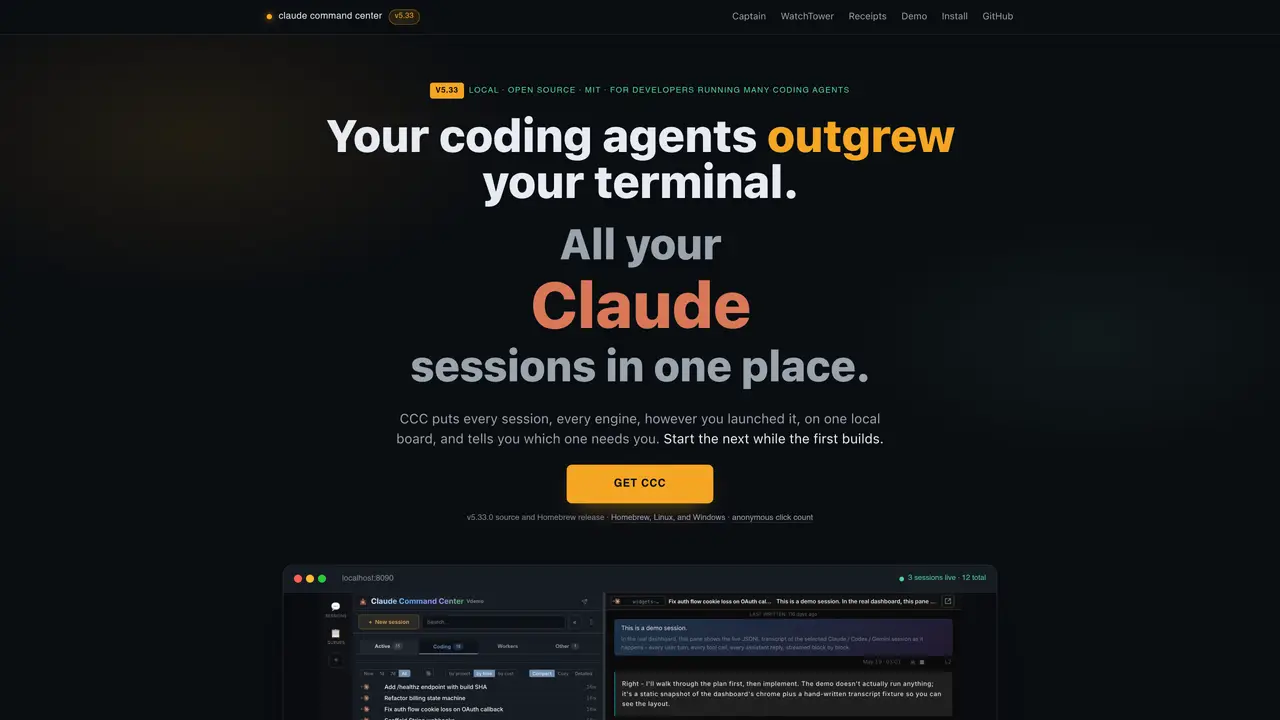
CCC is a local dashboard designed for developers running multiple coding-agent sessions. It consolidates all active and dormant sessions from various engines—including Claude Code, Codex, Cursor, Antigravity, Kilo Code, Kimi Code, OpenCode, and Devin—onto a single board. The tool reads each engine’s on-disk state to surface sessions, even those launched or resumed manually outside the dashboard. Sessions continue running independently when the dashboard is closed and automatically reattach upon reopening, ensuring no work is lost. CCC addresses the challenge of tracking parallel agents by providing visibility into every session, flagging those needing attention, and offering tools to organize and compare transcripts efficiently. It includes features like a needs-attention lane, per-session context meters, Kanban states, a project tree, and a Flow canvas for spatial organization. The interface supports split-pane viewing for side-by-side transcript comparisons and includes search functionality across session history.
Key features
- Single local board listing all coding-agent sessions
- Needs-attention lane with desktop notifications on macOS
- Per-session context meter with warning and danger levels
- Kanban states (Working, Review, In Testing, Verified, Archived) with drag-and-drop
- Project tree for grouping sessions under nestable named objects
- Flow canvas for spatial organization of sessions and repos
- Split-pane viewing for side-by-side transcript comparisons
- Search across session history for quick retrieval of past decisions
Use cases
- Managing multiple parallel coding-agent sessions across different engines
- Tracking and resuming forgotten or dormant sessions
- Organizing and comparing agent transcripts for project review
Pros
- Consolidates sessions from multiple coding agents into a single local dashboard
- Tracks and reattaches sessions even when launched or resumed outside the dashboard
- Provides visibility into session status, context usage, and attention needs
- Supports spatial organization with Kanban states, project tree, and Flow canvas
- Includes split-pane viewing for comparing transcripts side by side
Cons
- No free tier or open access; requires installation
- Limited to local use; no cloud-based functionality mentioned
- Documented gaps in support for non-Claude Code engines
Frequently asked questions about CCC
What is CCC and what problem does it solve?
CCC is a local dashboard that consolidates all active and dormant coding-agent sessions from multiple engines—such as Claude Code, Codex, Cursor, and others—onto a single board. It addresses the challenge of tracking parallel agents by providing visibility into every session, flagging those needing attention, and offering tools to organize and compare transcripts efficiently.
Who is CCC designed for?
CCC is designed for developers running multiple coding-agent sessions across different engines. It is particularly useful for those who struggle to keep track of parallel agents, sessions launched outside the dashboard, or work that may have been forgotten.
How does CCC handle sessions launched outside the dashboard?
CCC reads each engine’s on-disk state to surface sessions, including those launched or resumed manually outside the dashboard. Headless sessions launched outside the dashboard automatically attach to their parent session when the dashboard is reopened.
Does CCC support sessions running independently when the dashboard is closed?
Yes, sessions continue running independently when the dashboard is closed and automatically reattach upon reopening, ensuring no work is lost.
What features does CCC offer for organizing sessions?
CCC includes features like a needs-attention lane, per-session context meters, Kanban states, a project tree, and a Flow canvas for spatial organization. It also supports split-pane viewing for side-by-side transcript comparisons and includes search functionality across session history.
How can I get started with CCC?
CCC can be installed locally and does not require additional setup beyond running the application. Users can download the source or a Homebrew release, and all data is stored locally. A read-only demo is available to explore the interface before installation.