Collaboration and version control platform for software development and AI model hosting.
645M visits/mo-0.6%#1 Coding & Development
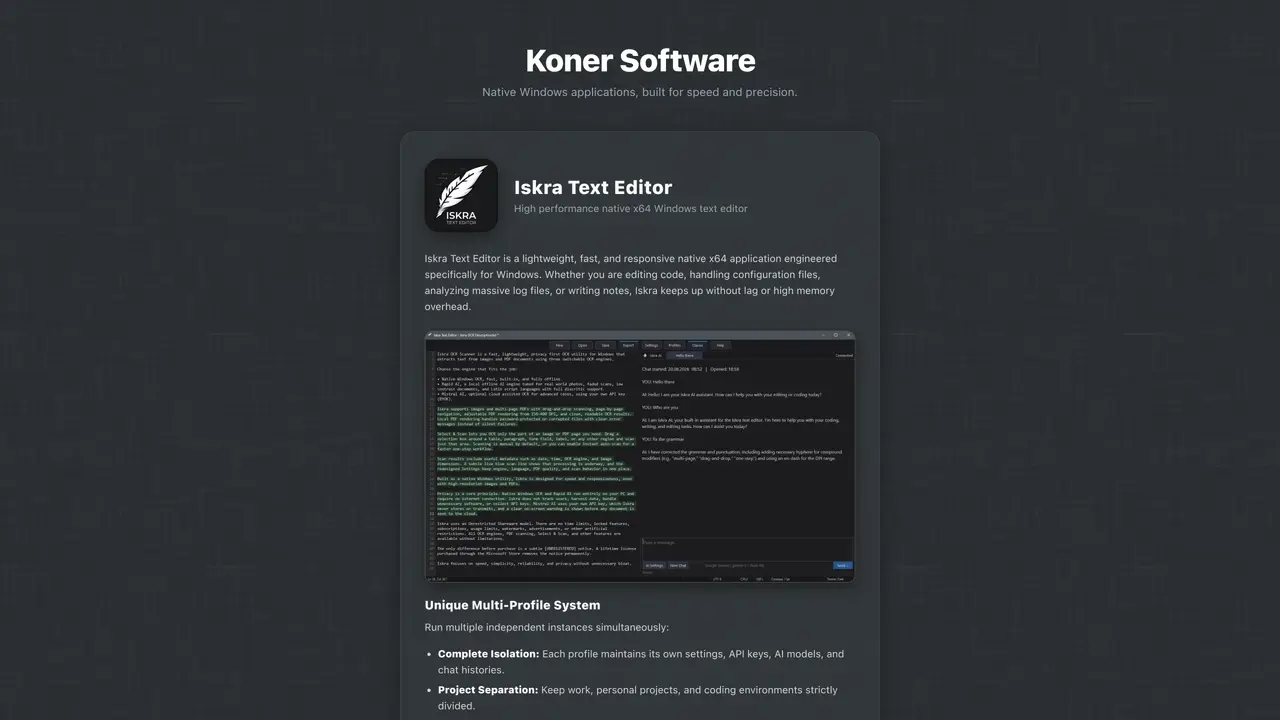
Iskra Text Editor is a lightweight native x64 application designed specifically for Windows environments. It provides a fast and responsive text editing experience suitable for code editing, configuration file handling, log file analysis, and note-taking. The editor supports large files without lag or excessive memory usage, ensuring smooth navigation even with massive datasets. A unique multi-profile system allows users to run multiple independent instances simultaneously, each maintaining separate settings, API keys, AI models, and chat histories for complete project isolation. Profiles can be managed and launched centrally from the default instance, enabling clear separation between work, personal, and coding environments. The interface is clean and modern, with customizable dark and light themes and 12 built-in color themes.
Iskra Text Editor is a lightweight native x64 application designed specifically for Windows environments. It provides a fast and responsive text editing experience for code editing, configuration files, log analysis, and note-taking.
The editor suits developers, system administrators, data analysts, and writers who require a high-performance text editor with project isolation and AI integration capabilities.
Yes, Iskra Text Editor offers optional AI assistance by allowing users to connect to free AI services such as Groq, Cloudflare AI, Google Gemini, and Mistral AI.
Yes, Iskra Text Editor supports large files without lag or excessive memory usage, ensuring smooth navigation even with massive datasets.
The multi-profile system allows users to run multiple independent instances simultaneously, each maintaining separate settings, API keys, AI models, and chat histories for complete project isolation.
Iskra Text Editor supports exporting files directly to PDF, HTML, RTF, or plain text formats.
We use essential cookies to run aitoolnavio™, and optional cookies to analyze traffic and measure our marketing. You choose what we use — optional cookies stay off unless you turn them on. See our Privacy Policy.
One short email a week: fresh tools worth trying, honest takes and the updates that actually matter. No spam, unsubscribe any time.
Collaboration and version control platform for software development and AI model hosting.
A cloud platform for deploying, scaling, and managing web apps and AI workloads with Git-based CI/CD and edge functions.
Unified platform to access and switch between hundreds of AI models like ChatGPT, Claude, and Gemini via a single API.
xAI builds Grok frontier AI models for reasoning, coding, voice, images, video, enterprise workflows, and developer APIs.
Meta AI enhances machine learning, NLP, and computer vision capabilities.
AI-powered coding platform that uses agents to plan, write, and test software with real-time feedback and verifiable artifacts.
Open-source backend platform providing Postgres, authentication, APIs, and real-time features to build scalable apps quickly.
Chat, build, and explore with open AI models.
Standardize application packaging and execution with portable containers for consistent local and cloud workflows.
Cloud communications platform that lets developers embed SMS, voice, WhatsApp, email, video, verification, and conversational AI via APIs.
Revolutionize AI application development, monitoring, and deployment with LangChain.
Run open-source chatbots locally on your PC without internet, keeping conversations private and offline.
Matched on what this tool does — grouped by the job you would be replacing.
matches Blazing fast performance with native x64 architecture · Large file support for text and log files
Streamline Webflow coding with AI-driven predictions.
Fast code writing with syntax highlighting, real-time error checking, and versatile language and framework support.
matches Export to PDF, HTML, RTF, or plain text · Interactive search with real-time highlighting · Advanced regular expression engine
matches Optional AI assistant integration · 12 built-in color themes · Clean and modern interface with theme customization
An AI-powered PDF editor and converter for editing, OCR, signing, annotating, merging, and chatting with documents across devices.
Instantly convert PDF, Word, PowerPoint, Excel, CSV, and HTML files into clean markdown
Converts documents and web links into AI-friendly Markdown format
AI-powered writing assistant for grammar, style, and tone improvements across documents and emails.
Prompt up editable, on-brand multi-format files.