

Summarizes, extracts, and rewrites content from files.
89M visits/mo+8.7%#2 Productivity & Office
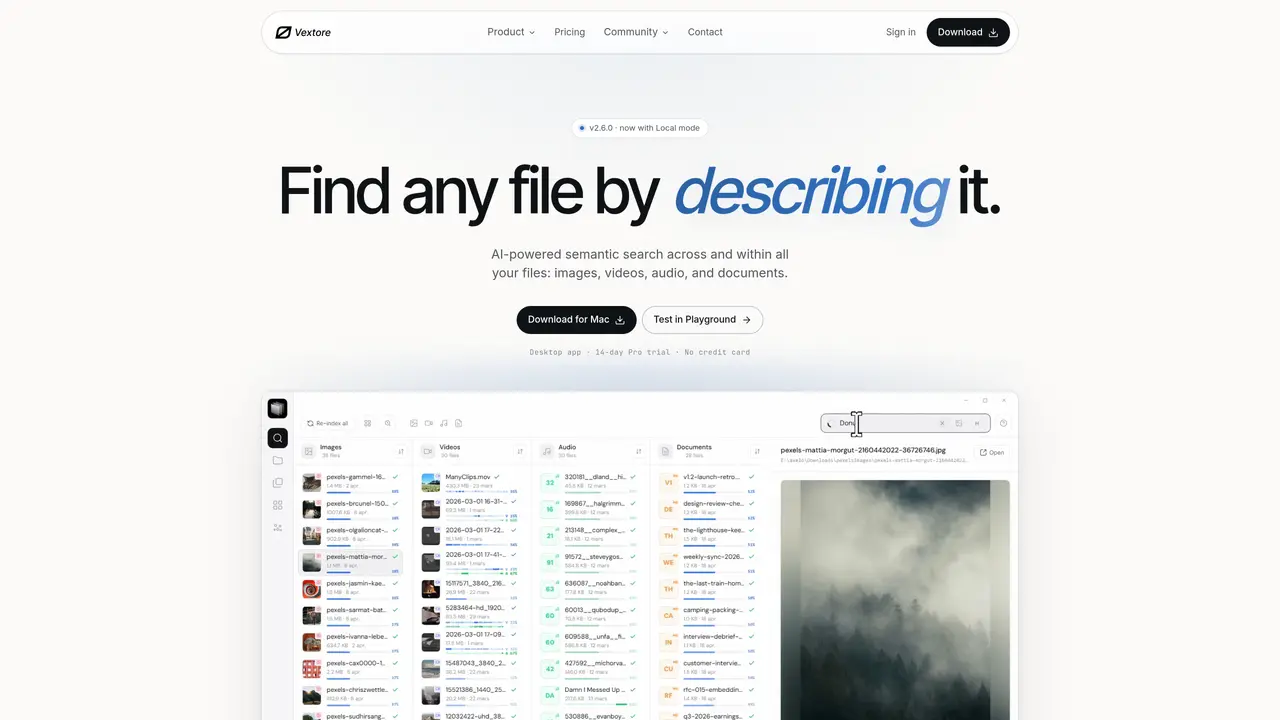
Vextore indexes local files—images, videos, audio, documents and code—and allows searches using text, images, audio or video clips. Queries are matched by semantic meaning rather than filenames or keywords, returning relevant files regardless of format. The tool supports two indexing modes: Local mode processes files entirely on the user’s machine, while Cloud mode uploads each file once for indexing before deleting both the upload and its vector. Searches run against the on-device index, returning results in about 0.05 seconds in Local mode or roughly a second in Cloud mode, even across millions of files. The desktop application can be set up by pointing it at a folder; indexing runs in the background and can be paused or resumed. Users can preview matches, jump to specific timestamps in long media files, or extract clips directly into editing software. The workspace layout is customizable and persists between sessions.
Vextore is an AI-powered semantic search tool that indexes local files—images, videos, audio, documents, and code—allowing users to search using text, images, audio, or video clips. It matches queries by semantic meaning rather than filenames or keywords, returning relevant files regardless of format.
Vextore is designed for individuals who need to quickly locate files across diverse formats using natural language or media-based queries. It suits creative professionals, researchers, and anyone managing large collections of mixed file types.
Vextore offers two indexing modes: Local mode, which processes files entirely on the user’s machine, and Cloud mode, which uploads each file once for indexing before deleting both the upload and its vector. Users can switch between modes with a single click.
Yes, Vextore indexes long media files moment by moment, allowing users to search for specific details and jump directly to the relevant timestamp within hours of footage or podcast episodes.
Getting started with Vextore is simple: point the desktop application at a folder to begin indexing. The tool handles the process in the background, and users can pause or resume indexing as needed. No complex setup or re-uploading of files is required.
Yes, Vextore allows users to extract specific clips from videos or audio files by selecting a range and dragging it directly into editing software like DaVinci Resolve or Premiere, eliminating the need for manual trimming.
vextore.com · third-party estimates from Similarweb
Last 3 months · grows by one month every month
Share of visits by channel
Share of visits · estimated visits
Productivity & Office · Sep 2026
Traffic figures are third-party estimates, good for scale and trends; they can differ from a company's own numbers. Updated monthly.
We use essential cookies to run aitoolnavio™, and optional cookies to analyze traffic and measure our marketing. You choose what we use — optional cookies stay off unless you turn them on. See our Privacy Policy.
One short email a week: fresh tools worth trying, honest takes and the updates that actually matter. No spam, unsubscribe any time.
Summarizes, extracts, and rewrites content from files.
Automate citation and reference management, aid research with text and data mining, and securely store and share documents.
Capture, organize, and share ideas, notes, and documents effortlessly.
Headless CMS that lets developers manage structured content and deliver it anywhere via flexible APIs and real-time collaboration tools.
Efficiently create and manage cases, streamline workflows, securely store and share documents, and collaborate with colleagues.
Access files, collaborate, and secure your data with unbeatable customizable system.
An AI-powered PDF editor and converter for editing, OCR, signing, annotating, merging, and chatting with documents across devices.
Browser-based PDF editor that edits, signs, converts, merges, compresses, and shares files, with AI for form filling, document chat, and PDF creation.
Securely store, access, and search documents from any device with ease.
Create and customize legal documents, consult lawyers, and access legal guides all in one platform.
Centralize brand assets, automate approvals, and collaborate with external partners in a single digital asset management platform.
AI diagramming and documentation tool for engineering teams to create and update cloud architecture, ERDs, and flowcharts from prompts, code, and CI/CD workflows.
Matched on what this tool does — grouped by the job you would be replacing.
matches Semantic search across images, videos, audio, documents and code · Cross-format query and result matching · In-file search with moment-level precision
Local document search engine for AI agents with full-text indexing across multiple file types
AI-powered local file search for macOS that indexes documents, media, and other files offline for instant, private retrieval.
AI-powered semantic search for local files without cloud dependency
Private AI-powered file search for Windows that indexes and retrieves documents, images and notes by meaning
matches Clip extraction for video and audio editing · Natural-language video search for exact moment retrieval · Multimodal video indexing (visual, audio, text)
An AI video intelligence platform for indexing, searching, summarizing, and querying video libraries via web app and APIs.
AI video editor that repurposes long-form videos into clips, captions, and posts with built-in scheduling for social media.
AI-powered video search that locates exact moments using natural language, images, or examples across large video libraries.
AI-powered platform that transforms video, audio, and image libraries into searchable, timestamped metadata and embeddings for precise discovery and analysis.