Convert PDFs to Word, Excel, PowerPoint, HTML, merge multiple PDFs, and extract images.
2.2M visits/mo+5.4%#35 Productivity & Office

Web-based file converter that transforms documents into clean Markdown for AI workflows
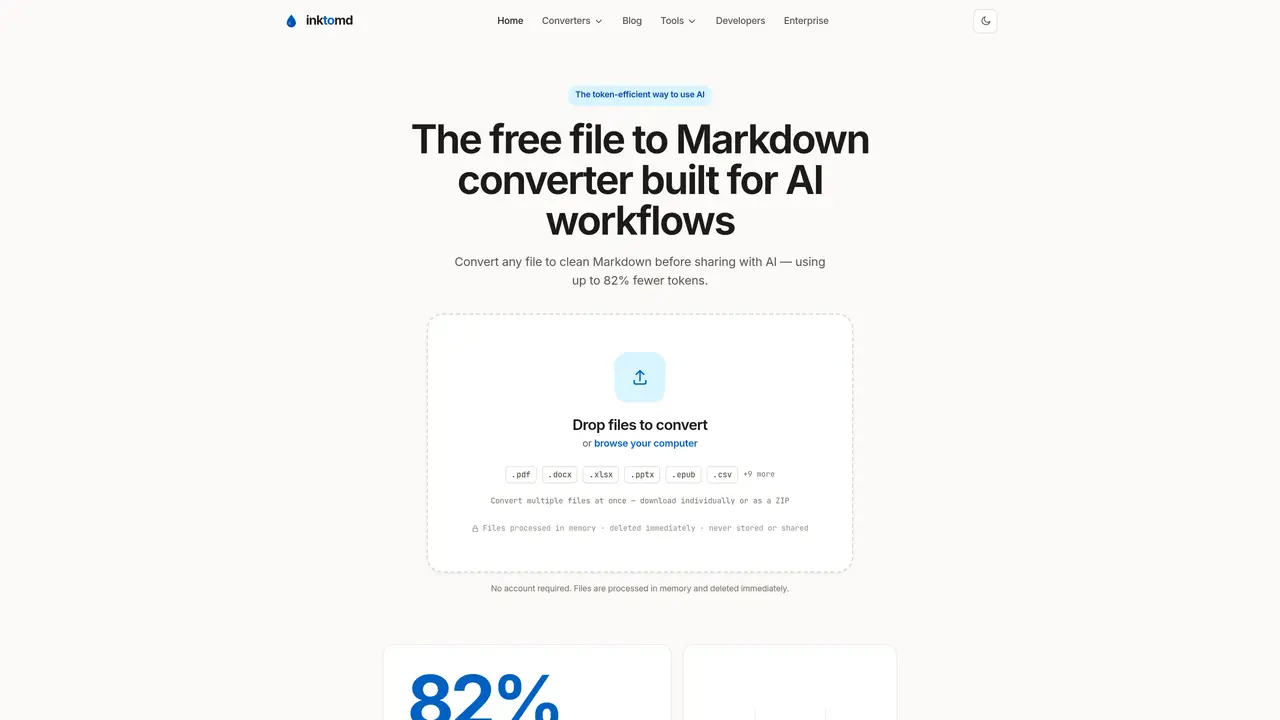
inktomd converts various file formats into clean Markdown to optimize AI interactions. It supports over 28 formats including PDF, Word, Excel, PowerPoint, EPUB, CSV, JSON, HTML, and more. The tool processes files in memory and deletes them immediately, requiring no account or storage. Conversion happens in about two seconds, reducing token usage by up to 82% compared to raw files. The resulting Markdown preserves document structure such as headings, lists, tables, and code blocks, making it easier for AI models to interpret content accurately. It is designed for users who frequently share documents with AI systems, developers integrating file conversion into pipelines, and teams needing consistent formatting across different file types. The platform offers focused converters for specific formats as well as a universal uploader for mixed file types.
Inktomd supports over 28 file formats, including PDF, Word, Excel, PowerPoint, EPUB, CSV, JSON, HTML, ZIP, LaTeX, VTT, Confluence, OpenAPI, BibTeX, and various web and URL formats like YouTube, Google Docs, arXiv, and Twitter.
No account is required, and files are processed in memory and deleted immediately after conversion, ensuring no storage or sharing of user data.
The average conversion time is approximately two seconds, providing quick and efficient Markdown output for immediate use with AI models.
Yes, inktomd allows users to convert multiple files at once, with the option to download results individually or as a ZIP file.
Yes, inktomd is developer-friendly, offering plain text output that is easy to version, diff, search, and integrate into scripts or pipelines.
Converting files to Markdown reduces token usage by up to 82%, preserves document structure like headings and tables, and aligns with the format AI models were trained on, improving efficiency and accuracy.
inktomd.com · third-party estimates from Similarweb
Last 4 months · grows by one month every month
Share of visits by channel
Share of visits · estimated visits
Productivity & Office · Sep 2026
Traffic figures are third-party estimates, good for scale and trends; they can differ from a company's own numbers. Updated monthly.
We use essential cookies to run aitoolnavio™, and optional cookies to analyze traffic and measure our marketing. You choose what we use — optional cookies stay off unless you turn them on. See our Privacy Policy.
One short email a week: fresh tools worth trying, honest takes and the updates that actually matter. No spam, unsubscribe any time.
Convert PDFs to Word, Excel, PowerPoint, HTML, merge multiple PDFs, and extract images.
End-to-end encrypted file sharing with built-in AI editing for photos, videos, and documents.
Free online directory offering AI-powered file editing tools for PDFs, images, videos, QR codes, and text.
A browser-based media management platform for storing, searching, and collaborating on photos, videos, and design files with AI tagging.
Secure cloud storage and organization tool with encryption and authentication for remote access and collaboration.
Converts PDF, Word, Excel and images to AI-ready Markdown in-browser
AI-powered desktop app that renames and organizes files by analyzing content with a local LLM for privacy-preserving file management.
Mac-only AI tool that automatically sorts files into a personalized folder system without reading file contents.
macOS app that renames screenshots and files by content and provides private, offline search for Mac users.
Browser-based PDF tools for merging, compressing, converting and editing files
Online converter turning PDF, Word and other files into clean Markdown for AI workflows
Free online PDF tools for merging, splitting, compressing and converting files without signup
Matched on what this tool does — grouped by the job you would be replacing.
matches Drag-and-drop file upload · Instant Markdown conversion (~2 seconds) · Universal and format-specific converters
Online converter turning PDF, Word and other files into clean Markdown for AI workflows
Converts PDF, Word, Excel and images to AI-ready Markdown in-browser
Converts documents and images to and from Markdown format
Converts documents, images, audio and video to clean Markdown
matches AI chat integration · Obsidian and Slack cleanup tools
matches Token cost calculator · RAG chunk visualizer
No-code platform to build and deploy AI support agents across multiple channels
Creates a custom GPT assistant from uploaded documents or URLs
Extract insights from PDFs, Word docs, CSVs, Excel files, and SQL databases by chatting with them in natural language.
Upload PDF, TXT or DOCX files and chat with them using an OpenAI or Google Gemini API key
Open-source AI document parser that converts PDFs, images, and documents into structured Markdown or JSON for AI workflows.
Browser-based tools to clean, compress and anonymize text before sending it to AI models