End-to-end encrypted file sharing with built-in AI editing for photos, videos, and documents.
3M visits/mo-18.1%#29 Productivity & Office

Convert PDFs to Word, Excel, PowerPoint, HTML, merge multiple PDFs, and extract images.
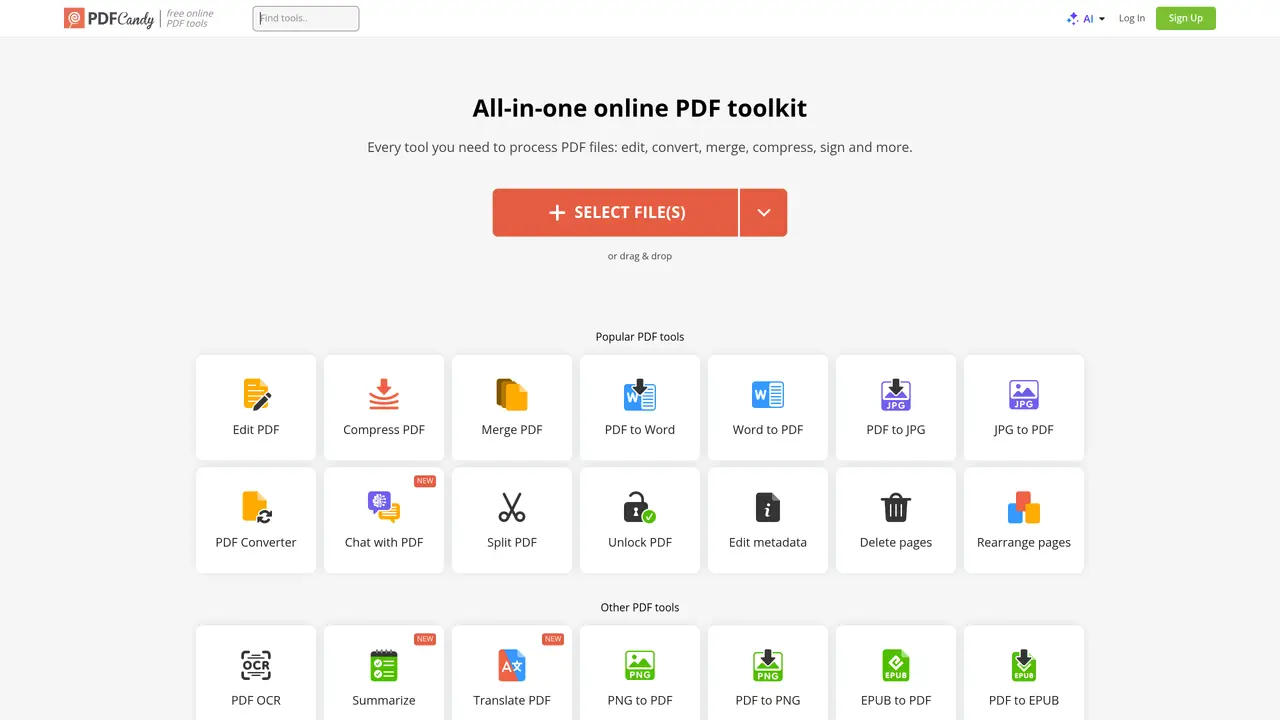
PDF Candy is an online PDF converter that provides users with a comprehensive suite of tools to quickly and easily convert, edit, and merge PDF files. With PDF Candy, you can quickly and accurately convert PDFs to a range of different formats such as Word, Excel, PowerPoint, HTML, and more. Additionally, users can merge multiple PDFs into a single document, split PDFs into separate documents, and even extract images from PDFs. The intuitive user interface makes PDF Candy easy to use, even for those without any prior experience. With just a few clicks, you can easily convert, edit, and merge PDFs without having to download or install any extra software. Plus, the conversion process is fast and secure, allowing you to get the job done quickly and with confidence. PDF Candy is the perfect solution for anyone who needs to quickly and easily convert and edit PDFs.
PDF Candy is an all-in-one online PDF toolkit that allows users to edit, convert, merge, compress, sign, and manage PDF files without installing additional software. It offers over 90 free tools for handling PDFs, including conversion between formats, OCR, summarization, and metadata editing.
PDF Candy suits individuals, professionals, and businesses needing quick and secure PDF processing, such as students, educators, legal teams, and office workers. It is designed for users who require a wide range of PDF tools accessible directly from a web browser.
Yes, PDF Candy provides a free online version with access to all tools, though some features like batch processing or larger file sizes may be limited. The free version processes files with standard priority and adheres to strict privacy policies.
PDF Candy supports conversion to and from formats such as Word, Excel, PowerPoint, JPG, PNG, EPUB, HTML, TIFF, ODT, SVG, CSV, MOBI, GIF, BMP, and many others. It also handles specialized formats like HEIC, DXF, and eBook formats.
PDF Candy complies with GDPR regulations and deletes uploaded files from its servers within two hours of processing. It uses secure connections and does not store user data beyond the necessary processing time to protect privacy.
To get started, visit the PDF Candy website, select the desired tool, and upload your file or enter the required information. No software installation is needed, and most tools are accessible directly in the browser. For advanced features, users can opt for a paid plan.
pdfcandy.com · third-party estimates from Similarweb
Last 4 months · grows by one month every month
Share of visits · estimated visits
Other countries: 46%
How people reach this site from other AI tools
1.4K a month · 0.1% of all visits
Productivity & Office · Sep 2026
Traffic figures are third-party estimates, good for scale and trends; they can differ from a company's own numbers. Updated monthly.
We use essential cookies to run aitoolnavio™, and optional cookies to analyze traffic and measure our marketing. You choose what we use — optional cookies stay off unless you turn them on. See our Privacy Policy.
One short email a week: fresh tools worth trying, honest takes and the updates that actually matter. No spam, unsubscribe any time.
End-to-end encrypted file sharing with built-in AI editing for photos, videos, and documents.
Free online directory offering AI-powered file editing tools for PDFs, images, videos, QR codes, and text.
A browser-based media management platform for storing, searching, and collaborating on photos, videos, and design files with AI tagging.
Secure cloud storage and organization tool with encryption and authentication for remote access and collaboration.
Converts PDF, Word, Excel and images to AI-ready Markdown in-browser
AI-powered desktop app that renames and organizes files by analyzing content with a local LLM for privacy-preserving file management.
Mac-only AI tool that automatically sorts files into a personalized folder system without reading file contents.
macOS app that renames screenshots and files by content and provides private, offline search for Mac users.
Browser-based PDF tools for merging, compressing, converting and editing files
Online converter turning PDF, Word and other files into clean Markdown for AI workflows
Web-based file converter that transforms documents into clean Markdown for AI workflows
Free online PDF tools for merging, splitting, compressing and converting files without signup
Matched on what this tool does — grouped by the job you would be replacing.
matches Convert PDFs to Word · Convert PDFs to Excel · Convert PDFs to PowerPoint
Browser-based PDF tools for merging, compressing, converting and editing files
Free online PDF tools for merging, splitting, compressing and converting files without signup
Suite of 37 browser-based tools for PDF and image editing without uploads
All-in-one PDF toolkit with AI-powered features and client-side processing