

Convert PDFs to Word, Excel, PowerPoint, HTML, merge multiple PDFs, and extract images.
2.2M visits/mo+5.4%#35 Productivity & Office
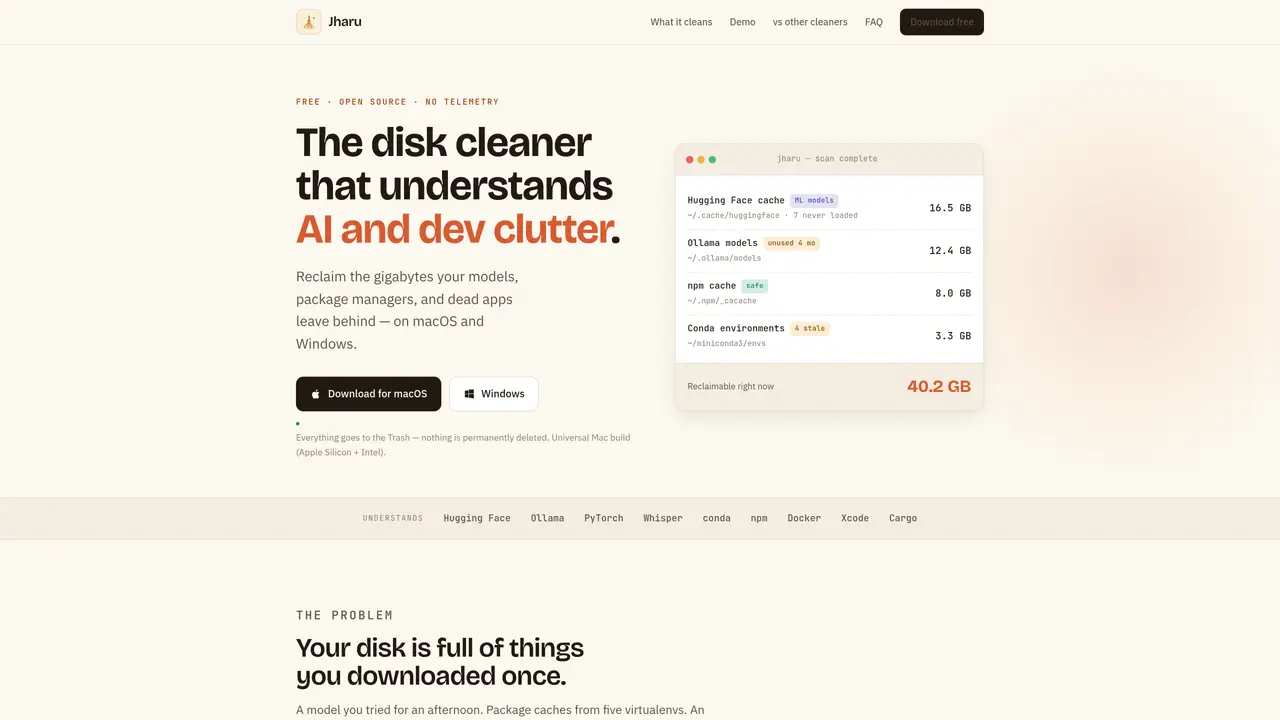
Jharu is a free, open-source disk cleaner designed to reclaim storage occupied by AI and developer-related clutter on macOS and Windows. It scans and identifies specific types of data such as ML model caches, package manager caches, and leftover files from uninstalled applications. The tool distinguishes between files that have been used and those merely downloaded, helping users avoid accidental deletion of important data. A treemap visualization provides an intuitive overview of disk usage by folder and type, allowing users to pinpoint large space consumers. Actions move files to the system trash rather than permanently deleting them, with clear explanations of potential consequences before any cleanup. Jharu also includes a clean uninstaller for applications and an environment analyzer for Python virtual environments and conda installations.
Yes. Jharu is completely free and open source under the Apache 2.0 license with no subscription, paid tier, ads, or telemetry. It runs on both macOS and Windows.
No. Jharu is rule-based and precise, not an AI-driven guessing machine. It specializes in cleaning AI and developer clutter by understanding specific caches and leftovers.
Open Jharu’s ML models tab to see every downloaded model with its size and usage status. Select models you no longer need to move them to the Trash; they re-download automatically when needed. Shared Ollama layers are preserved to avoid breaking dependencies.
Nothing is permanently deleted; all cleanups move files to the system Trash or Recycle Bin. Before each action, Jharu provides a plain-language explanation of the consequences, and protected system locations are never cleaned.
Yes, especially for developers and machine learning practitioners. It is free, open source, and focuses deeply on model caches, package caches, virtual environments, and app leftovers that general-purpose cleaners often miss.
Yes. The macOS build is universal (supports Apple Silicon and Intel), and the Windows build is a standard 64-bit installer. Jharu updates itself in-app on both platforms.
We use essential cookies to run aitoolnavio™, and optional cookies to analyze traffic and measure our marketing. You choose what we use — optional cookies stay off unless you turn them on. See our Privacy Policy.
One short email a week: fresh tools worth trying, honest takes and the updates that actually matter. No spam, unsubscribe any time.
Convert PDFs to Word, Excel, PowerPoint, HTML, merge multiple PDFs, and extract images.
End-to-end encrypted file sharing with built-in AI editing for photos, videos, and documents.
Free online directory offering AI-powered file editing tools for PDFs, images, videos, QR codes, and text.
A browser-based media management platform for storing, searching, and collaborating on photos, videos, and design files with AI tagging.
Secure cloud storage and organization tool with encryption and authentication for remote access and collaboration.
Converts PDF, Word, Excel and images to AI-ready Markdown in-browser
AI-powered desktop app that renames and organizes files by analyzing content with a local LLM for privacy-preserving file management.
Mac-only AI tool that automatically sorts files into a personalized folder system without reading file contents.
macOS app that renames screenshots and files by content and provides private, offline search for Mac users.
Browser-based PDF tools for merging, compressing, converting and editing files
Online converter turning PDF, Word and other files into clean Markdown for AI workflows
Web-based file converter that transforms documents into clean Markdown for AI workflows
Matched on what this tool does — grouped by the job you would be replacing.
matches Scans and identifies ML model caches (Hugging Face, Ollama, PyTorch, Whisper) · Detects used vs. never-loaded files · Treemap visualization of disk usage by folder and type
Windows cleaner that scans and removes AI and developer caches
Local tool that scans and visualizes installed software, dependencies and AI agents on a developer machine