Generate content, correct spelling, suggest synonyms to enhance writing.
173M visits/mo+0.1%#1 Productivity & Office

Automate data entry, customize workflows, and tailor preferences with this powerful tool.
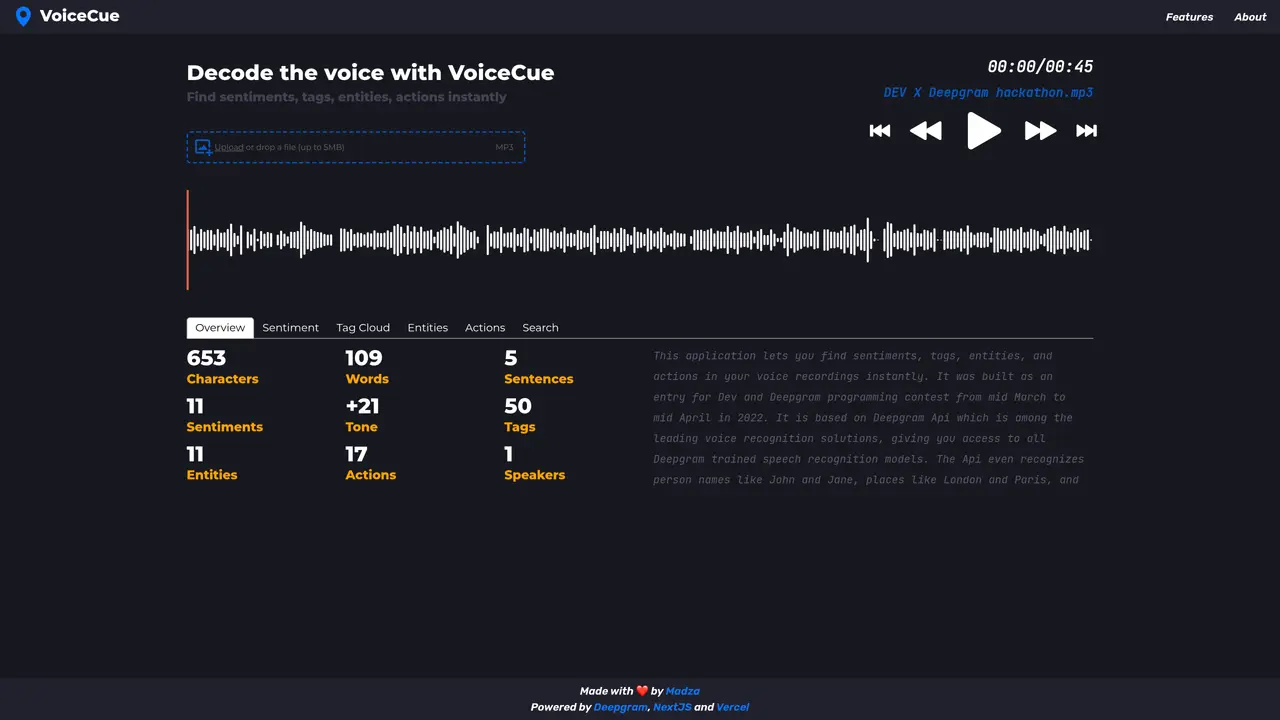
VoiceCue is an advanced voice-based automation tool designed to streamline daily tasks and simplify complex processes. VoiceCue uses natural language processing to interpret and execute commands accurately and quickly. It is designed for individuals and businesses alike, allowing users to create custom workflows and automate data entry, scheduling, and more. VoiceCue’s intuitive interface makes it easy to get started and begin creating automated workflows. With its user-friendly design, users can quickly learn how to use the application and start building custom workflows that fit their needs. VoiceCue is also highly customizable, allowing users to tailor their workflows to their exact preferences. VoiceCue can help you save time and reduce the risk of mistakes by automating mundane and repetitive tasks. It also helps you stay organized and on track with your workflow, so you can focus on more meaningful tasks.
VoiceCue is a voice-based automation tool that decodes voice inputs to identify sentiments, tags, entities, and actions. It allows users to upload audio files for instant analysis.
VoiceCue is designed for individuals and businesses looking to automate workflows, streamline tasks, and extract insights from voice data efficiently.
Users can upload or drop an audio file (up to 5MB) directly into the platform to begin analyzing voice content for sentiments, tags, entities, and actions.
VoiceCue supports MP3 audio files for analysis, with a maximum file size of 5MB.
VoiceCue is powered by Deepgram for voice processing, NextJS for the frontend, and Vercel for hosting.
Yes, VoiceCue is designed to help users automate workflows by extracting actionable insights from voice inputs, such as sentiments and entities.
We use essential cookies to run aitoolnavio™, and optional cookies to analyze traffic and measure our marketing. You choose what we use — optional cookies stay off unless you turn them on. See our Privacy Policy.
One short email a week: fresh tools worth trying, honest takes and the updates that actually matter. No spam, unsubscribe any time.
Generate content, correct spelling, suggest synonyms to enhance writing.
Turn messy team ideas into actionable plans with Miro's visual workspace.
Leverage analytics, automate tasks, share documents, and coordinate projects.
Integrates AI into Airtable to analyze data, summarize insights, draft content, and automate workflows without prior AI experience.
Cloud accounting software that automates bookkeeping, invoicing, and financial reporting for small and growing businesses.
Streamline teamwork, manage projects, automate tasks efficiently.
Automate code, research, and documents using agents.
AI assistant for safe, reliable productivity with code, collaboration, and integrations.
Create customizable tables, databases, and spreadsheets, share data securely with team members.
Easy-to-use CRM platform that automates lead capturing, prioritizes tasks, and provides sales pipeline analytics for businesses of all sizes.
Transforms thoughts into actions, enhancing productivity and efficiency.
Write & run code in 50+ languages, auto-complete with AI, and code faster with an intuitive interface.
Matched on what this tool does — grouped by the job you would be replacing.
Paid placement · similar tools from listings that support aitoolnavio™
Instant lead response for home-service pros: your phone rings on every new lead, plus 14 days of follow-up
matches Automate data entry tasks · Create custom workflows and schedules · Tailor workflows to specific preferences
matches Use natural language processing for accurate command execution · Intuitive interface for easy use
All-in-one project management platform for task management, team collaboration, and workflow visualization with time tracking and reporting.
Build conversational forms, capture rich responses, and automate follow-ups with AI-powered surveys and workflows.
Automate invoice data extraction, tailor platform to fit needs, and reduce manual entry errors.
Create virtual assistants quickly, train & deploy models easily, optimize performance with analytics.
Automate support, customize conversations, and improve customer satisfaction with accurate responses.
Easily build multilingual speech applications with accurate command recognition and natural language processing.
Nina AI is a powerful AI-driven virtual assistant designed to help businesses save time and increase efficiency.