
Generate content, correct spelling, suggest synonyms to enhance writing.
173M visits/mo+0.1%#1 Productivity & Office
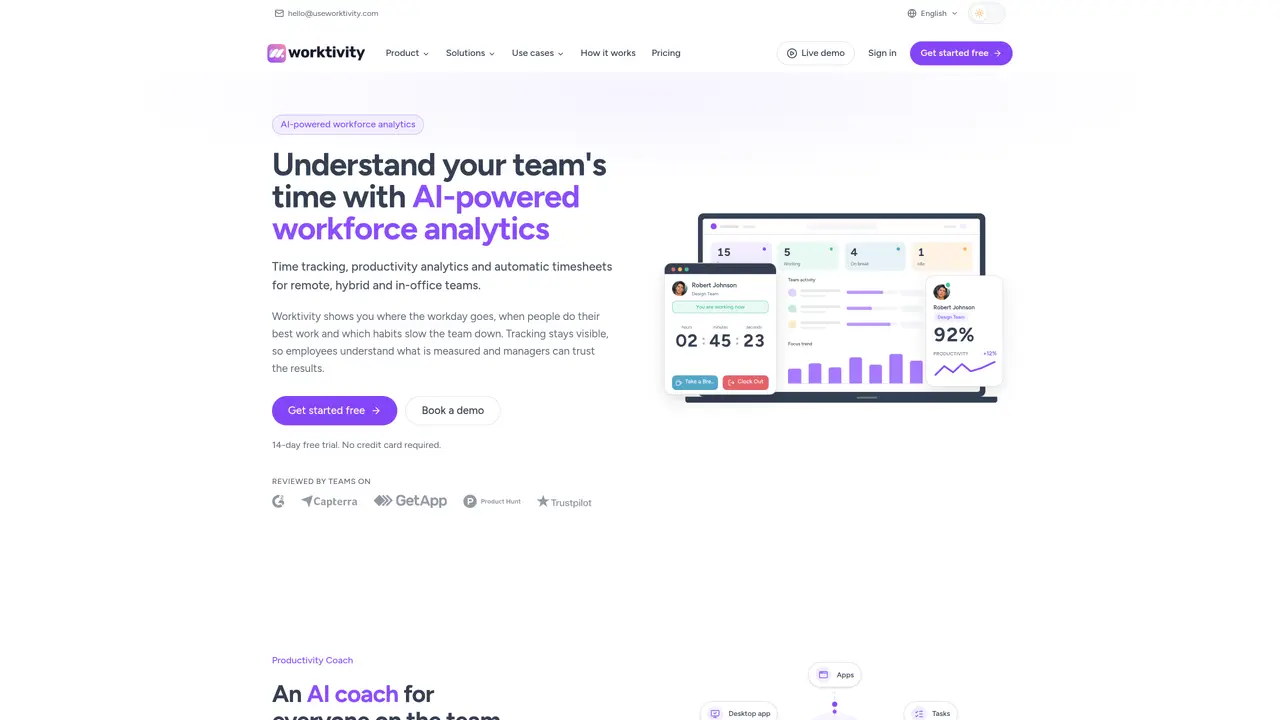
Worktivity provides time tracking, productivity analytics and automatic timesheets for remote, hybrid and in-office teams. The tool records work patterns from desktop apps, browsers, calendars, tasks and screenshots, then converts them into plain-language insights via an AI Productivity Coach. This coach identifies focus peaks, burnout risks and actionable recommendations without monitoring keystrokes. Managers receive live status updates on team activity, while employees see what is being measured to maintain transparency. Automatic timesheets roll up tracked hours into weekly and monthly reports, including overtime and exportable data for finance. Screenshots and timelapse videos serve as proof of work for billing disputes or client onboarding, with adjustable retention and privacy controls. The desktop agent operates in the background with visible indicators, requiring minimal configuration and no manual timers.
Worktivity is an AI-powered workforce analytics tool that provides time tracking, productivity monitoring, and automatic timesheets for remote, hybrid, and in-office teams. It records work patterns from desktop apps, browsers, calendars, tasks, and screenshots, then converts them into plain-language insights via an AI Productivity Coach.
Worktivity is designed for teams of various sizes and structures, including SMEs, agencies, remote teams, hybrid teams, startups, and BPO/KPO organizations. It supports businesses looking to understand time usage, improve productivity, and maintain transparency in tracking.
The AI Productivity Coach analyzes work patterns from tracked activity, such as focus peaks, burnout risks, and productivity trends, then generates plain-language reports with actionable recommendations. It does not monitor keystrokes and focuses on improving team performance.
No, Worktivity operates with a lightweight desktop agent that runs in the background, automatically tracking time, apps, tasks, and screenshots without requiring manual timers or extensive configuration.
Yes, Worktivity offers integrations with popular project management tools like Asana, Trello, and Zapier, as well as an open API for custom workflows. This allows teams to connect Worktivity with their existing project stacks.
Worktivity provides visible tracking indicators, adjustable retention and privacy controls, and clear explanations of what is being measured. Employees can see their tracked activity, and screenshots or timelapses are fully visible to those being recorded.
useworktivity.com · third-party estimates from Similarweb
Last 4 months · grows by one month every month
Share of visits by channel
Share of visits · estimated visits
Other countries: 1.4%
Productivity & Office · Sep 2026
Traffic figures are third-party estimates, good for scale and trends; they can differ from a company's own numbers. Updated monthly.
We use essential cookies to run aitoolnavio™, and optional cookies to analyze traffic and measure our marketing. You choose what we use — optional cookies stay off unless you turn them on. See our Privacy Policy.
One short email a week: fresh tools worth trying, honest takes and the updates that actually matter. No spam, unsubscribe any time.
Generate content, correct spelling, suggest synonyms to enhance writing.
Turn messy team ideas into actionable plans with Miro's visual workspace.
Leverage analytics, automate tasks, share documents, and coordinate projects.
Integrates AI into Airtable to analyze data, summarize insights, draft content, and automate workflows without prior AI experience.
Cloud accounting software that automates bookkeeping, invoicing, and financial reporting for small and growing businesses.
Streamline teamwork, manage projects, automate tasks efficiently.
Automate code, research, and documents using agents.
AI assistant for safe, reliable productivity with code, collaboration, and integrations.
Create customizable tables, databases, and spreadsheets, share data securely with team members.
Easy-to-use CRM platform that automates lead capturing, prioritizes tasks, and provides sales pipeline analytics for businesses of all sizes.
Transforms thoughts into actions, enhancing productivity and efficiency.
Write & run code in 50+ languages, auto-complete with AI, and code faster with an intuitive interface.
Matched on what this tool does — grouped by the job you would be replacing.
Paid placement · similar tools from listings that support aitoolnavio™
Instant lead response for home-service pros: your phone rings on every new lead, plus 14 days of follow-up
matches AI Productivity Coach with plain-language reports · Live team activity status and productivity trends · Timesheets with overtime calculation and export
matches Automatic time tracking with idle detection · Task tracking with estimated vs actual hours · Screenshots and timelapse videos with adjustable intervals
AI-powered time tracking platform for teams to log hours, manage timesheets, and generate invoices with automatic and manual tracking options.
AI-powered work intelligence platform that generates daily summaries of team activity for remote service teams
Cloud-based AI time tracking for project-based businesses to capture billable hours, manage attendance, and ensure labor compliance.
AI assistant for workforce insights and employee productivity analysis
Continuously captures screen, audio, and app data to provide AI agents with local work history
Automated AI time tracker for Mac that captures and classifies work activity without manual input
Unified platform for project execution, productivity tracking and time management