
Create cloud servers with ease, enjoy full control, automated backups, secure networking, and reliable support.
3.8M visits/mo-4.4%#44 Coding & Development
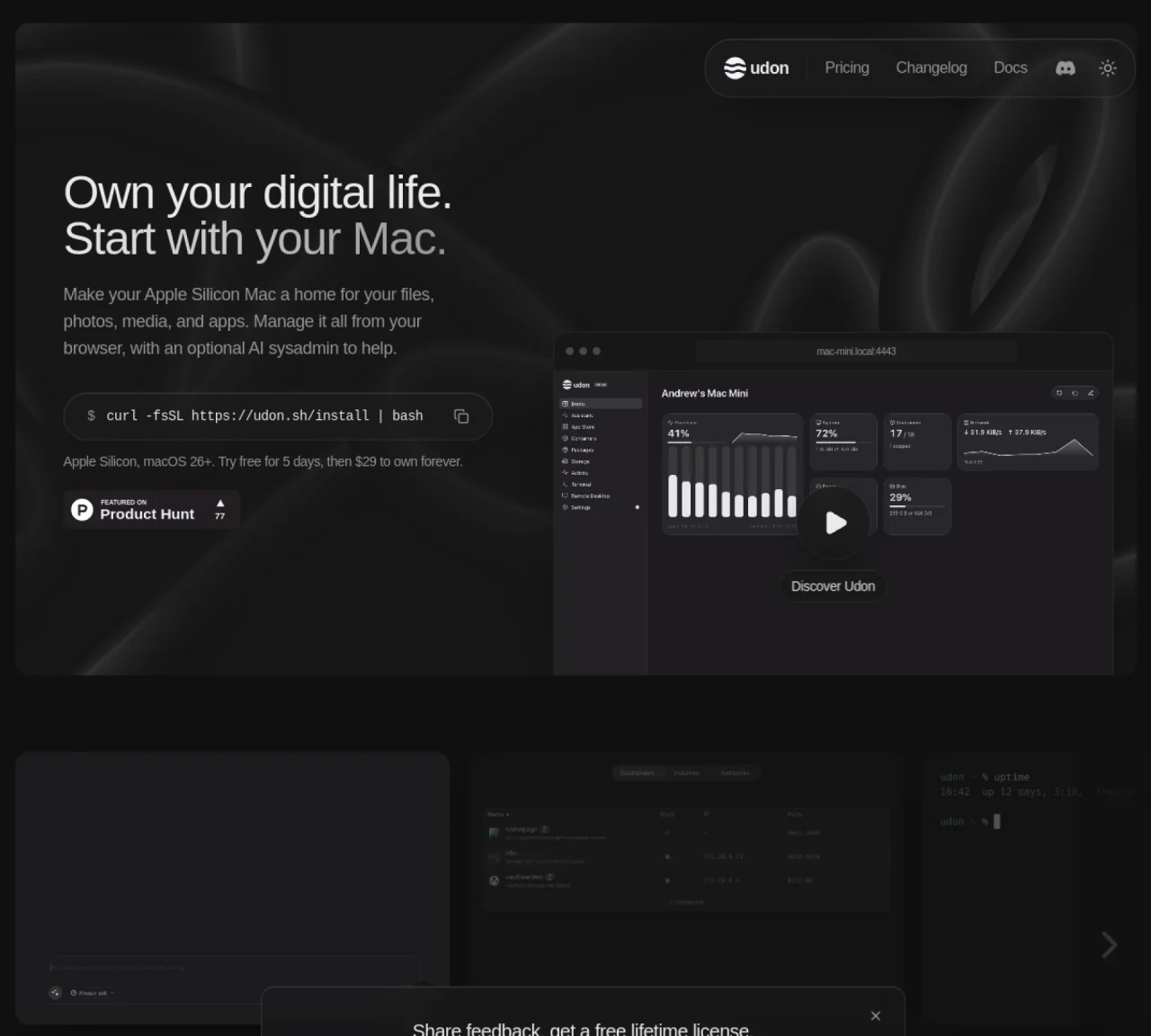
Udon converts an Apple Silicon Mac into a home server that can host files, photos, media, and applications. The server is controlled through a web dashboard accessible from any browser, with an optional AI assistant for tasks like installing software or troubleshooting issues. It supports Docker containers and Homebrew packages, allowing users to run self-hosted applications such as photo libraries or media servers. Remote access is provided via Tailscale, enabling secure connections from outside the home network. The dashboard includes live monitoring of system resources like CPU, memory, and network usage, as well as process management. Files are stored on local drives and can be shared across the home network. The software installs with a single terminal command and does not interfere with the Mac’s normal operation.
The dashboard locks until a license is purchased, but containers continue running and files or settings remain unchanged. No payment is required during the trial, and the dashboard unlocks immediately upon license verification after purchase.
No, Udon requires a one-time payment of $29 per Mac with no recurring fees or renewals. Each purchase includes updates and is tied to the Mac’s serial number, eliminating the need for accounts.
Udon transforms an Apple Silicon Mac into a home server that can host files, photos, media, and applications. It provides a web dashboard for management, an optional AI assistant for tasks, and supports Docker containers and Homebrew packages.
Udon supports any Apple Silicon Mac (M1 or newer) running macOS 26 or later, including Mac mini, Mac Studio, MacBook, or iMac. Intel-based Macs are not supported.
Yes, Udon supports running standard Docker images and includes visual compose stacks for OrbStack, allowing users to manage containers alongside Homebrew packages.
Udon installs with a single terminal command: `curl -fsSL https://udon.sh/install | bash`. The process does not interfere with the Mac’s normal operation.
We use essential cookies to run aitoolnavio™, and optional cookies to analyze traffic and measure our marketing. You choose what we use — optional cookies stay off unless you turn them on. See our Privacy Policy.
One short email a week: fresh tools worth trying, honest takes and the updates that actually matter. No spam, unsubscribe any time.
Create cloud servers with ease, enjoy full control, automated backups, secure networking, and reliable support.
Backend platform providing Postgres databases, authentication, storage and compute for applications and agents
Rent GPU computing resources for running AI models at a low cost.
Heroku enables developers to deploy, manage, and scale applications quickly with minimal server management, supporting multiple languages and frameworks.
Unified cloud platform to run VMs, Kubernetes, and AI-era applications across on-prem, cloud, and edge with centralized governance and cost control.
AI backend platform that simplifies app development with a database, server functions, and real-time updates for developers.
Open-source backend platform for building and scaling applications
Vertically integrated AI chip manufacturing program delivering high-volume, co-packaged logic–memory assemblies for Earth and orbital deployments with standardized, scalable production lines.
Runtime platform for deploying AI workloads, databases and services across clouds or on-premises
Revolutionize AI with scalable, decentralized, cost-effective compute management.
Disaggregated inference platform combining SN50 RDUs, GPUs, and OpenAI-compatible APIs for fast, scalable agentic AI at scale.
OpenViking turns scattered agent memory into structured, queryable files so teams can store once, retrieve precisely, and collaborate reliably across models and tools.
Matched on what this tool does — grouped by the job you would be replacing.
matches AI sysadmin for software installation and troubleshooting · Docker container management with OrbStack integration · Homebrew package management
Open-source framework for running controllable, auditable AI agents in Docker sandboxes on your local hardware with a desktop launcher and plugin hub.
Local-first desktop app for managing Linux servers with AI terminal and one-click deployments
matches Natural language to code file generation · Local file processing with remote prompt handling · API access for programmatic use
matches Local AI agent for Mac that integrates mail, calendar, files and tools in one window · Built-in terminal with approvals for sensitive commands · Meeting transcription with local audio processing
Desktop workspace and usage tracker for AI coding agents
Terminal-based AI agent for coding, data tasks and workflow automation
Desktop AI coding agent for Mac and Windows that writes files from natural language instructions
Local AI agent for Mac that integrates mail, calendar, files and tools in one window
AI workforce that runs on a single Mac with up to 100 specialized agents