Convert PDFs to Word, Excel, PowerPoint, HTML, merge multiple PDFs, and extract images.
2.2M visits/mo+5.4%#35 Productivity & Office
Extracts data from invoice files into a spreadsheet and renames the files using the extracted information.
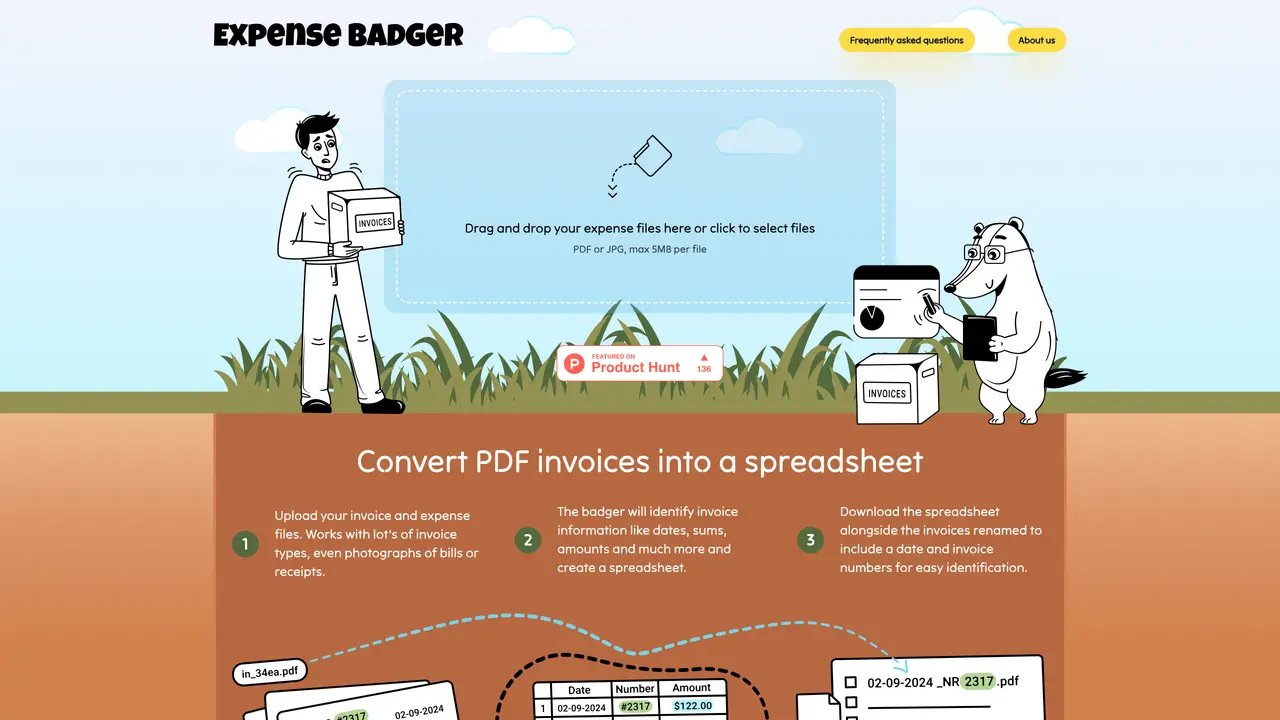
ExpenseBadger is a tool that simplifies tax season or accounting by automatically extracting billing information from electronic or digitized invoice PDFs. The extracted information can include supplier, invoice number, sums, dates, and more. This data is compiled into a simple spreadsheet for further processing. Additionally, the tool renames files based on chosen patterns of data elements, making it easier to identify files when needed. ExpenseBadger uses state-of-the-art invoicing classifier AI extraction that works with most invoice types, including handwritten notes as long as the handwriting is recognizable. It offers free processing for single files and about 10c per file for batches of files.
ExpenseBadger extracts billing information from expense invoices and receipts, converts the data into an Excel spreadsheet, and renames files based on extracted details like dates, amounts, and vendor names for easier accounting.
The tool is designed for individuals handling their own accounting, bookkeepers, and professional accountants who need to organize expense documents efficiently for bank statement matching and quick retrieval.
ExpenseBadger offers free processing for single files, while batches of files are processed under a pay-as-you-go model, with additional files charged at a fixed rate per file.
Yes, it works with a variety of invoice types, including PDFs, JPGs, and even photographs of bills or receipts, provided the handwriting is recognizable.
Files are renamed using a customizable Liquid template that incorporates extracted data such as dates, amounts, vendor names, and invoice numbers, allowing users to define their preferred format.
Begin by uploading your expense files (PDF or JPG) up to 5MB each, then enter your email to receive the processed spreadsheet and renamed files once the extraction is complete.
We use essential cookies to run aitoolnavio™, and optional cookies to analyze traffic and measure our marketing. You choose what we use — optional cookies stay off unless you turn them on. See our Privacy Policy.
One short email a week: fresh tools worth trying, honest takes and the updates that actually matter. No spam, unsubscribe any time.
Convert PDFs to Word, Excel, PowerPoint, HTML, merge multiple PDFs, and extract images.
End-to-end encrypted file sharing with built-in AI editing for photos, videos, and documents.
Free online directory offering AI-powered file editing tools for PDFs, images, videos, QR codes, and text.
A browser-based media management platform for storing, searching, and collaborating on photos, videos, and design files with AI tagging.
Secure cloud storage and organization tool with encryption and authentication for remote access and collaboration.
Converts PDF, Word, Excel and images to AI-ready Markdown in-browser
AI-powered desktop app that renames and organizes files by analyzing content with a local LLM for privacy-preserving file management.
Mac-only AI tool that automatically sorts files into a personalized folder system without reading file contents.
macOS app that renames screenshots and files by content and provides private, offline search for Mac users.
Browser-based PDF tools for merging, compressing, converting and editing files
Online converter turning PDF, Word and other files into clean Markdown for AI workflows
Web-based file converter that transforms documents into clean Markdown for AI workflows
Matched on what this tool does — grouped by the job you would be replacing.
matches Extracts data from invoice files · Compiles extracted information into a spreadsheet
Turn receipts into organized Excel sheets with automated renaming and batch processing for effortless expense tracking.
Extracts financial data from invoices, receipts and bank statements (including scanned PDFs) into Excel, JSON or XML without templates.
AI-powered PDF-to-Excel converter that extracts tables and text from invoices, bank statements, and receipts with high accuracy.
Extract structured data from invoices and receipts using AI technology.
matches Renames files based on chosen patterns of data elements
matches Works with most invoice types, including handwritten notes
Auto-renames messy files using content into clear labels.
AI-powered desktop app that renames and organizes files by analyzing content with a local LLM for privacy-preserving file management.
Desktop AI file renamer for Mac and Windows that analyzes images and documents to generate meaningful filenames with local or private cloud processing options.
DocuGenie packs 10 AI document tools into one app, including handwriting & image OCR, invoice/receipt/bank-statement to Excel, and more.
Free browser-based OCR tool that extracts text from images and PDFs
Automate data entry, extract text from various documents, and easily integrate into existing frameworks with minimal code.
AI-powered document extraction and coding for accounting software