Generate content, correct spelling, suggest synonyms to enhance writing.
173M visits/mo+0.1%#1 Productivity & Office

AI writing assistant for Word, Excel, PowerPoint, and Outlook that drafts, rewrites, translates, and analyzes data with ChatGPT models.
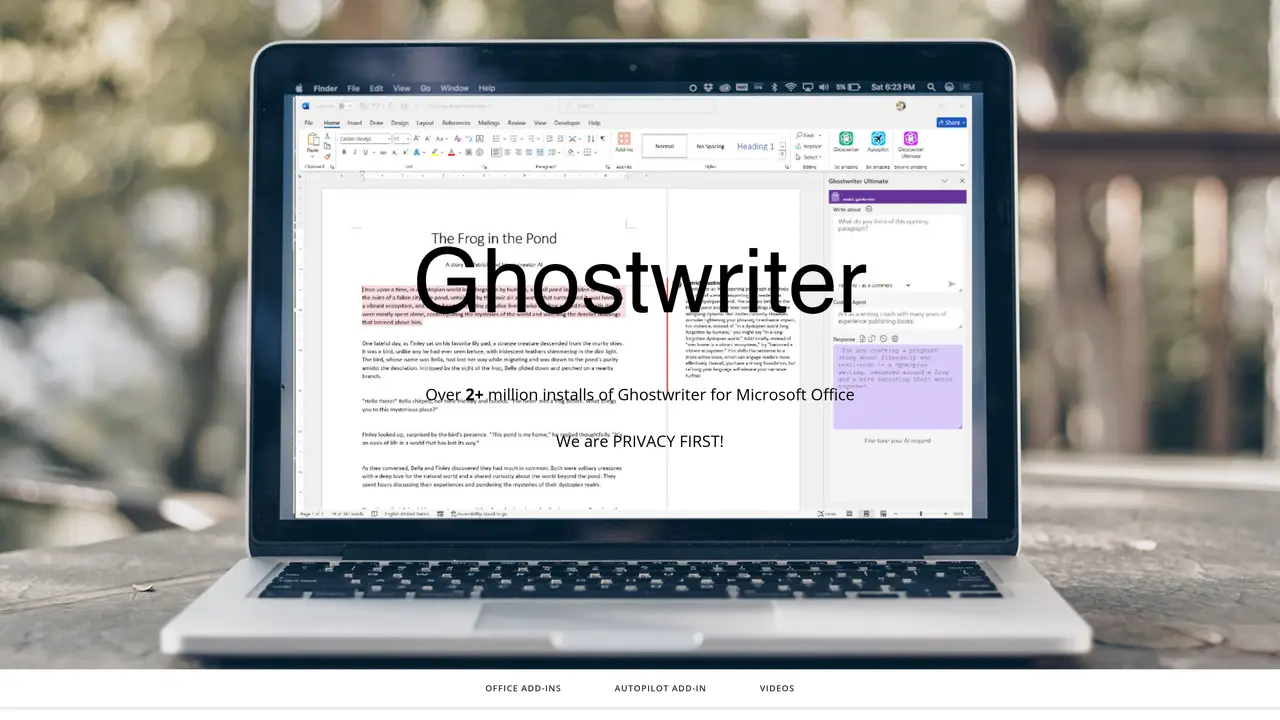
Ghostwriter AI is an AI writing assistant designed for Microsoft Office users, including students, professionals, and writers. It integrates ChatGPT-powered capabilities directly into Word, Excel, PowerPoint, and Outlook across Windows, Mac, Web, and iPad platforms. The tool supports drafting and rewriting documents in Word with adjustable writing styles, tones, creativity levels, and response lengths, along with optional inline editing features in higher-tier plans. It also provides Quick Action prompts and role-based agents (up to 100) for structured writing tasks, email assistance in Outlook for generating replies and translations, and Excel tools for analyzing tables, generating sample data, and translating text. PowerPoint users can generate bulleted presentation content quickly. The add-ins are distributed via the Microsoft Office Store and have reported over 2 million installs. Users can opt to supply their own OpenAI API key for additional privacy control, and the tool supports modern OpenAI models, including GPT-4o and GPT-4.1 variants. Pricing is based on one-time purchases for individual add-ins or bundled packages, with options tailored for legal professionals and teams.
Ghostwriter AI is an AI-powered writing assistant that integrates ChatGPT capabilities directly into Microsoft Office applications such as Word, Excel, PowerPoint, and Outlook. It supports drafting, rewriting, and analyzing content with adjustable styles, tones, and response lengths.
The tool is designed for students, professionals, writers, and teams who use Microsoft Office. It offers specialized editions for authors, legal professionals, and general users across Windows, Mac, Web, and iPad platforms.
Ghostwriter AI emphasizes a privacy-first approach, allowing users to supply their own OpenAI API key for additional control. It avoids using user data for training models and focuses on secure, private interactions.
The tool supports modern OpenAI models, including GPT-4o and GPT-4.1 variants, as well as models from Google Gemini and xAI Grok when users provide their own API keys.
Ghostwriter AI is available as an add-in in the Microsoft Office Store. Users can search for Ghostwriter within their Office application, click 'Add,' and follow the installation prompts to integrate it into Word, Excel, PowerPoint, or Outlook.
Yes, Ghostwriter AI provides multiple editions, including Word Basic, Word PRO, Word Ultimate, Outlook, Excel, PowerPoint, Author Edition, and a comprehensive Office Bundle. Each edition is available as a one-time purchase with varying features and capabilities.
ghostwriter-ai.com · third-party estimates from Similarweb
Last 4 months · grows by one month every month
Share of visits · estimated visits
Other countries: 35.8%
Productivity & Office · Sep 2026
Traffic figures are third-party estimates, good for scale and trends; they can differ from a company's own numbers. Updated monthly.
We use essential cookies to run aitoolnavio™, and optional cookies to analyze traffic and measure our marketing. You choose what we use — optional cookies stay off unless you turn them on. See our Privacy Policy.
One short email a week: fresh tools worth trying, honest takes and the updates that actually matter. No spam, unsubscribe any time.
Generate content, correct spelling, suggest synonyms to enhance writing.
Turn messy team ideas into actionable plans with Miro's visual workspace.
Leverage analytics, automate tasks, share documents, and coordinate projects.
Integrates AI into Airtable to analyze data, summarize insights, draft content, and automate workflows without prior AI experience.
Cloud accounting software that automates bookkeeping, invoicing, and financial reporting for small and growing businesses.
Streamline teamwork, manage projects, automate tasks efficiently.
Automate code, research, and documents using agents.
AI assistant for safe, reliable productivity with code, collaboration, and integrations.
Create customizable tables, databases, and spreadsheets, share data securely with team members.
Easy-to-use CRM platform that automates lead capturing, prioritizes tasks, and provides sales pipeline analytics for businesses of all sizes.
Transforms thoughts into actions, enhancing productivity and efficiency.
Write & run code in 50+ languages, auto-complete with AI, and code faster with an intuitive interface.
Matched on what this tool does — grouped by the job you would be replacing.
Paid placement · similar tools from listings that support aitoolnavio™
Instant lead response for home-service pros: your phone rings on every new lead, plus 14 days of follow-up
matches Drafting and rewriting in Word with adjustable styles, tones, and creativity · Email assistance in Outlook for replies and translations · Excel tools for data analysis, sample generation, and text translation
matches Drafting and rewriting in Word with adjustable styles, tones, and creativity · Quick Action prompts and role-based agents (up to 100)
matches Excel tools for data analysis, sample generation, and text translation
matches PowerPoint support for generating bulleted presentation content
AI email assistant that rewrites, drafts, and improves messages in Outlook, Gmail, Chrome, and iOS with tone control and grammar fixes.
AI assistant that integrates with Microsoft 365 to automate tasks and enhance productivity across Word, Excel, PowerPoint, Outlook, and Teams.
Get quick copywriting help, generate marketing copy, and easily translate, explain, and rephrase web page text.
Automate office tasks, content creation, and communication with AI efficiency.
A macOS AI writing assistant that proofreads, rewrites, summarizes, and drafts emails and Slack replies with cross-app integration and PDF/image chat.
AI-powered writing tool for paraphrasing, summarizing, and enhancing writing effortlessly.
The AI agent for Excel and Sheets with advanced add-ons for Google Workspace and Microsoft Office.
AI-powered presentation maker that generates PowerPoint and Google Slides decks from prompts, documents, or URLs for professionals, educators, and students.
Automate tasks, generate presentations, and work seamlessly with popular platforms like Google Slides and PowerPoint.
Create incredible PowerPoint presentations from any content with AI-powered tools.