
Generate content, correct spelling, suggest synonyms to enhance writing.
173M visits/mo+0.1%#1 Productivity & Office
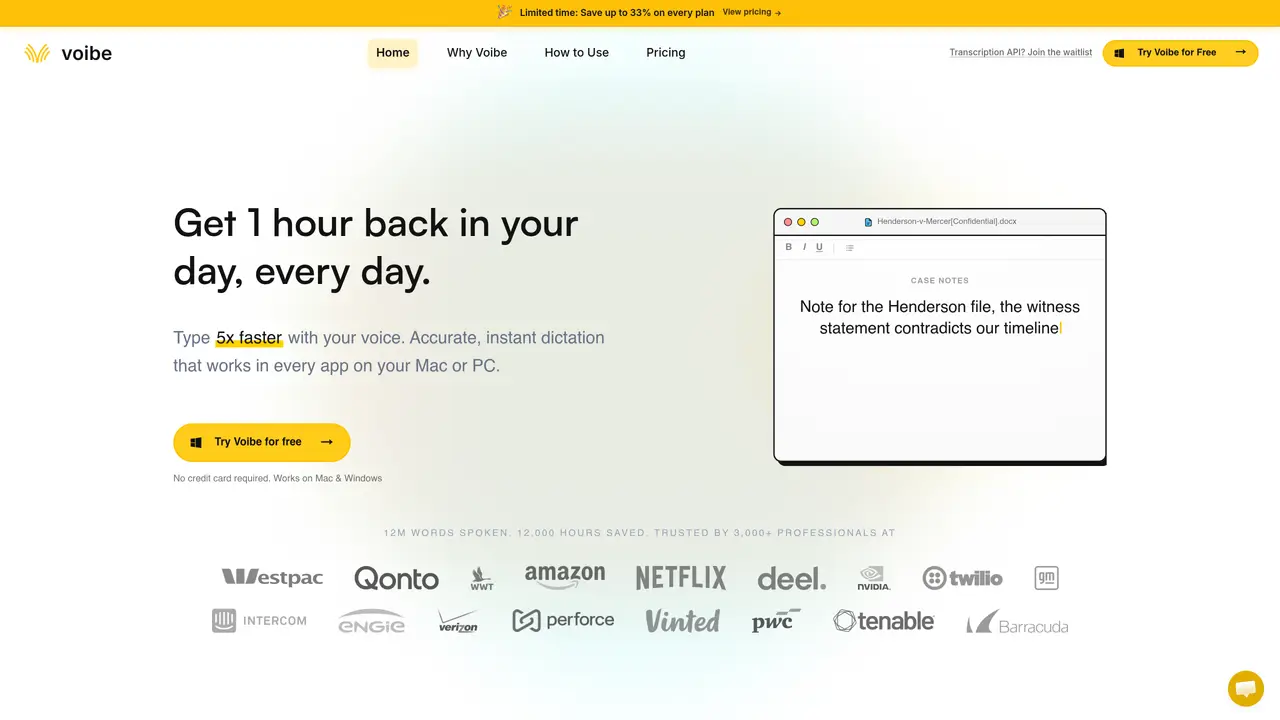
Voibe is a private offline dictation app for Apple Silicon Macs that turns spoken language into text in real time. It uses local AI speech recognition models to transcribe directly on the device, which means no audio is sent to external servers. The tool is aimed at professionals who live in documents, email, coding environments, and AI chat windows. By mapping dictation to a hotkey, Voibe lets users press, speak, and release to drop accurate text into any app where a cursor can sit. Key Features: Fully offline, on-device transcription: Uses optimized Whisper models on Apple Silicon to process audio locally, keeping both latency and privacy under tight control. Works in every Mac app with a cursor: From Notion, Slack, and email clients to VS Code, Cursor, and browsers, Voibe types wherever the system keyboard works. Hold-to-talk workflow: Users hold the Fn key or a custom hotkey, speak at a natural pace, then release to instantly insert text, which keeps thoughts moving without modal popups. Developer Mode for technical work: Purpose built for coding and documentation, with support for technical terms and smart handling of filenames and code-adjacent language. Memory, custom vocabulary, and smart punctuation: Learns from user behavior, supports domain-specific terms, and produces clean, well-punctuated text that needs less cleanup. Voice dictation for AI tools: Makes it easy to speak rich, nuanced prompts into tools such as ChatGPT, Claude, and Perplexity, which can dramatically improve AI responses.
Voibe is a dictation app that converts spoken language into text in real time using local AI speech recognition models. It operates entirely on the user's device, ensuring privacy and low latency by avoiding external servers.
Voibe is designed for professionals such as engineers, writers, lawyers, doctors, and anyone with repetitive strain injuries who need fast, private, and hands-free text input across multiple applications.
Yes, Voibe offers a fully offline mode on Apple Silicon Macs using optimized Whisper models, while Windows users can choose between zero-retention cloud dictation or on-device processing.
Yes, Voibe includes a Developer Mode that scans workspace context locally to correctly resolve file names, folder paths, and variable names in coding environments like VS Code, Cursor, and Windsurf.
Voibe uses open-source models and does not retain, log, or train on user voice data. It ensures zero retention whether operating in on-device or cloud modes, making it suitable for confidential work.
Voibe uses a hold-to-talk workflow where users hold a hotkey (e.g., Fn key) to speak and release it to instantly insert text into any app with a cursor. It also supports hands-free mode for continuous dictation.
getvoibe.com · third-party estimates from Similarweb
Last 4 months · grows by one month every month
Share of visits · estimated visits
Other countries: 62.5%
How people reach this site from other AI tools
1.5K a month · 1.7% of all visits
Productivity & Office · Sep 2026
Traffic figures are third-party estimates, good for scale and trends; they can differ from a company's own numbers. Updated monthly.
We use essential cookies to run aitoolnavio™, and optional cookies to analyze traffic and measure our marketing. You choose what we use — optional cookies stay off unless you turn them on. See our Privacy Policy.
One short email a week: fresh tools worth trying, honest takes and the updates that actually matter. No spam, unsubscribe any time.
Generate content, correct spelling, suggest synonyms to enhance writing.
Turn messy team ideas into actionable plans with Miro's visual workspace.
Leverage analytics, automate tasks, share documents, and coordinate projects.
Integrates AI into Airtable to analyze data, summarize insights, draft content, and automate workflows without prior AI experience.
Cloud accounting software that automates bookkeeping, invoicing, and financial reporting for small and growing businesses.
Streamline teamwork, manage projects, automate tasks efficiently.
Automate code, research, and documents using agents.
AI assistant for safe, reliable productivity with code, collaboration, and integrations.
Create customizable tables, databases, and spreadsheets, share data securely with team members.
Easy-to-use CRM platform that automates lead capturing, prioritizes tasks, and provides sales pipeline analytics for businesses of all sizes.
Transforms thoughts into actions, enhancing productivity and efficiency.
Write & run code in 50+ languages, auto-complete with AI, and code faster with an intuitive interface.
Matched on what this tool does — grouped by the job you would be replacing.
Paid placement · similar tools from listings that support aitoolnavio™
Instant lead response for home-service pros: your phone rings on every new lead, plus 14 days of follow-up
matches Speak, your Mac privately types into every app. · Works in every Mac app with a cursor · Hold-to-talk workflow
matches Fully offline, on-device transcription · Memory, custom vocabulary, and smart punctuation
Open-source voice dictation for macOS that types as you speak
On-device voice dictation for macOS with push-to-talk
Mac voice dictation that types directly at the cursor without switching windows
Mac voice dictation that writes directly at the cursor with optional cleanup
Offline AI voice-to-text app for macOS and iOS that formats transcribed speech into clean text for emails, code, or documents.
Privacy-first desktop app that converts voice to text offline using on-device AI for secure, instant transcription in 99 languages.
Offline AI transcription app that turns audio and video into editable captions in 60+ languages with SRT/VTT export.
Local voice-to-text dictation and file transcription for macOS