Generate content, correct spelling, suggest synonyms to enhance writing.
173M visits/mo+0.1%#1 Productivity & Office

Mac voice dictation that writes directly at the cursor with optional cleanup
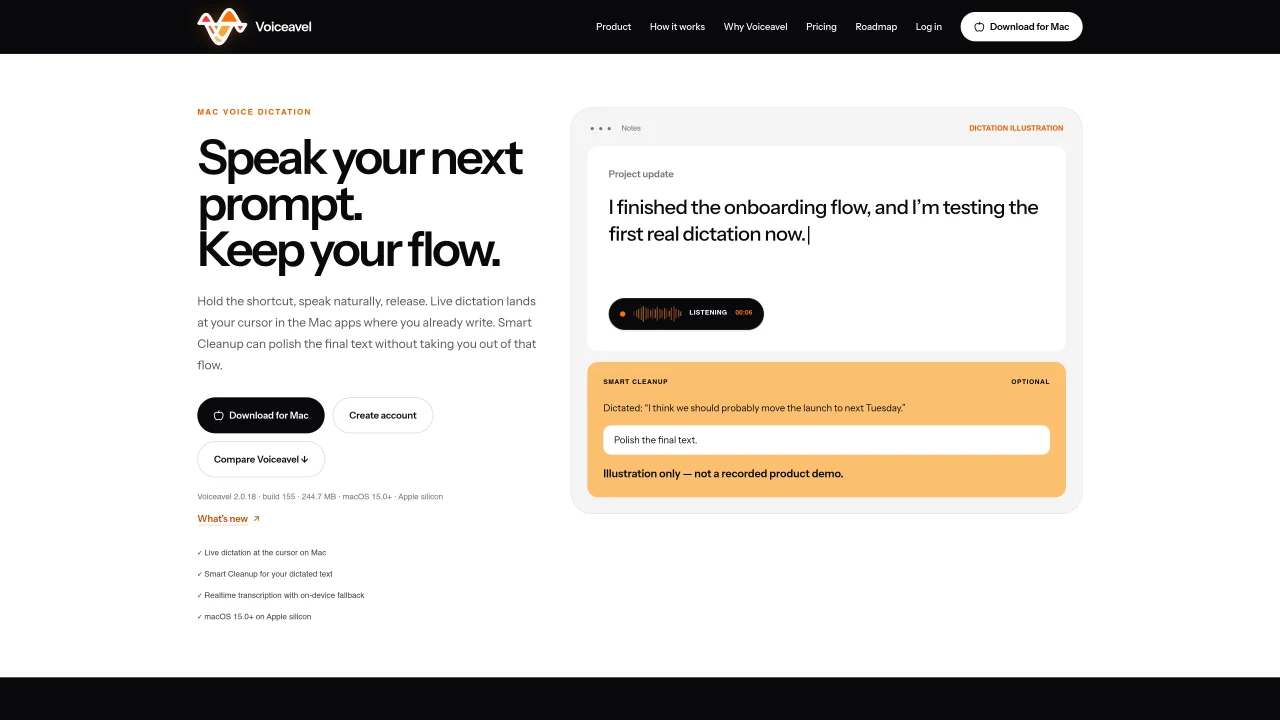
Voiceavel is a Mac application that provides live voice dictation at the cursor within existing writing applications. It uses a shortcut to capture spoken input, transcribing text in real time while the user maintains focus on their writing. The tool supports natural-language edits and includes an optional Smart Cleanup feature to refine dictated text before finalizing. Voiceavel operates with both account-backed realtime transcription and local processing, switching to on-device fallback when needed. Transcript history remains on the device, with account data limited to plan, device access, and aggregate usage metrics. The workflow is designed to minimize interface disruption, keeping the user within their current Mac app throughout the process. Voiceavel requires macOS 15.0 or later on Apple silicon and is intended for users who seek a streamlined dictation experience beyond basic system tools.
Voiceavel is a Mac application that provides live voice dictation at the cursor within existing writing applications. Users activate it with a shortcut, speak naturally, and see transcribed text appear in real time where they are typing.
Voiceavel is intended for Mac users who want a streamlined dictation experience beyond basic system tools, particularly those who prefer to maintain focus on their writing without switching interfaces.
Voiceavel supports natural-language edits during dictation and includes an optional Smart Cleanup feature to refine dictated text before finalizing, all without disrupting the user's workflow.
Voiceavel operates with both account-backed realtime transcription and local processing, switching to on-device fallback when needed to ensure continuous functionality.
Voiceavel requires macOS 15.0 or later on Apple silicon to function properly.
Users can get started by downloading Voiceavel from its official website and following the setup instructions to integrate it with their preferred Mac writing applications.
We use essential cookies to run aitoolnavio™, and optional cookies to analyze traffic and measure our marketing. You choose what we use — optional cookies stay off unless you turn them on. See our Privacy Policy.
One short email a week: fresh tools worth trying, honest takes and the updates that actually matter. No spam, unsubscribe any time.
Generate content, correct spelling, suggest synonyms to enhance writing.
Turn messy team ideas into actionable plans with Miro's visual workspace.
Leverage analytics, automate tasks, share documents, and coordinate projects.
Integrates AI into Airtable to analyze data, summarize insights, draft content, and automate workflows without prior AI experience.
Cloud accounting software that automates bookkeeping, invoicing, and financial reporting for small and growing businesses.
Streamline teamwork, manage projects, automate tasks efficiently.
Automate code, research, and documents using agents.
AI assistant for safe, reliable productivity with code, collaboration, and integrations.
Create customizable tables, databases, and spreadsheets, share data securely with team members.
Easy-to-use CRM platform that automates lead capturing, prioritizes tasks, and provides sales pipeline analytics for businesses of all sizes.
Transforms thoughts into actions, enhancing productivity and efficiency.
Write & run code in 50+ languages, auto-complete with AI, and code faster with an intuitive interface.
Matched on what this tool does — grouped by the job you would be replacing.
Paid placement · similar tools from listings that support aitoolnavio™
Instant lead response for home-service pros: your phone rings on every new lead, plus 14 days of follow-up
matches Hold-to-speak shortcut for live dictation · Real-time transcription with cursor placement
matches Smart Cleanup for optional text polishing · Natural-language edits and commands
matches Account-backed and local transcription modes · Visible fallback indicator for transcription source
Speak, your Mac privately types into every app.
On-device voice dictation for macOS with push-to-talk
Open-source voice dictation for macOS that types as you speak
Mac voice dictation that types directly at the cursor without switching windows
Offline AI tool that transcribes speech to text, cleans transcripts, and reads text aloud directly on your device.
AI voice-to-text app that turns speech into polished text with style adaptation, punctuation, and filler-word removal for emails, docs, and notes.
Offline voice assistant and dictation tool for desktop
Mac voice productivity tool that transcribes speech into polished text and auto-generates meeting notes
Fast, private, open-source voice dictation for macOS
Converts spoken words into structured markdown locally on macOS and iOS
Mac app for private, offline voice typing and text-to-speech using Apple Silicon with 31 languages and 64 voices.
Local speech-to-text transcription for macOS with privacy-focused features